Every lab owner has one story. A digit that moved, a male reference range applied to a female patient, a previous patient's values left in a reused template. The report went out, somebody caught it or somebody did not, and the memory is still uncomfortable years later.
Start from an honest premise: in a lab where a person reads an analyser and types the value in, errors are possible, and no software removes that. The realistic goal is fewer chances to slip, and a reliable chance to catch the slip before it leaves the building — not a fantasy of zero-touch reporting that entry-level systems cannot deliver and should not claim.
This article covers where errors actually originate, the process habits that reduce them before any software is involved, and what a system like ours genuinely contributes.
Where Manual Errors Actually Happen
Four points, and only one of them is the one people expect.
At registration. A misspelled name, a wrong age, a wrong sex. This is the most underrated error source in any lab, because it does not look like a clinical error — but sex and age determine which reference range gets applied, so a registration slip becomes a clinical misinterpretation three steps later. A report showing normal against the wrong range is worse than no report.
At transcription. Reading a value off the analyser screen or a printout and typing it into the system. Two hand-offs, and the classic failures are a transposed pair of digits and a decimal in the wrong place. This remains the norm in labs without analyser interfacing, which is most labs at small and mid scale.
In units and ranges. The same analyte reported in different units by different instruments, or a range carried over from a source that used the other convention. A value that is right in one unit and catastrophic in another passes every check that only looks at the number.
In reused templates. Where reports are produced by copying the last patient's document and editing it, some part of the previous patient eventually survives the edit. This is a Word-template problem specifically, and it is one of the few error classes that software eliminates outright rather than merely reduces.
What a Reporting Error Costs
Worth being concrete, because the cost is spread across places that never get totalled.
Direct: repeat sampling and re-testing at the lab's own expense, plus the staff time to investigate what happened and issue a correction.
Relational: a referring doctor who stops sending patients. This is the expensive one, and it is almost always silent — nobody calls to complain, the referrals simply thin out over a few months, and the lab attributes it to competition. Trust with a referring doctor is built over years and spent in one afternoon.
Clinical: a genuinely abnormal value going out looking normal. Rare, and the reason every other control in this article exists.
We are not going to attach percentages to any of that. Published error-rate figures come from settings very different from a Pakistani independent lab, and quoting them here would be decoration rather than evidence.
Process Habits That Cut Errors Before Software Does
These cost nothing and work in a paper lab. Any lab planning to buy software should fix these first, because software cements a process rather than inventing one.
Separate entry from verification. The person who types the value should not be the only person who approves it. Even a brief second look by another pair of eyes catches transpositions that the typist's brain will read straight past — because they are reading what they meant to type.
Read back critical values. For anything clinically urgent, say the number out loud to a second person before release. It is old-fashioned, it is thirty seconds, and it catches the errors that matter most.
One canonical name and one unit per test. Kill the synonyms on your rate list. If the same test can be ordered under three names, it will eventually be reported under three formats, and the ranges will drift apart. This is a one-afternoon cleanup that pays out indefinitely.
Never transcribe from memory. The value goes from the instrument to the record, with the worksheet in front of you. Carrying a number across the room in your head is where digits change.
Confirm identity at registration, out loud. Name, age, sex and phone, read back to the patient. Four seconds, and it protects every downstream step including range selection.
What Software Genuinely Contributes
Four mechanisms, described precisely — not as "the software prevents errors", which is not true of any system in this price class.
Ranges stored per test, applied automatically. The technician does not recall whether the upper limit differs for women; the catalogue holds the range for that test and that patient's sex, and out-of-range values are highlighted as they are typed.
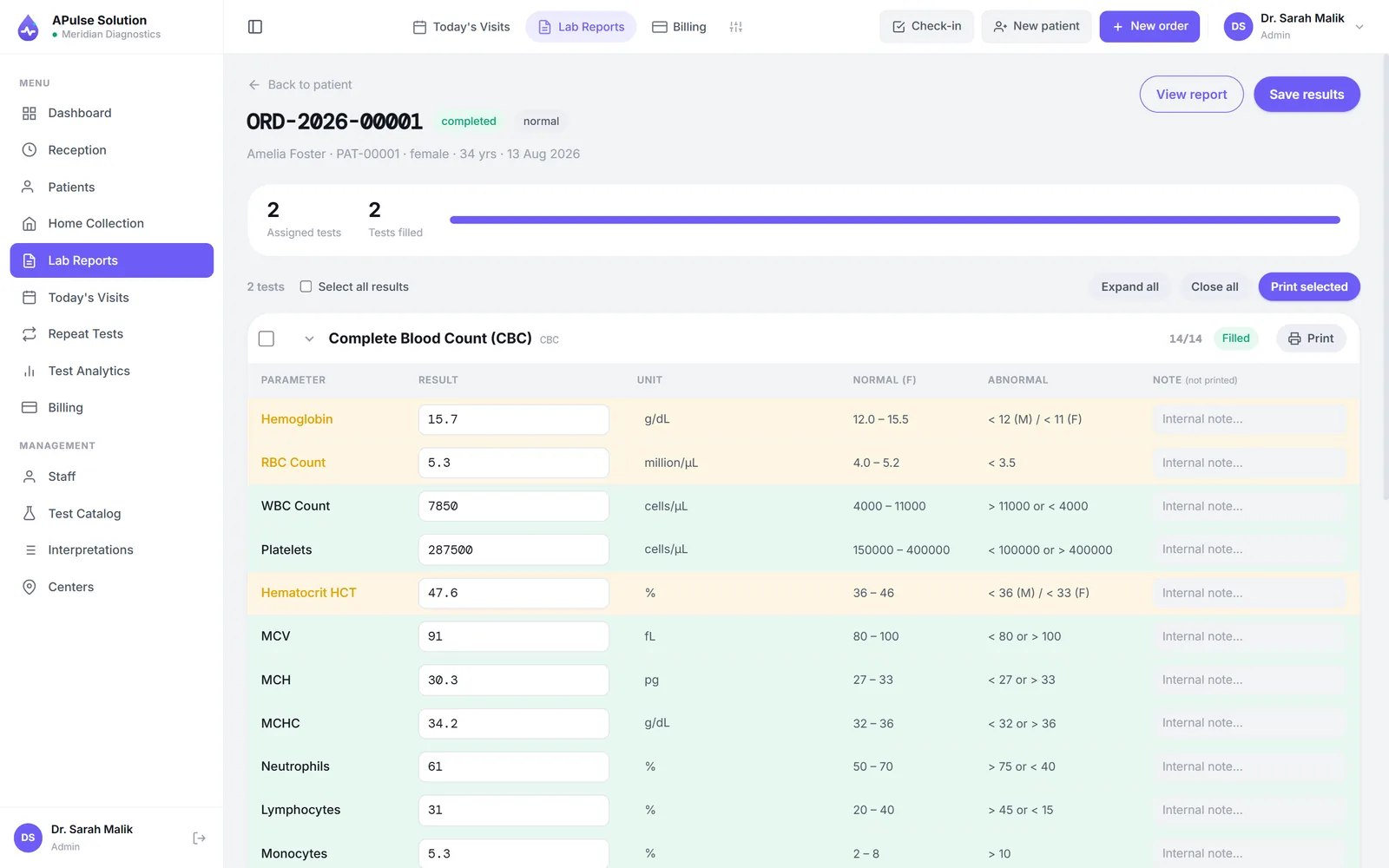
Structured entry instead of free text. Qualitative results come from dropdowns rather than typed phrasing, so reports do not carry four spellings of the same finding — and "Negative" cannot be typed where the previous line said "Not detected".
Permanent record numbers. One identity per patient prevents the mixed-history class of error at source: results filed against the right person, not against a same-name duplicate. The registration errors above are exactly why fast search matters.
A fixed report layout. Reports are generated from the entered values, so the copy-paste category of error simply cannot occur. No template is reused because no template is edited.
And an approval step before release, which is where the human check gets a defined place in the workflow rather than being something conscientious staff do when they have time.
What software does not fix: the value the technician typed. If entry is manual — and in A Pulse Solution it is, unless analyser interfacing has been switched on for your account on request and the machine connected during setup — then the number that goes in is the number that comes out, flagged against a range but not independently verified. This is precisely why the verification step below matters more in a manual-entry lab than in an interfaced one, and why we would rather say so than let "automated" imply otherwise.
A Verification Step Staff Will Actually Follow
The verification policies that fail are the ones that pretend every line of every report gets checked. Nobody has time, so nothing gets checked, and the policy exists only on paper.
Design one that survives a busy morning:
- Check the flagged and critical values, not every line. The software has already told you which lines are interesting. That is the list.
- Make sign-off a recorded step in the system before the PDF can be produced, so "approved" is a fact with a name attached rather than an assumption.
- Spot-check a fixed small number of routine reports per shift — three, five, whatever survives your workload. A predictable sample beats an aspirational census.
- Give the check to someone other than the person who entered it whenever staffing allows.
The test of a good verification policy is whether it still happens at 11am on your busiest day. If it does not, it is too ambitious, and a smaller policy that actually runs is worth more.
When a Wrong Report Has Already Gone Out
It will happen eventually. How the lab handles it determines whether it costs you a report or a relationship.
Call the referring doctor first for anything clinically significant, before sending anything in writing. A phone call from the lab is a lab taking responsibility; a corrected PDF arriving with no explanation is a lab hoping nobody noticed.
Issue a clearly marked amended report. Never silently replace the file. The receiver may have already acted on the first version, and they need to know which document they are holding.
Keep both on record — the original, the correction, who amended it and why. This is partly discipline and partly self-protection, and it is also the raw material for the log below.
Tell the patient plainly where a repeat sample is needed. Labs that explain errors keep patients more often than labs that quietly re-test and say nothing.
Keep an Error Log, and Read It Monthly
Three columns is enough: what happened, which test, which step and shift. Anything more elaborate stops being filled in.
Read it once a month, looking for patterns rather than culprits. What emerges is usually structural: one test whose name or units are ambiguous, one shift where one person is covering both entry and verification, one report format that invites mistakes. Those are fixable by changing the catalogue, the rota or the template.
The one thing that makes an error log useless is using it to assign blame. Staff who expect consequences stop recording near-misses, and near-misses are the cheapest data you will ever get about how your lab actually fails.
Frequently Asked Questions
Can software eliminate manual errors in lab reporting? No, and any vendor claiming it should be asked how. Where result entry is manual, the typed value is the value reported. Software reduces the classes of error it can see — wrong range, reused template, mixed-up patient, unflagged abnormal — and gives the human check a defined place in the workflow.
What is the most common lab reporting error? Transcription remains the classic where entry is manual. But registration errors are the most underrated, because a wrong age or sex silently selects the wrong reference range, and the resulting report looks entirely normal.
How does automatic flagging actually work? Each test in the catalogue stores its reference range, including separate ranges by sex where clinically relevant. As a value is entered it is compared against the range for that patient, and anything outside it is highlighted on entry and marked on the printed report.
Should the same person enter and verify results? Ideally not. The typist re-reads what they intended rather than what they typed, so a second pair of eyes catches transpositions that no amount of care will catch alone. Where staffing makes that impossible, at least separate the two in time — enter now, verify after a break.
How should we handle a report that went out wrong? Phone the referring doctor first if it is clinically significant, issue a clearly marked amended report rather than silently replacing the file, and keep the original, the correction and the reason on record.
Does analyser integration remove transcription errors? It removes that specific class, which is a real benefit at high volume. It is also a different class of system at a different price, and it introduces its own failure modes around mapping and calibration. At small-lab volumes, structured manual entry with stored ranges and a real verification step is the practical answer.