Every lab in Pakistan now hears the same question at the counter: "report online mil jayegi?" — will I get my report online? The patient asking it is not requesting a website login. They mean something simpler and more specific: will the report arrive on my phone, or do I have to come back for paper?
This article explains, honestly and mechanically, how that happens — how a number read off an analyser becomes a branded PDF on a patient's WhatsApp the same day. We build A Pulse Solution, lab software that does exactly this, so we will use it for the concrete details; the mechanics are much the same in any decent system. What you will not find here is portal talk dressed up as delivery, or "automation" claims for steps a person actually performs. The gap between what "online reports" means in a sales pitch and what happens in the lab is precisely what this article is for.
What "Online Lab Report" Actually Means
Two different models hide behind the phrase, and they are not interchangeable.
The patient portal. Patients create an account on the lab's website or app, log in and download their own results. This is how large hospital networks operate. It suits them: huge patient volumes, repeat visitors, IT departments. It suits patients poorly at small scale — one more password for a lab they may visit twice a year.
The lab-shared PDF. The lab generates the report as a PDF inside its software and a staff member sends it to the patient — most commonly on WhatsApp, to the number captured at registration. No account, no password, nothing for the patient to install or remember. This is the model most independent labs in Pakistan run, it is the model patients are actually asking for, and it is the model this article explains.
From the patient's side the whole thing is one sentence: sample in the morning, PDF on WhatsApp by evening. From the lab's side there are three steps, and each one earns its place.
Step 1 — The Result Is Entered and Checked Against Reference Ranges
It starts at the bench. The technician runs the sample and enters the values into the software, against a test catalogue that already knows each test's units and reference ranges — including separate male and female ranges where they differ clinically.
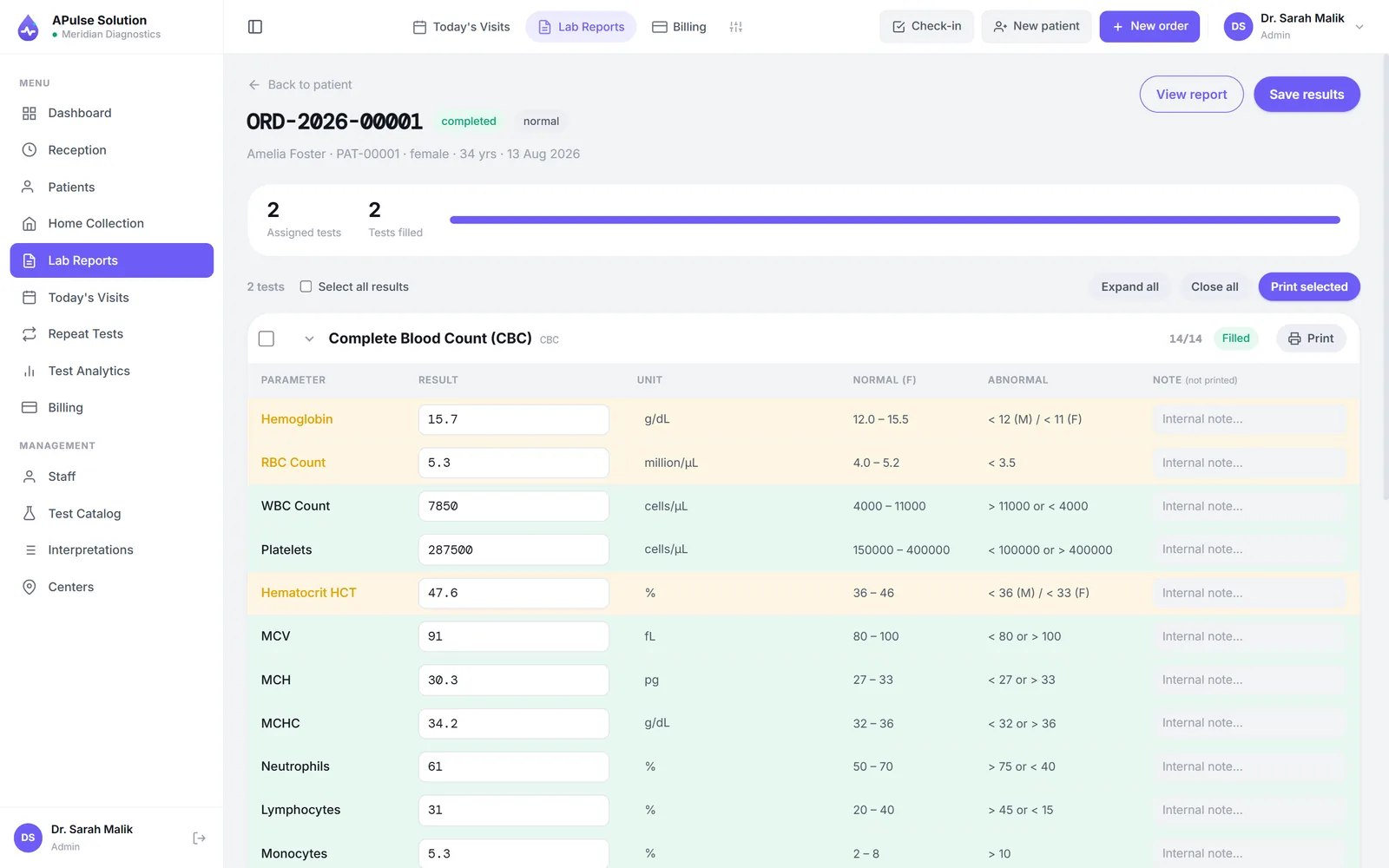
The software's contribution at this step is structure and vigilance, not magic. As each value is typed it is checked against the range for that test and that patient's sex, and anything out of range is highlighted immediately — on entry, not discovered later on paper. The flag follows the value onto the finished report, so a borderline haemoglobin is marked for the reader whether that reader is a doctor or an anxious patient.
An honest note on how the values get there: in most affordable systems the technician reads the analyser's screen or printout and types the results in. That is also how A Pulse Solution works unless analyser interfacing is switched on for your account, which we do on request, on any plan; it then takes ASTM E1394 or HL7 v2 results that a bridge posts to it, and connecting the machine is setup work that depends on the analyser. Any vendor calling that plug and play should be asked for specifics. What structured entry gives you is the safety net: no transposed slips, no missing units, no forgotten flags, every value attached to the right patient's permanent record.
Between entry and release sits a review step. Nothing should reach a patient because one person pressed one key at the end of a long shift — a second look, however brief, is where transcription slips get caught. The software's role is to make that review easy: the day's completed and pending results in one list, not a pile of slips.
Step 2 — The Result Becomes a Branded PDF
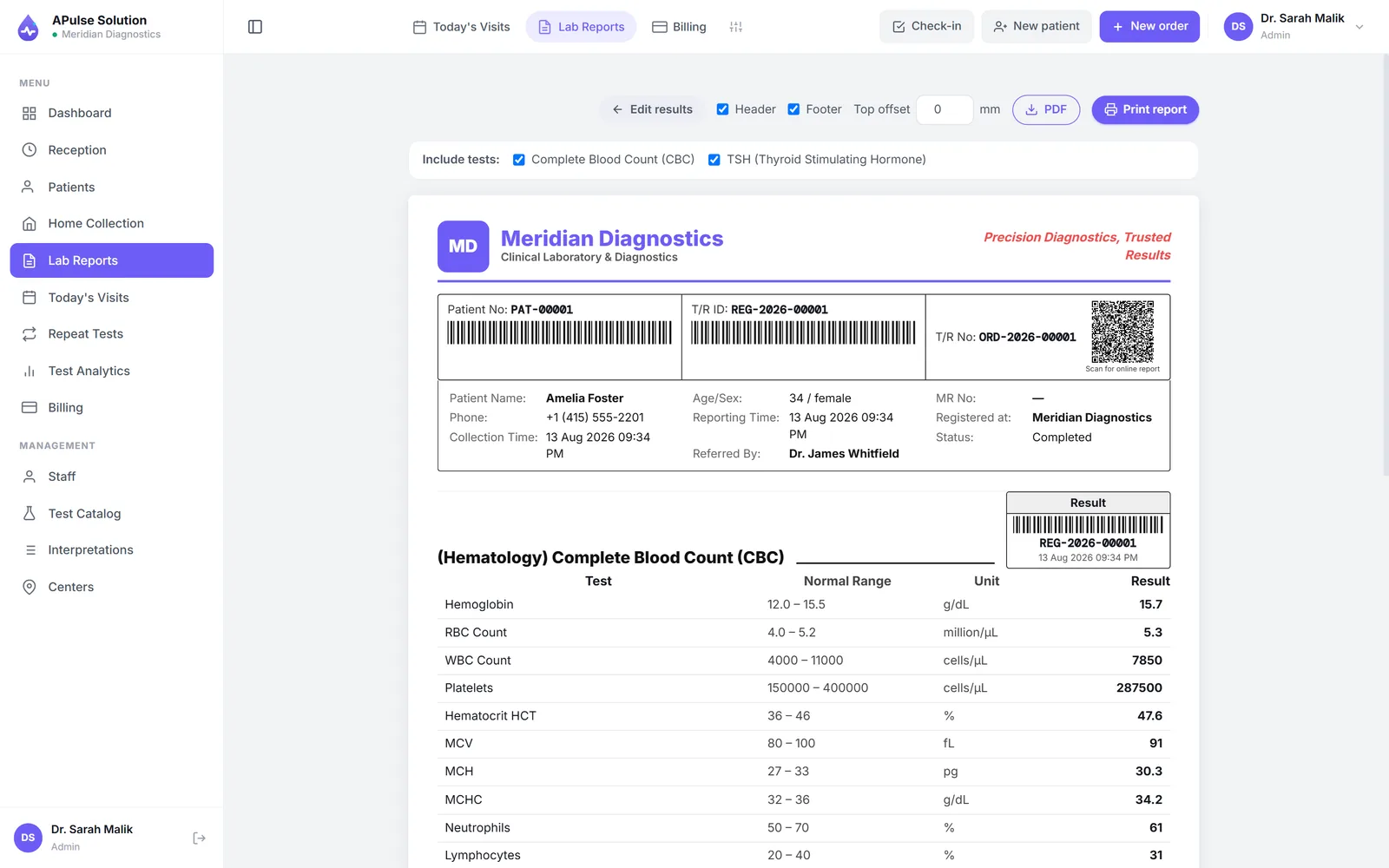
Once released, the result is rendered into the lab's report layout — and this step matters more commercially than technically, because the report is the lab's public face. Most patients never see your bench, your analysers or your quality control. They see this one document, and so does every doctor they carry it to.
A professional report carries the lab's name, logo and colours; the patient's details and MRN; each test with its result, unit and reference range; and clear flags on anything abnormal. Just as important is what does not vary: the layout is identical whether the report is the first of the day or the two-hundredth, produced by the senior technician or the newest hire. Consistency is how a lab's reports become the ones a referring doctor trusts at a glance.
PDF is the right container for the job for three plain reasons: it renders identically on any phone, tablet or computer; it prints cleanly when the patient wants paper after all; and it is not casually editable the way a Word file is. Not tamper-proof — we will get to verification — but not an open invitation either.
Step 3 — Delivery: How the PDF Reaches the Patient
Now the step the patient actually asked about. The lab shares the report — most commonly a staff member sends the PDF on WhatsApp to the number captured at registration. Printed copies remain available at the counter for whoever wants them; the two coexist in every real lab.
Being explicit about the mechanics, because this is where sales language gets slippery: there is no portal and no automatic pipeline, and the patient never creates an account. What there is, on every plan, is a second route that needs no staff at all — the billing slip carries a QR code, and scanning it opens that patient's own report online for 30 days. So either a person at the lab sends the file, or the patient collects it themselves from the slip already in their hand. The system can also send the link itself on approval — on every plan, once the lab connects its own WhatsApp Business (Cloud API) or SMS gateway account; without one, staff send it with one tap. Ask any vendor the same question ("does the system send it, or do your staff?") and expect an answer this specific.
Three practical habits make the manual model run smoothly:
- Confirm the WhatsApp number at registration, read back, while the patient is standing there. Every delivery problem downstream is cheaper to prevent at this desk.
- Decide who is authorised to send reports — a named role, not "whoever is free". This keeps sensitive results in the fewest necessary hands and makes questions traceable.
- The master copy lives in the system, not in a chat. The WhatsApp message is a delivery; the record is the patient's file in the software, which is where reprints and next visits come from.
How a Receiver Knows the Report Is Genuine
Shareable PDFs create a question paper never faced at this scale: when a report can be forwarded, it can also be forged. Doctors and employers have learned caution about photographed, edited and outright fabricated reports, and that caution lands on honest labs too — your genuine report inherits the suspicion earned by fakes.
Being straight about our own software here, because this is exactly where vendors overclaim: A Pulse Solution does not verify reports. There is no code on the report that a doctor can scan to prove it is genuine. If a vendor offers you that, ask them to demonstrate it on a printout you brought with you.
What we do have addresses a different problem. The billing slip carries a QR code that opens that patient's own report online for 30 days, on every plan. Its job is to answer "where is my report?" rather than "is this document real?" — and it does mean a doctor can ask the patient to open the report from the lab's own system rather than trusting a forwarded file. That is not verification, but it is the closest honest thing to it.
The forgery problem itself remains real and unsolved: a fabricated report circulating under your letterhead is your reputation being spent by someone else, and today the only reliable answer is a receiver phoning the lab.
Privacy and Common-Sense Safeguards
A lab report is sensitive by nature, and the sharing model needs a few standing rules — none of them burdensome:
- Send only to the number given at registration. A report sent to a wrong number is a breach, not an oops.
- Mind shared and family numbers. One phone often serves a household here. For sensitive tests, the difference between "sent to the patient" and "sent to the family phone" can matter enormously — when in doubt, offer counter collection instead.
- Keep reports in the system, not scattered. Loose PDFs saved to the reception PC's desktop are an audit nobody wants. The software holds the record; staff share from it, and role-based access decides who can.
What Online Delivery Changes for the Lab, Day to Day
The patient's convenience is obvious; the lab's gains are quieter but compound.
The counter decongests. Every report collected on a phone is one visit that did not happen — one fewer person queuing only to be handed paper, in the same space where new patients are trying to register.
"Lost report" stops being a reprint queue. The patient scrolls back in the chat, or reception resends from the system in seconds, because the master copy never left it.
The referral loop tightens. A patient with a PDF forwards it to their doctor the same minute, instead of carrying paper across town tomorrow. The result reaches the person who ordered the test faster, which is ultimately what the test was for.
The lab looks the way it works. A clean, branded, flagged report arriving promptly on a phone communicates competence in a way no waiting-room banner can — to the patient and to every doctor that PDF is forwarded to.
If you want to see the full journey rather than read about it — result entry, the abnormal flag, the branded PDF, the share — the free demo runs the whole sequence on a real report in your own workspace, including the QR code on the slip that the patient scans to open it themselves.
Frequently Asked Questions
Do patients need an app or account to receive online lab reports? Not in the lab-shared model most Pakistani labs use. The report is a PDF sent to the patient's WhatsApp; there is nothing to install and no password. Patient portals with logins exist, but mainly at large hospital networks.
Is sending lab reports on WhatsApp safe? Handled with basic discipline, yes: send only to the number confirmed at registration, be deliberate about shared family numbers on sensitive tests, and keep the master copy in the lab system rather than in chats. WhatsApp encrypts messages in transit; the lab's real responsibilities are the correct recipient and controlled access on its own side.
How fast can a patient get a report online? As fast as the result is entered, reviewed and released — for routine tests, commonly the same day. Online delivery removes the travel and the counter queue, not the laboratory work itself.
Can an online report be used as proof — for a job, a visa, a doctor? A plain PDF proves little by itself, and we do not offer report verification, so be careful what you promise here. What helps is that the patient can open the report from the lab's own system by scanning the QR on their billing slip, which a receiver can watch them do. Beyond that, a receiver who needs certainty still phones the lab.
Does the software send reports automatically? In A Pulse Solution, yes, if the lab connects its own WhatsApp Business (Cloud API) or SMS gateway account: the report link goes out on approval, on every plan. Without one, a staff member sends it with one tap. Ask any vendor this exact question and expect a straight answer; "automatic" in a sales pitch frequently turns out to mean "your staff send it from inside the software".
What happens if the patient loses the report? Reception resends it from the system in seconds, because the report lives in the patient's permanent record — not as a loose file on someone's desktop. The same record is what allows the next visit's results to sit alongside this one's.