Laboratory Information System
Patient demographics, test orders, validated results and verified reports — the information side of laboratory work, kept in one cloud system of record that runs in any browser.
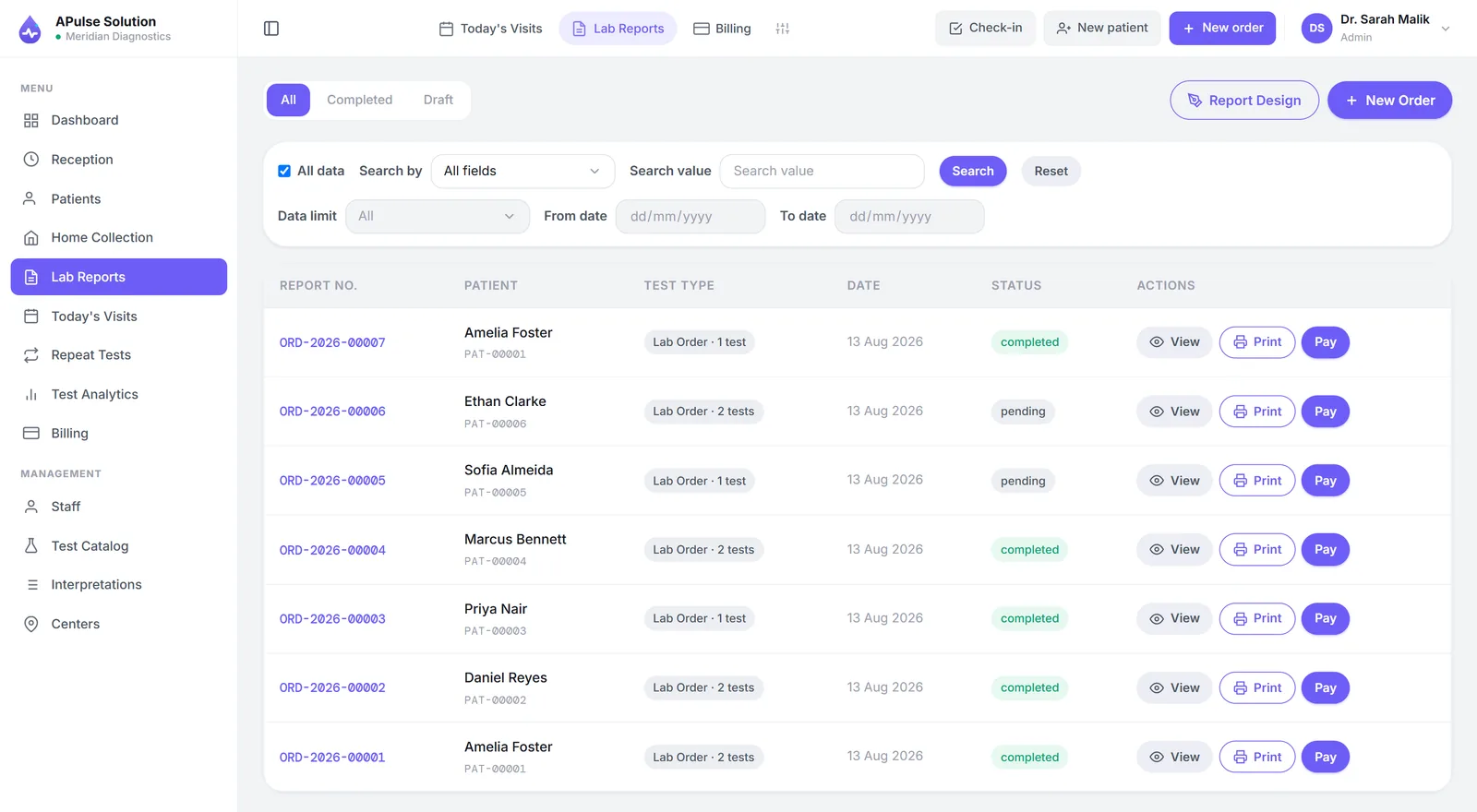
What a laboratory information system does
Strip the acronym away and a laboratory information system (LIS) is the system of record for the information a clinical laboratory produces. The sample passes through the lab once; the information around it has to survive far longer — who the patient is, what was ordered, what the bench found, what the verified report finally said, and where to find all of it three years later. A LIS manages that lifecycle from order to result to report, and keeps the history searchable.
The label varies — LIS software, medical laboratory information system, or simply "the lab system" — but inside a working pathology lab or diagnostic centre it means the same four things held together: structured patient records, test orders, validated results and issued reports.
One near-identical acronym causes most of the confusion. A LIMS grew up in research and industrial labs, where the unit of work is a sample in a study; a LIS grew up in clinical labs, where the unit of work is a patient. For a medical lab the practical differences are smaller than the vendors' glossaries suggest — we unpack the terminology properly on the LIMS software page.
The order-to-report lifecycle in A Pulse Solution
A Pulse Solution is a cloud LIS for small and mid-sized medical, pathology and diagnostic labs. Each stage of the lifecycle leaves a structured record behind it.
A patient record, not a register entry
Registration creates the patient once, with an auto-generated MRN. Walk-ins join today's visit queue, and a returning patient is found by search rather than typed in again — the demographics half of a LIS, handled at the front desk.
Orders from a defined test catalog
Tests are ordered from your own catalog — your categories, your prices — so an order is a structured line item rather than an abbreviation in a register. The invoice is raised in the same flow, at registration.
Results validated on entry
Technicians enter results against pre-set, gender-specific reference ranges, and abnormal values are flagged automatically the moment they are typed. Qualitative tests use dropdown values, so "Positive" is spelled one way across every technician and every report.
A verified, findable report
The verified result becomes a branded PDF report — preview, print or download, in a detailed or short view, on your lab's own letterhead. The record stays behind it, searchable by patient, doctor or reference.
What about analyzer and EMR interfaces?
A fair question deserves a plain answer, and it is two different answers. Analyzers: yes, switched on for your account on request, on any plan — your instruments post results into the lab over ASTM E1394 or HL7 v2 rather than being read off a screen and retyped, and if somebody changes what the machine reported, the change is flagged and a reason is required. The caveat worth hearing before you buy: the small bridge program that sits on a lab PC and talks to the physical machine is specific to your analyser and is part of setup, not something that works on day one. Hospital EMR and HIS systems: there is a public API with signed webhooks, also switched on for your account on request, on any plan, so the hospital's system can read released results and place orders — but someone on the hospital's side has to build their half of the link. And if your laboratory runs high-volume automated lines that demand bidirectional instrument interfacing across a hospital estate, you need a heavier LIS — with the budget, servers and IT team that come with it.
For most small and mid-sized labs the trade-off runs the other way. Until analyser interfacing is switched on, results are entered at the keyboard and validated against reference ranges on entry, which catches the transcription slips that matter — and that is a large part of why APulse runs in the browser with nothing to install, needs no interfacing project before it is useful, and can be live the same day you pay.
A LIS sized for real-world labs
A LIS does not have to be a six-month IT project. APulse is the LIS core — records, orders, results, reports — inside a broader lab management system that also handles the money and the queue.
- Runs in the browser on any computer, tablet or phone — nothing to install, no server to buy
- Each lab's data kept in its own isolated database schema, encrypted in transit — how your data is protected
- Billing, daily revenue and staff roles included alongside the LIS core, with home collection on Medium and Premium
- Monthly or yearly plans, quoted for your lab in PKR or USD — ask for a quote
- A free 7-day demo with every feature unlocked and up to 10 patients — no card
Create your demo lab now — or take the wider tour of the lab management software it sits inside.
Frequently Asked Questions
What is a laboratory information system (LIS)?
A LIS is the system of record for the information a clinical laboratory produces — patient demographics, test orders, results and issued reports. It manages the lifecycle from order to result to verified report, and keeps the history searchable so any record can be found again by patient, doctor or reference.
What is the difference between a LIS and a LIMS?
A LIS grew up in clinical laboratories, where the unit of work is a patient; a LIMS grew up in research and industrial labs, where the unit of work is a sample in a study. For a medical, pathology or diagnostic lab the practical differences are small — APulse covers the clinical order-to-report lifecycle either way, and our LIMS software page unpacks the terminology in more depth.
Does APulse connect to lab analyzers?
Yes, on request, on any plan: our team switches analyser interfacing on for your account, and your analyser then posts its results straight into the lab over ASTM E1394 or HL7 v2. If somebody changes what the machine reported, the change is flagged and a reason is required. Connecting the physical machine is specific to your analyser and part of setup, not a switch you flip. Until it is switched on, results are entered by the technician at the keyboard and validated against pre-set, gender-specific reference ranges as they are typed, with abnormal values flagged automatically.
Does APulse integrate with hospital EMR or HIS systems?
Yes, through a public API with signed webhooks, which our team switches on for your account on request, on any plan. The hospital's system reads patients and released results, and can place orders and register patients through the same checks as the front desk. Someone on the hospital's side builds their half of the link. Without it, APulse runs standalone for the laboratory itself.
What does a LIS cost for a small lab?
We quote each lab individually, because the price depends on your report volume, staff accounts and branches. Message us on WhatsApp or use the quote form with your daily patient count and we'll send the price in writing, for monthly or yearly billing. The free 7-day demo, with every feature unlocked, needs no card. The Basic plan is built for a small lab: one lab, 3 staff accounts and up to 300 reports a month.
Further reading
Background reading on how this software category works — written to inform, not to sell.
Ready to Get Started?
Create your free demo lab in seconds — every feature, 10 patients, no credit card. Or ask us for a quote and we'll set everything up for you.