A laboratory management system is software that runs the daily paperwork of a diagnostic laboratory — registering patients, booking their tests, recording results, printing reports and tracking the money — against one shared record instead of several disconnected books.
If your lab currently keeps a registration register at the counter, a results notebook at the bench and a billing book in a drawer, a laboratory management system is what replaces all three with a single system that every desk reads from.
This guide walks through what one actually does during a working day, which parts matter most, and how to judge whether your lab needs one yet.
What Is a Laboratory Management System?
At its simplest: it is the system of record for everything your laboratory produces.
A patient arrives. They are registered once and given a permanent identifier. The tests they need are attached to that registration, and so is the bill. When the sample is processed, the results attach to the same record. When the report is printed, it is built from those results. When the owner asks what the lab earned today, the answer is calculated from those same invoices.
One entry, many uses. That is the whole idea — and it is the reason a lab on software can answer questions ("has this patient been here before?", "what did we collect on Tuesday?", "which doctor referred these twelve patients?") that a lab on paper genuinely cannot.
The terminology, cleared up
You will see several names for overlapping things, which makes shopping confusing:
- Laboratory management system (or lab management system) — the general term for software that runs a lab's operations. In practice this is what most diagnostic labs mean when they go looking.
- Laboratory information system (LIS) — grew up in clinical laboratories, where the unit of work is a patient. Emphasis on the order-to-result-to-report lifecycle.
- LIMS (laboratory information management system) — grew up in research and industrial labs, where the unit of work is a sample in a study. Carries things a clinical lab rarely needs, like batch tracking and electronic lab notebooks.
For a medical, pathology or diagnostic lab, the practical differences between these are small, and vendors use the labels loosely. Judge the software by whether it does your actual work, not by which acronym it claims. If you want the distinction in more depth, we've written it up separately for LIS and LIMS.
What it is not
Being clear about this saves wasted demos:
- It is not a hospital management system. No wards, no pharmacy, no OPD queue.
- It does not replace the pathologist. Automatic flagging helps a reviewer spot what needs attention; a human still verifies and signs.
- It does not necessarily talk to your analysers. Direct instrument interfacing is a separate, more expensive category of software. In most small and mid-sized labs, results are typed in by the technician and validated on entry. A Pulse Solution can take results from an analyser, but only once our team switches it on for your account (on request, on any plan) and the machine has been connected as part of setup.
How Does a Laboratory Management System Work?
The mechanics are easier to follow as a day rather than a feature list.
Morning — the counter. A patient arrives for a CBC and an LFT. Reception searches their name first; if they have been before, their existing record opens and nothing is re-typed. If they are new, registering them creates a permanent record with an automatically generated MRN and registration number. The two tests are attached, and the invoice is raised in the same flow — so there is no separate billing step to forget, and no way to run a test that nobody charged for.
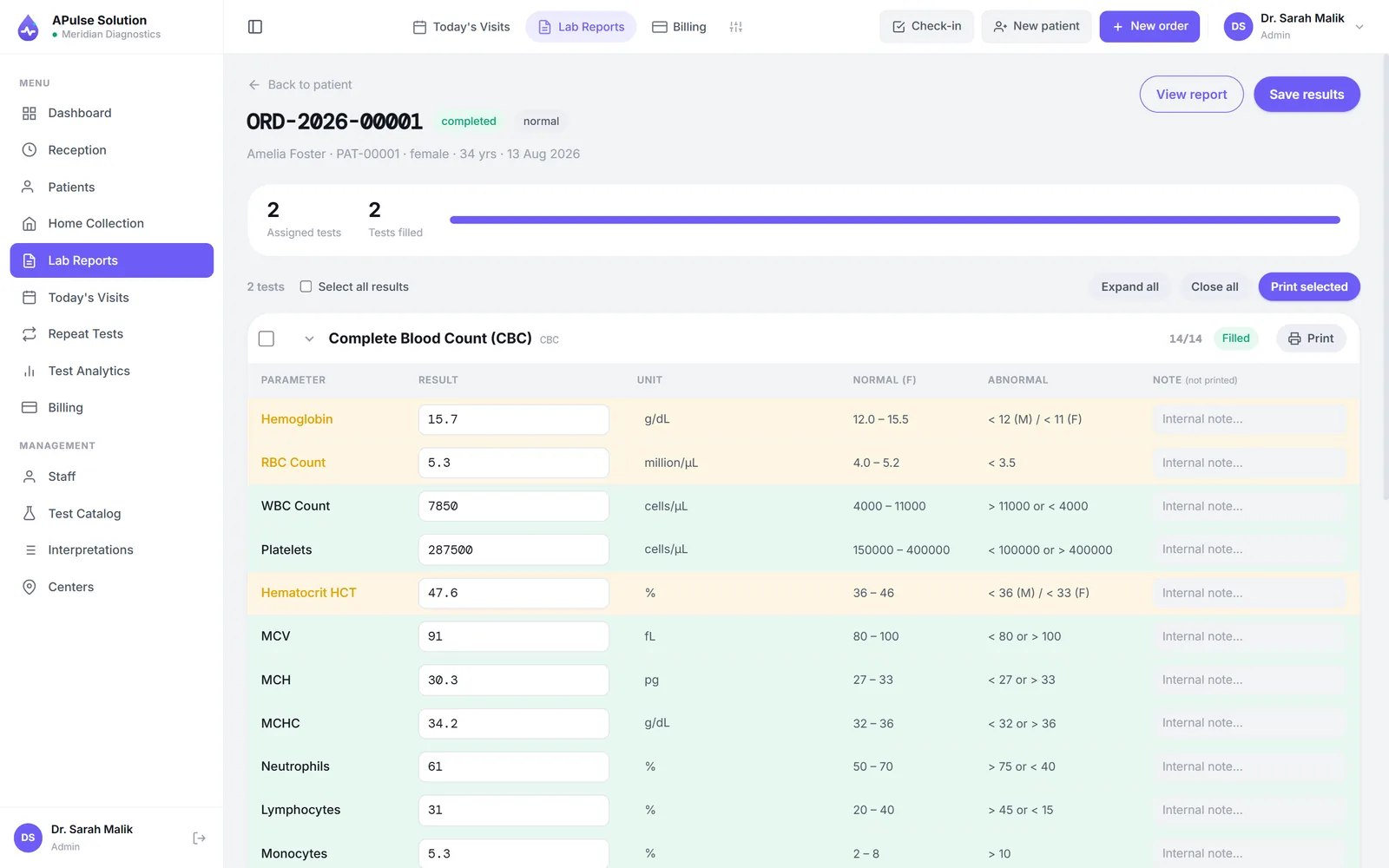
Midday — the bench. The technician works from the day's order list, or a printed worksheet generated from it. As each value is entered it is checked against that test's reference range for that patient's sex, and anything outside the range is flagged immediately — on screen at entry, and again on the finished report. Qualitative tests (serology, cultures) are entered from a fixed dropdown — Positive, Negative, Trace — rather than free text, so two technicians can't record the same finding three different ways.
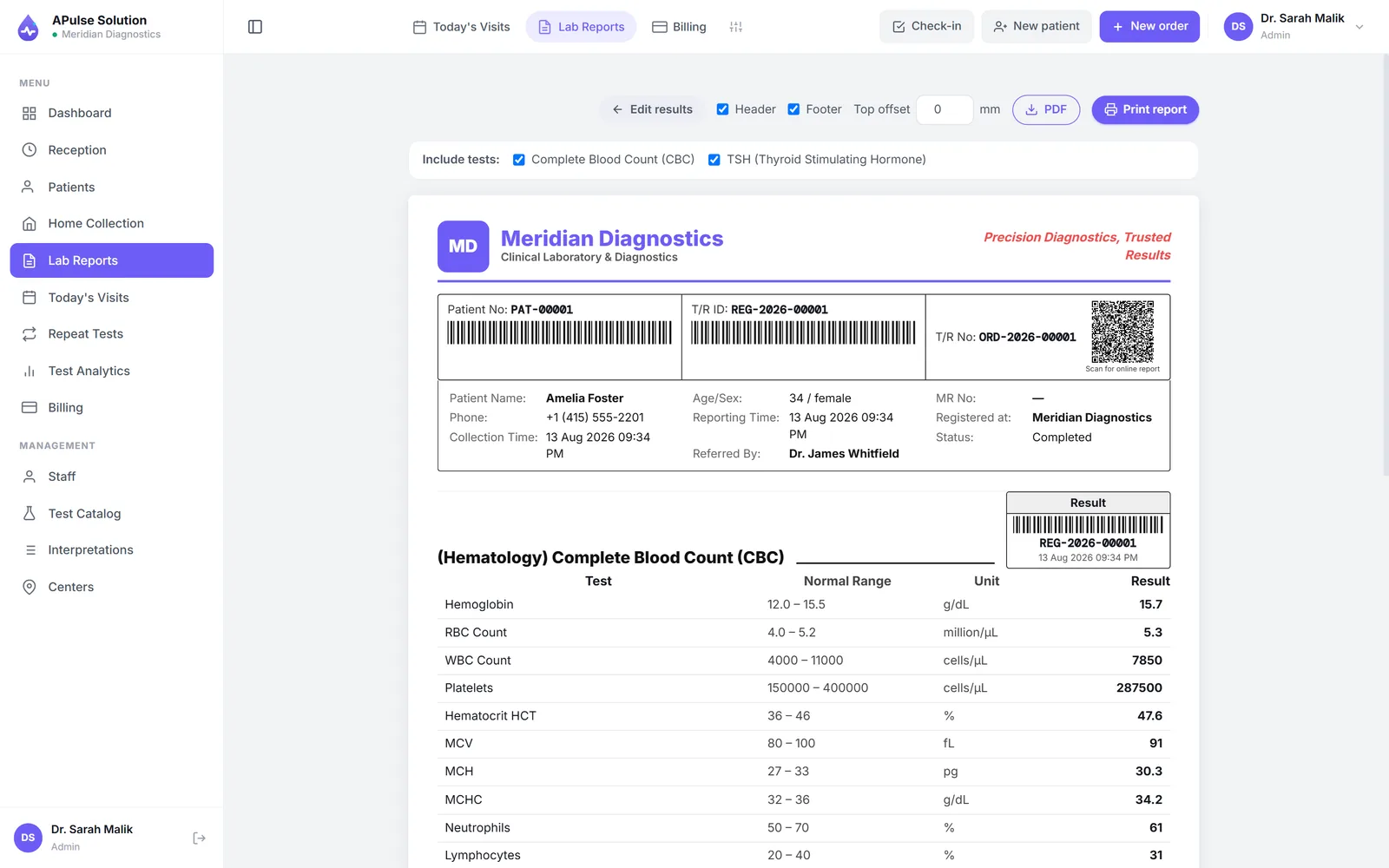
Afternoon — review and release. Results are reviewed, and the report is generated as a branded PDF carrying the lab's own name, logo and colours. It can be previewed, printed, or downloaded and sent to the patient however the lab prefers.
Evening — the desk. The owner opens the dashboard: how many patients came, what is still pending, what the day collected. No adding up receipts.
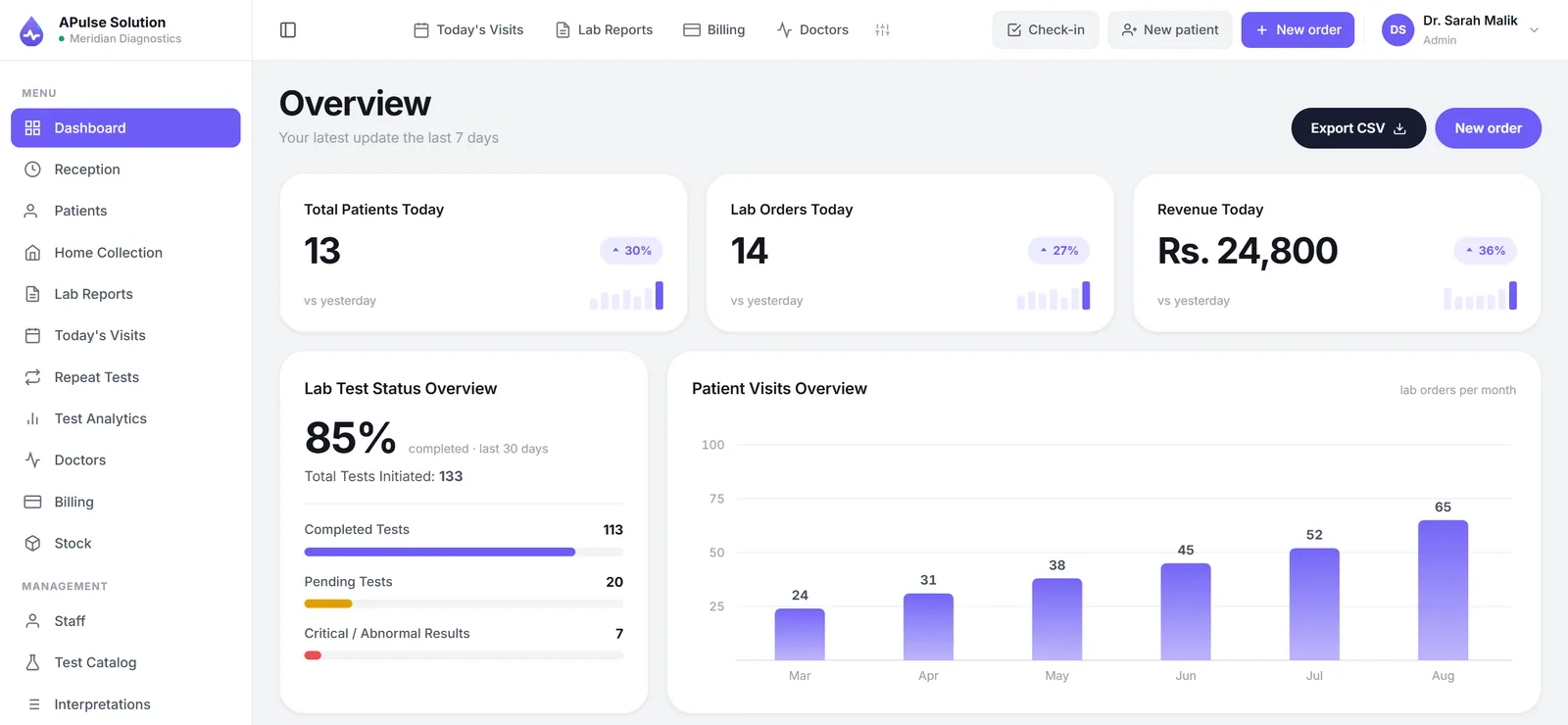
Nothing in that sequence is re-entered. The patient's details typed at 9am are the same details on the 4pm report and on the invoice in the evening summary — which is precisely why software reduces transcription errors. Every manual copy between books is a chance to get a digit wrong, and there are no copies left.
What Does Laboratory Management Software Manage?
The sections below describe what A Pulse Solution actually does today. Where something is limited to a higher plan, it says so.
Patient registration
One permanent record per patient, created at first visit with an auto-generated MRN and registration number. Every later visit, order, invoice and report attaches to it, so a returning patient's history is in one place rather than spread across register volumes. Walk-ins are checked in from the same screen and appear in the day's visit queue, so reception can see who is waiting and what for. Home sample collection is booked on a dedicated screen — including for a phone caller who isn't registered yet — and tracked from pending to scheduled to collected. There's more detail on how patient records are organised.
Test management
You build your own test catalogue: your categories, your test names, your prices, updated whenever your rate list changes. Each quantitative test carries its reference ranges, including separate male and female ranges where that matters. Qualitative tests carry their list of permitted result values.
Laboratory workflow
Orders move from booked to entered to verified to reported. A printable technician worksheet (also exportable to CSV, with columns you choose per test) gives the bench a working document generated from the day's actual orders rather than copied by hand.
Results
Entry validated against pre-set, sex-specific reference ranges, with abnormal values flagged automatically. On every plan, previous-result comparison places today's values beside the same patient's earlier ones, which is what makes a trend visible.
Reports
Branded PDFs on every plan — your name, logo, colours and address, in a detailed or short layout, with a letterhead and report-layout designer for controlling the exact arrangement. On every plan the billing slip carries a QR code, so a patient holding it a forwarded PDF can confirm it genuinely came from your lab. See lab report generation for the specifics.
Billing
The invoice is created at registration, not afterwards. Discounts recalculate the total. The referring doctor's share is recorded against the invoice. The day closes with a revenue summary, and Medium and Premium add trend reporting over weeks and months. Doctor referral commission tracking and its settlement reports arrive with Medium — useful mainly because it turns a month-end reconstruction into something that accumulated as you worked. More on billing and invoicing.
Branch management
On the Premium plan, patients, orders and invoices are tagged to their branch and the whole network is managed from one login, with up to 5 branches and collection centres and 25 staff accounts, more on request. Lower plans cover a single location.
Online reporting
Worth being precise here, because "online reports" means different things to different vendors. A Pulse Solution has no patient portal — patients never create an account. What it has is a branded PDF that exists the moment results are verified, which your staff download and share (typically over WhatsApp), plus a QR code on the billing slip that lets the patient authenticity without an account. Automatic WhatsApp and SMS sending works on every plan once the lab connects its own WhatsApp Business or SMS gateway account. If a self-service patient login is essential to you, this is the point to check before going further — how online reports work here sets out the model.
Automation
In this context automation means removing copying and arithmetic, not bench robotics: MRNs generated rather than assigned by hand, invoices raised at registration, discounts recalculated, abnormal results flagged on entry, worksheets built from the day's orders, daily revenue summarised without a calculator. There is more on workflow automation, including what it deliberately does not attempt.
Benefits of a Laboratory Management System
The honest version — benefits that follow directly from the mechanics above rather than from marketing:
- Patient history that survives. A permanent record per patient means a repeat visitor is found in seconds instead of hunted through old registers.
- Fewer transcription errors. Details are entered once and flow to the order, worksheet, invoice and report. Values are range-checked at the moment of entry.
- Consistent, professional reports. Every report leaves the lab in the same layout under your own branding, regardless of who produced it.
- Money that reconciles. Because billing is attached to registration, the day's takings are a calculation rather than an estimate.
- Fewer commission arguments. With the referring doctor recorded on every order, both sides are reading the same record.
- Answers on demand. Pending results, today's revenue, a doctor's referrals this month — questions that are impractical on paper become ordinary.
- Accountable access. Role-based accounts mean reception isn't browsing results, and you can see the system was used as intended.
What it will not do is make a badly run lab well run. Software enforces a process; it does not invent one.
Who Needs Laboratory Management Software?
A laboratory management system earns its keep when the volume of records passes what a person can reliably hold in their head and a register.
Good candidates:
- Small diagnostic labs and collection centres where one or two people do everything and re-typing the same patient's details is a daily tax.
- Pathology labs with a real test catalogue, where reference ranges and consistent reporting matter clinically.
- Diagnostic centres juggling walk-ins and home collection at once.
- Hospital laboratories running their reporting separately from the hospital's main system — often because the lab module bundled into an HMS is its weakest part.
- Multi-branch chains, where the alternative is ringing each location at closing time.
Signs you have outgrown paper — a fair self-check:
- Repeat patients cannot be found quickly, so duplicates accumulate.
- Reports look slightly different depending on who typed them.
- Month-end totals take an evening to assemble.
- There is a recurring disagreement about dues or referral shares with no clean record.
- You cannot answer "how did last month compare to this one?" without a lot of work.
If none of those bite yet, a register may still be fine. Buying software to solve a problem you don't have is how labs end up with a system nobody uses.
Laboratory Management System in Pakistan
For labs in Pakistan there are a few practical considerations beyond the feature list.
Cost and currency. A Pulse Solution is quoted in PKR, by plan, sized to your report volume, staff and branches — the plans page shows what each includes, and we quote in writing before you commit. Whoever you talk to, if a vendor won't put the number and the first-year total in writing, treat that as information.
Payment that matches how labs actually pay. Card-on-file subscriptions suit few labs here. Manual bank transfer with same-day activation is a better fit, and it's how billing works at A Pulse Solution.
Support in the right language, at the right hours. Our team works GMT+5, and answers on WhatsApp seven days a week in Urdu and English. For most labs, WhatsApp is the realistic support channel, not a ticket portal.
Hardware. Because the software runs in a browser, there is no server to buy and nothing to install — any computer, tablet or phone the lab already owns will do. That also removes the single-PC failure point that ends a paper-plus-desktop setup's day.
Getting existing records in. Most labs arrive with years of Excel. Migration is available at a small one-time cost on any plan. Ask about this before you sign, not after.
There is a fuller treatment on our Pakistan page, and a market-specific buying guide in medical lab software in Pakistan.
How to Choose a Laboratory Management System
Judge candidates on the things your staff will touch every day, and insist on seeing them rather than hearing about them.
- Watch a registration end to end. Can reception complete one without a manual? That is the screen used most; if it's awkward, nothing else compensates.
- Print a report with your own logo on it. Not a sample — yours. This is where generic software usually shows.
- Load five of your own tests, with your reference ranges. Confirm abnormal flagging behaves the way your pathologist expects.
- Get the total cost in writing. Plan price, setup, migration, and anything per-user or per-report. Ask directly what is not included.
- Ask what it doesn't do. A vendor who answers this plainly is easier to work with later than one who says yes to everything. Analyser interfacing, EMR integration and patient logins are the usual gaps. A Pulse Solution has no patient logins; analyser interfacing and an API for hospital systems are switched on per account on request, and both need setup work on your side, which we say up front.
- Test support before paying. Message them with a real question and time the reply.
- Check the exit. Whose data is it, and can you get it out? (Yours, and yes, is the correct answer.)
Trialling properly matters more than comparing brochures. A Pulse Solution's free demo creates your own workspace with every feature unlocked, up to 10 patients for 7 days, no card — enough to run a handful of real tests through it and see the report your patients would receive. A comparison of system-level capabilities and the full feature list are both public if you'd rather read first.
Frequently Asked Questions
Is a laboratory management system the same as a LIMS? Not historically. A LIMS came from research and industrial labs and is organised around samples and studies; a laboratory management system for a diagnostic lab is organised around patients and reports. For a clinical lab the two labels increasingly describe the same software, but a true research LIMS carries modules — electronic lab notebooks, batch and QC tracking — that a diagnostic lab will never open.
Do I need to buy a server? No, for browser-based systems like this one. Your data is stored in the cloud and staff sign in from any computer, tablet or phone. Desktop software is the option that needs a machine to live on, and a backup routine you run yourself.
Will it connect to our analysers? Not out of the box. By default technicians enter results at the keyboard, and the software validates them against reference ranges and flags abnormal values. Analyser interfacing is switched on for your account on request, on any plan: A Pulse Solution then accepts ASTM E1394 or HL7 v2 results that a bridge on your side posts to it. Connecting the machine to that bridge is part of setup and depends on the analyser, so it is never plug and play — it is the slow part of any LIS project. Results flow one way, from the analyser to the lab system; if bidirectional instrument integration is a requirement, you need a different class of system.
Can patients log in to see their own reports? No portal, by design — most patients do not want another account. They want the report on their phone. Reports are branded PDFs your staff share directly, and on every plan puts a QR code on the billing slip that opens their report without any login anywhere.
How long does it take to get running? The demo workspace is created instantly and needs no approval. The real work is loading your test catalogue and rate list, which depends on how many tests you offer. Our team helps with this over WhatsApp, and anything you enter during the demo carries over if you upgrade.
Is our patient data separated from other labs' data? Yes. Every laboratory gets its own isolated database schema, so one lab's records are never mixed with another's. Connections are encrypted with TLS, backups are encrypted on a rolling window of roughly 30 days, and staff access is role-based. The security page documents this.
We run two branches. Does that need a different plan? Yes — multi-branch management is a Premium feature. Patients, orders and invoices are tagged to their branch and the whole network is visible from one account, with up to 5 branches and collection centres and 25 staff accounts (more on request). On Basic or Medium you are managing a single location.