Medical Lab Software
Manage your laboratory's patients, tests, reports, billing, and operational workflows with A Pulse Solution — your own test catalog, gender-specific reference ranges, and branded reports doctors trust.
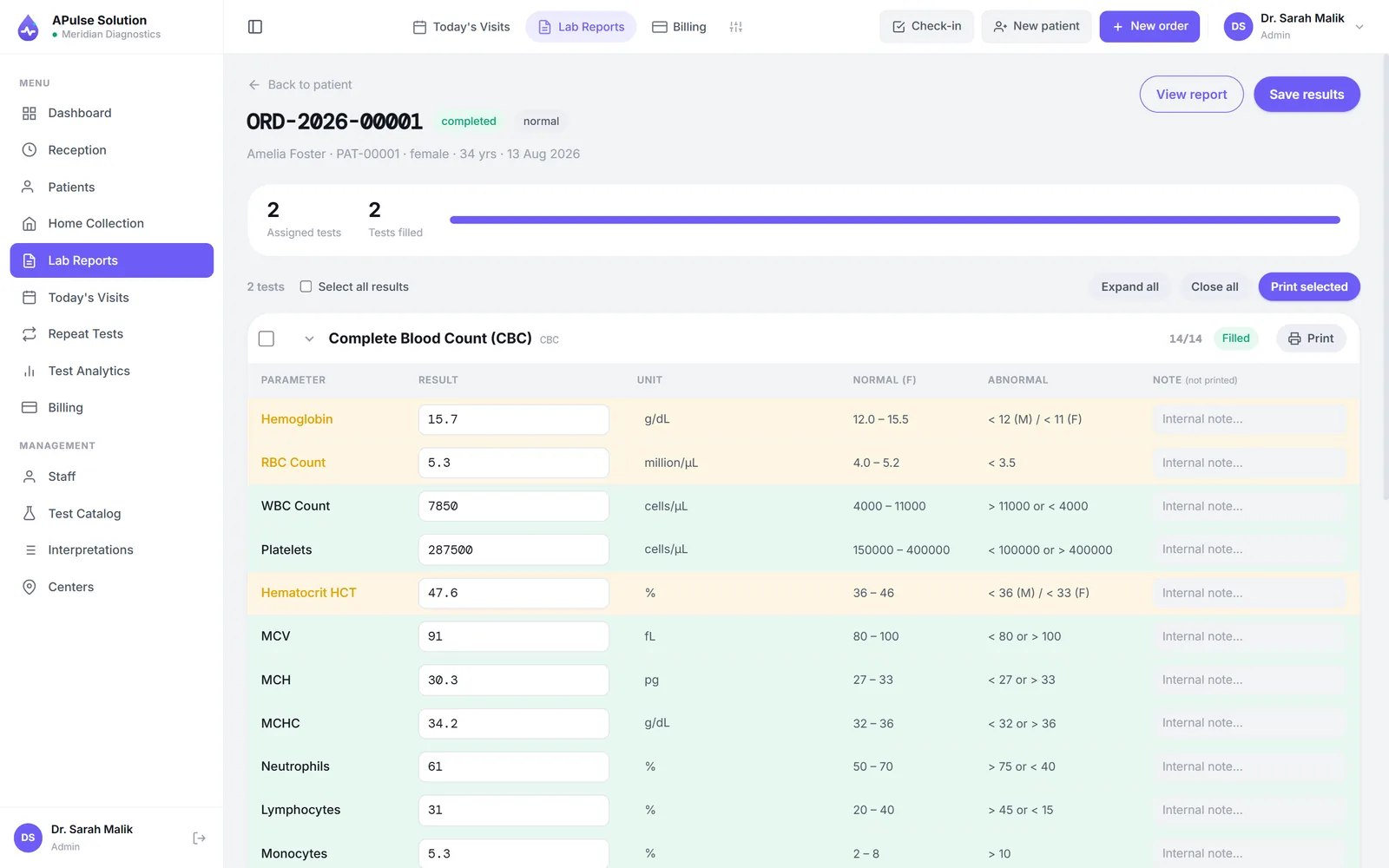
Software built around medical test results
A medical laboratory is judged on one thing: whether the number on the report is right. A Pulse Solution is built around that fact. At its centre is a test catalog you define yourself — CBC, LFTs, lipid profiles, thyroid hormones, cultures, whatever your lab actually performs — organised into your own categories, at your own prices. There is no fixed menu to fight with; the software takes the shape of your bench.
Around the catalog sits the rest of the day's work — registration, orders, billing, home collection — which the lab management system page walks through end to end. This page is about the part that makes a lab medical: the results.
Accuracy enforced at entry, not discovered later
Most reporting errors are not exotic. They are a male range applied to a female patient, a borderline value nobody looked at twice, or two technicians writing the same qualitative result three different ways. APulse closes each of those gaps at the moment of entry.
Reference ranges that know the patient
Every quantitative test carries pre-set reference ranges, including separate ranges for male and female patients. The technician enters the value and it is checked against the right range for that patient — haemoglobin is not judged the same way for everyone.
Abnormal results flagged automatically
Values outside range are flagged the instant they are typed, and the flag carries through to the printed report. The technician sees it before the report leaves the lab; the doctor reading it sees at a glance what needs attention.
Dropdowns keep qualitative results consistent
Qualitative tests use dropdown result values — Positive, Negative, Trace, whatever set the test needs — so results read identically no matter who entered them. “Nil seen”, “nil” and “negative” stop being three answers to one question.
One honest note: unless analyser interfacing is switched on for your account, results are entered by the technician at the keyboard and validated against the ranges. Direct analyser interfacing — the machine posting its own results in over ASTM or HL7 — is switched on for your account on request, on any plan, and connecting each machine is a site-specific part of setup that depends on the analyser. Either way, whatever is entered is checked, flagged and recorded the same way every time. On every plan, previous-result comparison puts a patient's earlier values alongside today's, so a trend — or a suspicious jump — is visible before the report is signed off.
Reports doctors and patients can trust
The finished result becomes a branded PDF under your lab's own name, logo and colours — preview it, print it, download it, in detailed or short view. Reports are searchable by patient, doctor or reference number. On every plan the billing slip carries a QR code, so the patient can scan it with their phone and open their own report online without a login. The lab report software page covers layouts and the letterhead designer in detail.
From one-room labs to hospital departments
The same result discipline scales from a single bench to a department, because none of it depends on hardware — only on a browser.
- Runs on any computer, tablet or phone — nothing to install, data in the cloud
- The Basic plan covers 3 staff and 300 reports a month — see the plans, pricing on request
- Staff roles keep reception, technicians and doctors on their own screens
- Built for clinical labs worldwide; labs at home should see medical lab software in Pakistan
- Histopathology-leaning workflows get the same rigour in pathology lab software
Try the free demo — every feature unlocked, up to 10 patients, no card — or see how the demo works first.
Frequently Asked Questions
What is medical lab software?
It is software that runs the daily work of a clinical laboratory — registering patients, ordering tests, entering results against reference ranges and printing branded reports. A Pulse Solution does all of this in the browser, with your data stored securely in the cloud, so there is nothing to install and any computer, tablet or phone will do.
How does APulse handle reference ranges?
Every quantitative test in your catalog carries pre-set reference ranges, including separate ranges for male and female patients. When a technician enters a value it is checked against the right range for that patient, and abnormal results are flagged automatically — on screen at entry and on the printed report.
What about qualitative tests like serology and cultures?
Qualitative tests use dropdown result values — for example Positive / Negative / Trace — instead of free typing, so results stay consistent no matter which technician entered them. Quantitative tests take numeric entry validated against reference ranges. They are entered at the keyboard unless your account has analyser interfacing, which our team switches on by request on any plan: the machine then posts its results in over ASTM or HL7, and connecting each machine is part of setup.
Can a doctor verify that a report is genuine?
On every plan the billing slip carries a QR code the patient scans to open their own report online for 30 days, with no login. Reports themselves are branded PDFs under your lab's own name, logo and colours, searchable by patient, doctor or reference.
Is APulse suitable for a small clinical lab?
Yes. The Basic plan covers one lab, up to 3 staff accounts and 300 reports a month, which is enough for most single-room labs. Start with the free demo: every feature unlocked, up to 10 patients for 7 days, no card needed. Then ask for a quote sized to your lab.
Further reading
Background reading on how this software category works — written to inform, not to sell.
Ready to Get Started?
Create your free demo lab in seconds — every feature, 10 patients, no credit card. Or ask us for a quote and we'll set everything up for you.