Lab Software Features
Every feature in A Pulse Solution on one page — what every plan includes, what Medium and Premium add, and where to read the detail.
This is the whole catalog — everything A Pulse Solution's laboratory management software does, organised the way a lab day actually runs: front desk, then bench, then the money. Each feature gets one honest line, each section links to a deeper page, and plan gating is marked plainly — unmarked features are on every plan, (Medium+) means Medium and Premium, (Premium) means Premium only, and (on request) means our team switches it on for your account, on any plan. Every released feature is unlocked in the free demo, except the (on request) ones, which we switch on for a demo when you ask.
Patients and reception
The day starts at the front desk, so the software does too.
- Patient registration with auto-generated MRNs — enter a patient once, never twice
- Walk-in check-in and a live queue of today's visits
- Home collection booking and tracking, from pending to scheduled to collected (Medium+)
- Search reports by patient, doctor or reference
- Repeat-test tracking — every patient who tests with you month after month, listed on their own
- A daily sample collection list for home visits and collection rounds (Medium+)
The whole front-desk flow is covered on the patient registration page.
Tests, results and reports
At the bench
- Custom test catalog with your own categories and your own prices
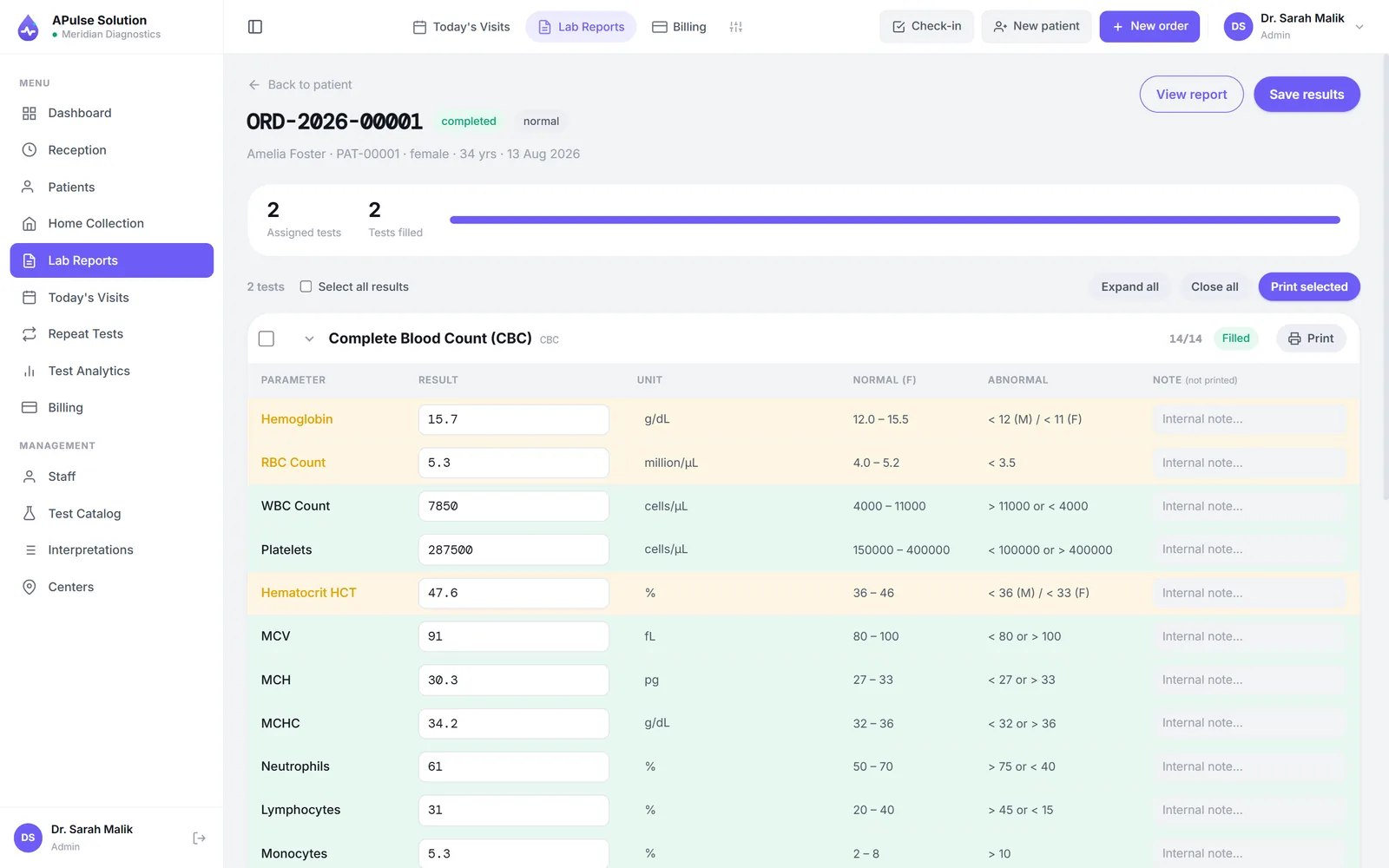
- Result entry against reference ranges set per sex and per age band — infant, child, adult — with each patient's own range on their report
- Automatic abnormal result flagging, on entry and on the report
- Dropdown result values for qualitative tests, so wording stays consistent
- A default result per parameter — "Negative", "Nil", a normal value — pre-filled at entry and still editable, with type-ahead for the rest
- Printable technician worksheet with customizable columns and CSV export
- A worklist of every open test with how long it has waited and which are past their turnaround time, filterable by department, test or overdue, and printable as a worksheet
- Batch entry: one test entered for every patient on the list at once, each against their own range, with abnormal values flagged as you type
- Calculated rows — LDL, VLDL, the A/G ratio, eGFR — work themselves out, and the differential count must add up to 100 before approval
- Delta check: a sharp change from the patient's previous result for the same test is flagged before anyone approves it
- Reflex rules such as "TSH above 4.5, offer Free T4", added to the same order in one click
- Consent recorded before the result can be saved, for tests that need it
- Outsourced tests show the lab the sample went to, and the note it came back with
- An approval step before release: once every result is saved the order waits at Pending approval, and approving it is what unlocks printing, the archived PDF and the patient's QR link
- Optional two-step release: a technician verifies, a different person approves; a result changed after verification goes back to be verified again
- Amendments with history: changing a released result asks for a reason, and the old value, new value, who and when are kept
Results are typed in by the technician and validated against the ranges. With analyser interfacing (on request, any plan) your analyser can post its results straight into the lab over ASTM E1394 or HL7 v2 instead, so a value is never retyped — and if somebody changes what the machine reported, the change is flagged and a reason is required. One caveat we would rather give here than in a sales call: the small bridge program that connects the physical machine is specific to your analyser and is part of setup, not something that works the moment you sign up. How working labs build their catalogs is on the pathology lab software page.
On the report
- Branded PDF reports — your lab's name, logo, slogan, colors and contact details — preview, print or download
- Detailed or short report views
- Letterhead and report layout designer
- Previous-result comparison reports — on every plan
- Trend graphs beside a result on the printed report, when the patient has history
- Bulk print: tick several reports and print them in one go
- A QR code on the billing slip that opens the patient's own report online for 30 days — no login, no app, on every plan; before release it says payment pending or tests in process instead
- Report links go out by WhatsApp, SMS or email on every plan — automatically on approval once you connect your own WhatsApp Business (Cloud API) or SMS gateway account, or with one tap by your staff without one.
- Patient messages when an order is booked and when a payment is received, and balance reminders — sent the same way
What the PDFs actually look like is shown on the lab report software page.
Histopathology, cytology and microbiology
- A proper pathology report for biopsies, Pap smears, FNAC and fluid cytology: specimen and site, clinical history, gross description with blocks and slides, specimen adequacy, microscopy, diagnosis and a diagnostic category
- Case numbers given automatically — H-26-00001 for histopathology, C-26-00001 for cytology — and never reused
- Phrase templates inserted with one click — Bethesda NILM, ASC-US, LSIL and HSIL; "negative / positive for malignant cells" — and never pre-filled, so nothing is released by accident
- Atypical, suspicious and malignant diagnoses flagged on the report
- Culture and sensitivity reports with organisms, colony counts and an S / I / R antibiotic table, with ready-made panels
- An antibiogram for any period, counted on the first isolate per patient, printable for the infection-control committee
Billing, commissions and the money
- Invoice raised at registration — no separate billing step to forget
- Discounts with auto-recalculated totals, visible on the record
- Daily revenue summary dashboard
- Full analytics dashboard — revenue trends and test status over time (Medium+)
- Doctor referral and commission tracking — routine and special share % per doctor (Medium+)
- Printable daily, weekly and monthly commission reports for settlements (Medium+)
- Per-doctor test prices, for referrers paid on an agreed price per test rather than a share (Premium)
- Credit clients — corporate and panel billing with statements (Medium+)
- Rate lists for panels and corporate clients, and doctor share payouts recorded against each doctor (Medium+)
- Refunds against the bill, in cash or back to the patient's advance; cancelling an order asks for a reason and keeps it
- Patient advances taken before the tests are decided, and tests added to an open order on the same bill
- Discount limits per role, with a manager's approval and a reason above the limit
- Cash close: each cashier counts the drawer at the end of a shift, and any shortage or excess needs a note
- Expenses with their own voucher numbers — voided with a reason, never deleted — and profit & loss for any period, by category, payment method and month (admin)
- Payroll: monthly salary runs with allowances, deductions, unpaid leave and advance recovery, and an A4 payslip for each person (admin)
The money side splits across two pages: billing and invoicing for the invoices, and doctor commissions for the referring doctor's share.
Barcodes and sample tracking
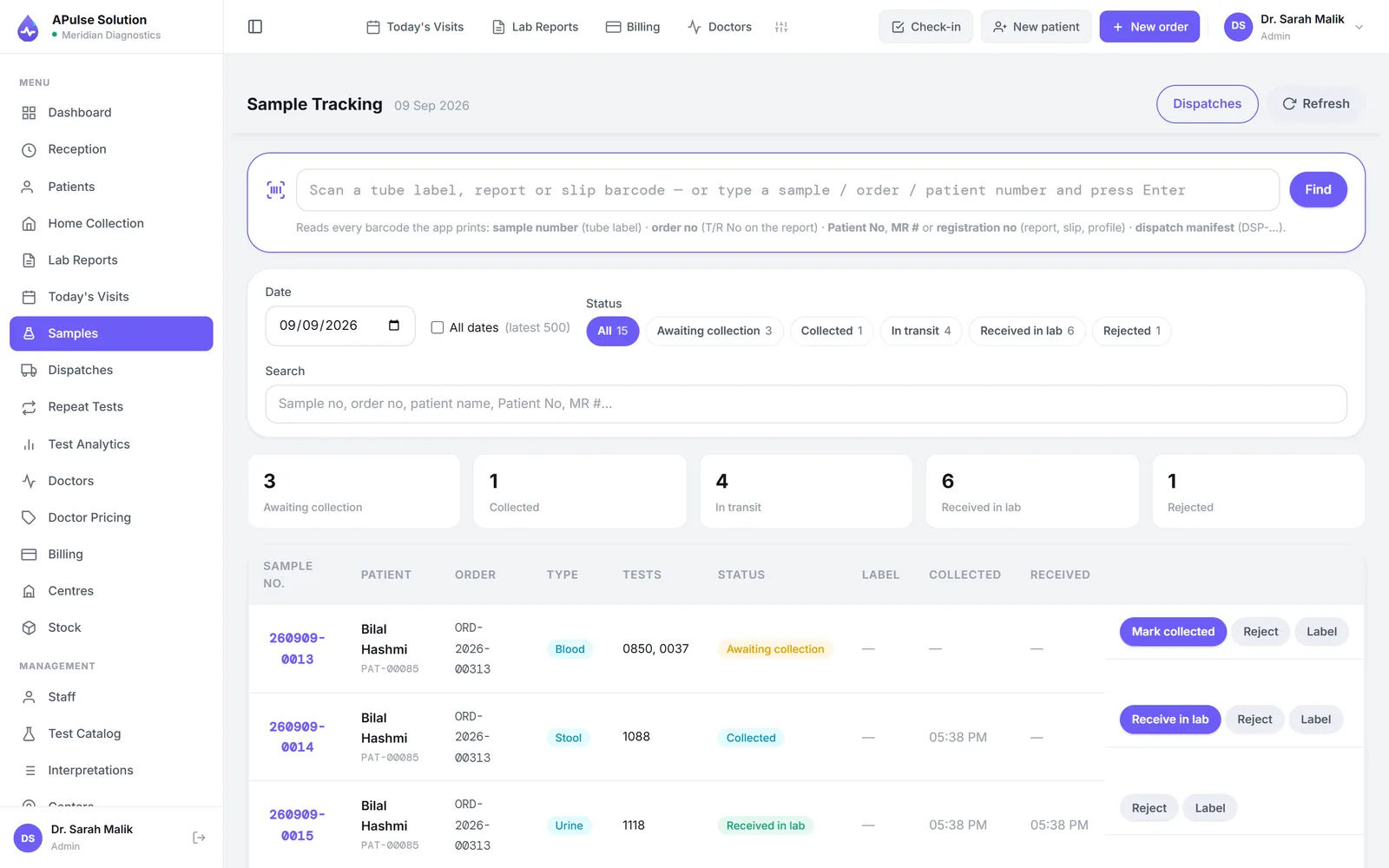
- Every tube gets its own sample number the moment the order is booked — one per container, not one per test, so tests sharing a sample type share a tube
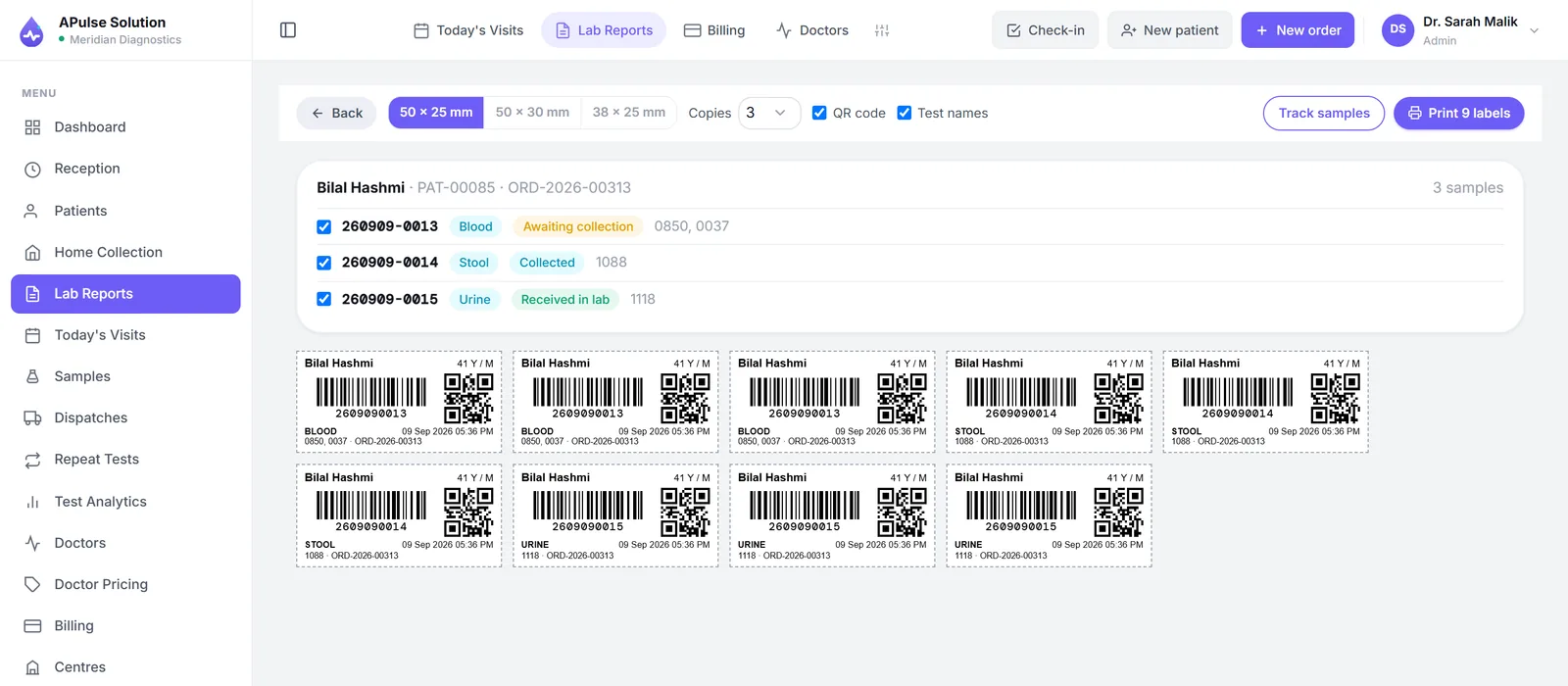
- Print adhesive tube labels on a thermal label printer in 50 × 25, 50 × 30 or 38 × 25 mm, one to three copies
- Each label carries the patient's name, age and sex, the barcode, the number in readable digits, a QR code, the sample type, the time and the test codes
- Scan a tube with any USB or Bluetooth barcode scanner and the right patient opens — a scanner behaves like a keyboard, so there is nothing to configure
- Scan with an Android phone's camera instead, if you would rather not buy a scanner
- Tube lifecycle tracked from pending to collected to received, or rejected with a reason — haemolysed, clotted, quantity not sufficient, wrong tube
- Recollect issues a fresh number and keeps the bad draw in the history; a rejected number is never reused
- Every step recorded with the staff member's name and the time — created, label printed, collected, received, rejected, replaced
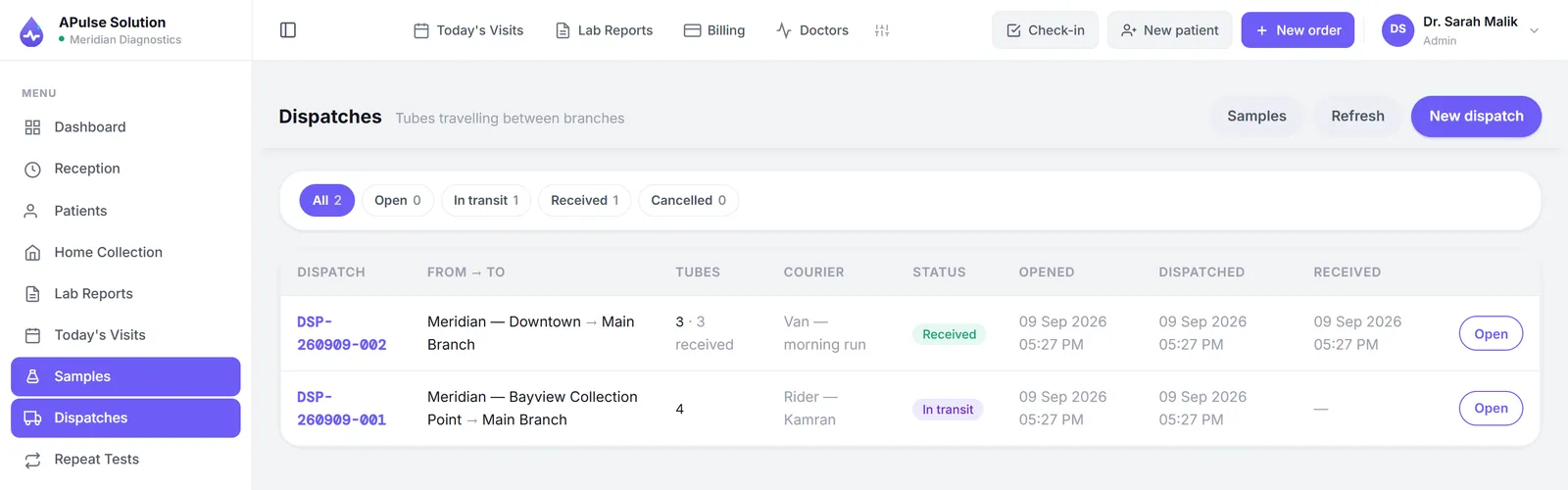
- Dispatch manifests move collected tubes from a collection centre to the main lab: scan the tubes in, print an A4 manifest with its own barcode, then scan that one barcode at the lab to receive the whole batch (Premium)
All of this is on every plan, including Basic, except dispatch manifests, which come with multiple branches on Premium. A thermal label printer is the one piece of equipment it needs, and there is no ink or toner to buy. The guide to barcode labels for lab samples walks through the whole process, including what to order from a label supplier.
Two limits worth knowing: the barcode is printed on the tube label, the billing slip and the dispatch manifest, but not on the patient's report, which carries its identifiers as text. And the barcode is not yet connected to analysers — the sample numbers such a link would need are in place, but results are still entered at the keyboard.
Cloud edition: on every device, and installable as an app
- Runs in any modern browser on a computer, tablet or phone — nothing to install if you would rather not
- Or install it: the app goes to the home screen or desktop and opens in its own window, with no browser bar around it
- The installed app carries your lab's name and your brand colour, not ours — each lab's portal installs as itself
- Shortcuts on the icon jump straight to sample tracking, registering a patient, or today's visits
- It opens without waiting for the network, so a weak signal at the counter no longer means staring at a blank screen
- A banner says plainly when the connection has dropped — and when a newer version is ready to load
One limit worth stating plainly, because it decides whether this matters to your lab: patient data still needs the connection. Nothing clinical is stored on the device — no patient records, no results, no report files — so while you are offline the app opens and tells you, rather than letting someone register a patient or enter a result. That is deliberate rather than unfinished: order, invoice and sample numbers are issued by the server and cannot be minted on a disconnected phone without colliding, and a payment recorded offline could end up collected twice. What you gain offline is a fast, dependable start, and printing whatever is already on screen.
Installing is on every plan, and it changes nothing about how the software is licensed — there is still no per-machine licence and no server to buy.
Offline edition: the same software on your own PC
- A single Windows installer that carries its own database — no internet needed for the install, the first run or daily work
- Every module above, unchanged: patients, samples and tube labels, results and approval, branded reports, doctors, collection centres, stock, billing, staff and permissions
- A daily automatic backup keeping the last fourteen, with one-click restore
- Several PCs in one lab can share it over the lab's own network
- Updates download themselves in the background, with a Restart & update button when one is ready
- A 30-day evaluation on a fresh install, then a licence key sent on WhatsApp
- Connect it to your cloud account and the two work together: the PC keeps working with or without internet, everything on it goes up whenever there is a connection, and what the owner changes online comes down
Connected, an offline lab gets back the three things it had given up: the patient's QR link on the billing slip (the report opens once it has reached the cloud), the owner's view of the lab from anywhere, and an off-site copy of the data. If the same record is changed on both sides, the lab PC wins for results, reports and samples and the later edit wins otherwise, with the losing version kept for review. Sync is switched on per account by our team, on request.
What stays out, because it only works with a hosting company behind it: the free online demo, Google sign-in and OTP, anything that arrives by email, and the online payment screens; and on an unconnected PC, the QR link too. Backups are kept on the same PC, so copying one to a USB stick each week is still your job. The offline edition page sets out the requirements, the licence and how to choose between the two editions, and this guide explains the sync in full.
Staff, security and control
- Staff roles for admin, reception, technician and doctor
- Referring doctors get their own login and see only their own patients' results (Medium+)
- Your whole team working in it at the same time — no per-machine licence
- Priority support on WhatsApp and email, 7 days a week — on every plan
- Your own domain name for your lab's portal
- Per-user permission overrides (Medium+)
- An isolated database schema for every lab — your data is never mixed with anyone else's
- TLS-encrypted connections, and encrypted backups on a rolling ~30-day window
- An activity trail of who did what and when — registrations, results, approvals, payments, dispatches, catalogue and settings changes. Admins see the whole lab; everyone else sees only their own actions
- A notification bell for the things that need a person: results ready to check, a report approved, a sample rejected, a dispatch arrived, a payment recorded. Routine events stay in the trail and never ring it
- Forgot password on the sign-in screen mails a one-time reset link that expires in four hours — no call to us, and nobody can set a password from an email address alone
Access control here is a feature like any other — not an afterthought — and your lab owns its data throughout. The security page sets out how the data is stored, isolated and backed up.
Inventory and multi-branch
- Stock and inventory with request approvals (Medium+)
- The reagent a test uses comes out of stock when its result is saved, from the batch that expires first (Medium+)
- Suppliers and purchase orders — received with batch number and expiry straight into stock, and "order what is low" fills one for you (Medium+)
- Alerts for low, out-of-stock, expiring and expired items, on the Stock page and the dashboard (Medium+)
- Collection points and centres with their own logins, entering their own patients (Premium)
- Multi-branch management — patients, orders and invoices tagged per branch, up to 5 branches and collection centres (more on request), one account (Premium)
- Up to 25 staff accounts, more on request (Premium)
Blood bank (Premium)
- Donors with a donor number, one per CNIC, refused unless eligible that day — age 18–60, at least 50 kg, Hb at least 12.5, and 90 days (men) or 120 days (women) since the last donation
- Bags donated or received, by component — whole blood, packed red cells, FFP, platelets, cryo — each with its own expiry
- Every bag held in quarantine until HIV, HBsAg, HCV, syphilis and malaria are recorded non-reactive; one reactive result discards the bag and defers the donor permanently
- Crossmatch lists only compatible, in-date, screened bags, soonest expiry first, and refuses anything else whatever is clicked; emergency issue before crossmatch needs a clinical reason
- Transfusion reactions recorded against the bag, with the lab's admins notified
Hospital systems and your own website (on request)
API & webhooks is not tied to a plan: our team switches it on for your account, whichever plan you are on.
- A public API for a hospital information system (HIS) or EMR: read patients, orders and the catalogue, receive results only once a report is released, and place orders and register patients through the same checks as the front desk
- Signed webhooks when an order is placed or a report is released; keys created and revoked in Settings, each read-only or allowed to place orders
The API is the lab's side of the link. Connecting a hospital system needs someone on the hospital's side to build their half; the settings page carries the reference they need. What changed recently is listed on what's new.
Your lab's own website
The same API connects the lab's own website, using a key from Settings → Tests → API & webhooks that only ever reaches that one lab's data.
- Show the live test list with prices, sample type and turnaround, read from the same catalogue the desk uses
- Online booking: register the patient and book tests, arriving in the lab's account with invoice and sample tubes like a desk booking
- A "download your report" page: results and a 30-day report link, only once the report is released
- A webhook calls the website when an order is placed or a report is released, for example to email the patient
A developer builds the website's side, and the calls must come from the website's server, never the visitor's browser. The website also checks who the patient is before showing a report, and the API takes no payment. The website integration guide covers each of these.
Labs running more than one location should start with the multi-branch lab software page.
Open a free demo lab and try every feature above with up to 10 patients (ask us to switch on the on-request ones) — or see which plan carries which feature.
Frequently Asked Questions
Can our lab's own website take online bookings and show reports?
Yes, once our team switches API & webhooks on for your account, which we do on request on any plan. A key from Settings → Tests → API & webhooks lets the website show your test list with prices, register patients and book tests (arriving with invoice and sample tubes like a desk booking), and fetch reports once they are released. A webhook can tell the website when a report is ready. A developer builds the website's side, the calls must come from the website's server, and the website must check who the patient is before showing a report.
Are all features available in the free demo?
Yes — the demo unlocks every released feature on this page, including the Medium and Premium ones, with up to 10 patients for 7 days and no card. The two on-request features, analyser interfacing and API & webhooks, are off in a demo until you ask us to switch them on. When you upgrade, your account and demo data carry over to your paid plan.
Which features are Medium or Premium only?
Medium and Premium add stock and inventory with request approvals, the full analytics dashboard, per-user permission overrides, home collection booking and tracking, credit clients with statements, and doctor referral and commission tracking with its settlement reports and referring-doctor logins. Premium alone adds per-doctor test prices, multi-branch management with dispatch manifests between sites (up to 5 branches and collection centres), and up to 25 staff accounts — more of either on request. The letterhead designer, previous-result comparison reports and priority support are on every plan.
Do any features cost extra?
No. Features are plan-based — your plan price covers everything the plan includes, with no per-feature charges. The other cost to know about is optional data migration — a small one-time cost on any plan.
Are software updates free?
Yes — updates are free on every plan. APulse runs in the browser, so improvements simply appear the next time your team signs in; there is nothing to install or upgrade on your machines. On the offline edition, a new version downloads itself in the background when the PC has internet and a Restart & update button installs it, keeping your data in place; a PC with no internet waits for an installer on a USB stick.
Does APulse connect to lab analyzers or hospital systems?
Yes, on request, on any plan: our team switches each on for your account. Analysers post their results into the lab over ASTM E1394 or HL7 v2, and any later change to what one reported is flagged with a reason required; connecting the physical machine is specific to your analyser and part of setup. Hospital HIS and EMR systems connect through a public API with signed webhooks; someone on the hospital's side builds their half of the link. Without analyser interfacing, results are entered by the technician at the keyboard and validated against pre-set, gender-specific reference ranges, with abnormal values flagged automatically.
How do barcodes get onto the sample tubes — do staff write them by hand?
Nothing is handwritten. The system prints an adhesive label with the barcode already on it, and a staff member peels it off and sticks it on the tube while the patient is still at the counter. You need a thermal label printer loaded with direct thermal labels in 50 x 25, 50 x 30 or 38 x 25 mm; there is no ink or toner to buy. A barcode scanner is optional, because the number is also printed in readable digits under the barcode, and an Android phone's camera can scan instead. This is on every plan, including Basic.
Can APulse be installed as an app on a phone or desktop?
Yes, on every plan. Your lab's portal installs to the home screen or desktop and opens in its own window, carrying your lab's own name and brand colour rather than ours, with shortcuts straight to sample tracking, registering a patient or today's visits. It also opens without waiting for the network, so a weak signal at the counter no longer means a blank screen. Installing is optional — the same software runs in any browser with nothing installed at all.
Does APulse work offline?
There are two answers. The cloud edition's installed app opens offline but your data does not come with it: nothing clinical is stored on the device, so while the connection is down it tells you it is offline and lets you print what is already on screen, nothing more — order, invoice and sample numbers are issued by the server and would collide otherwise. If your lab's connection is genuinely unreliable, the separate offline edition is the same software installed on your own Windows PC with its own database, and it needs no internet at all. Since October 2026 that PC can also be connected to your cloud account: the lab keeps working through every outage, everything syncs up whenever the internet is back, the patient's QR link works again, and the owner sees the lab from anywhere. Sync is switched on per account on request.
Is there an offline version of APulse?
Yes. The offline edition is a Windows installer built from the same application: every module on this page, a private database inside the installer, a daily automatic backup keeping the last fourteen, a 30-day evaluation before a licence key is needed, and the option to share one PC's install with the other PCs in the lab over the local network. It can be connected to your cloud account so the two stay in step, which brings back the patient QR link and the owner's view from anywhere. On its own it leaves out the QR link, the free online demo, Google sign-in and OTP, email-based password resets and the online payment screens. It is licensed separately from the cloud plans.
Is there an approval step before a report goes out?
Yes, on every plan. Once every result on an order has been saved, the order sits at Pending approval. Approving it — an admin or a technician with report-editing permission — is what releases the report: the patient's QR link starts working, the PDF is archived and printing is unlocked. Editing an approved report takes it back to pending, and both saving results and approving wait until the invoice is settled, so a report never leaves with a balance owing.
Does anyone get told when something needs attention?
Yes. A notification bell on every screen tells the right people when results are ready to check, a report is approved, a sample is rejected or needs recollecting, a dispatch is on its way or has arrived, a payment is recorded, stock is requested or a home collection is booked. The person who did the thing is never notified of it, and routine events like registering a patient never ring the bell — they go into the activity trail instead.
Further reading
Background reading on how this software category works — written to inform, not to sell.
Ready to Get Started?
Create your free demo lab in seconds — every feature, 10 patients, no credit card. Or ask us for a quote and we'll set everything up for you.