Vendor feature lists are close to useless for comparison, because they are all long and they all look the same. Thirty bullet points, most of them describing the same four capabilities in different words, none of them telling you whether the software will make Tuesday morning easier.
So flip the question. Start from the six things your lab does every single day — register, bill, run, enter, report, reconcile — and judge every advertised feature by one test: does it remove a register, a re-entry or a dispute that I actually deal with? Features that pass are worth paying for. Features that do not are someone else's requirements.
This is a framework for choosing rather than a ranking. We build A Pulse Solution, so where the article names a tier or a limitation it is ours, cited as a concrete example rather than as a benchmark.
Start From Your Workflow, Not Their Brochure
Before reading any feature list, write your lab's day on one page: who registers patients, where the price comes from, who carries the sample, who types the result, who checks it, who prints the report, who hands it over, who counts the money, and who reconciles at night.
Then count the re-entries. In most paper labs the same patient's name is written by hand three or four times before their report leaves the building, and the same test price is looked up two or three times. That count is your target. It is also the fairest way to compare two products: not which has more features, but which removes more of your steps.
Be sceptical of feature-count comparisons. Ten modules nobody opens are worth less than one that saves the receptionist forty seconds, forty times a day.
Core Features: Non-Negotiable on Day One
These five carry the daily work. A system weak in any of them is the wrong system regardless of what else it offers.
Patient registration with permanent record numbers. One identity per person, reused for life, with a search fast enough that finding a returning patient beats re-registering them. If search is slow, staff will create duplicates under pressure, and the patient history you are paying for stops existing.
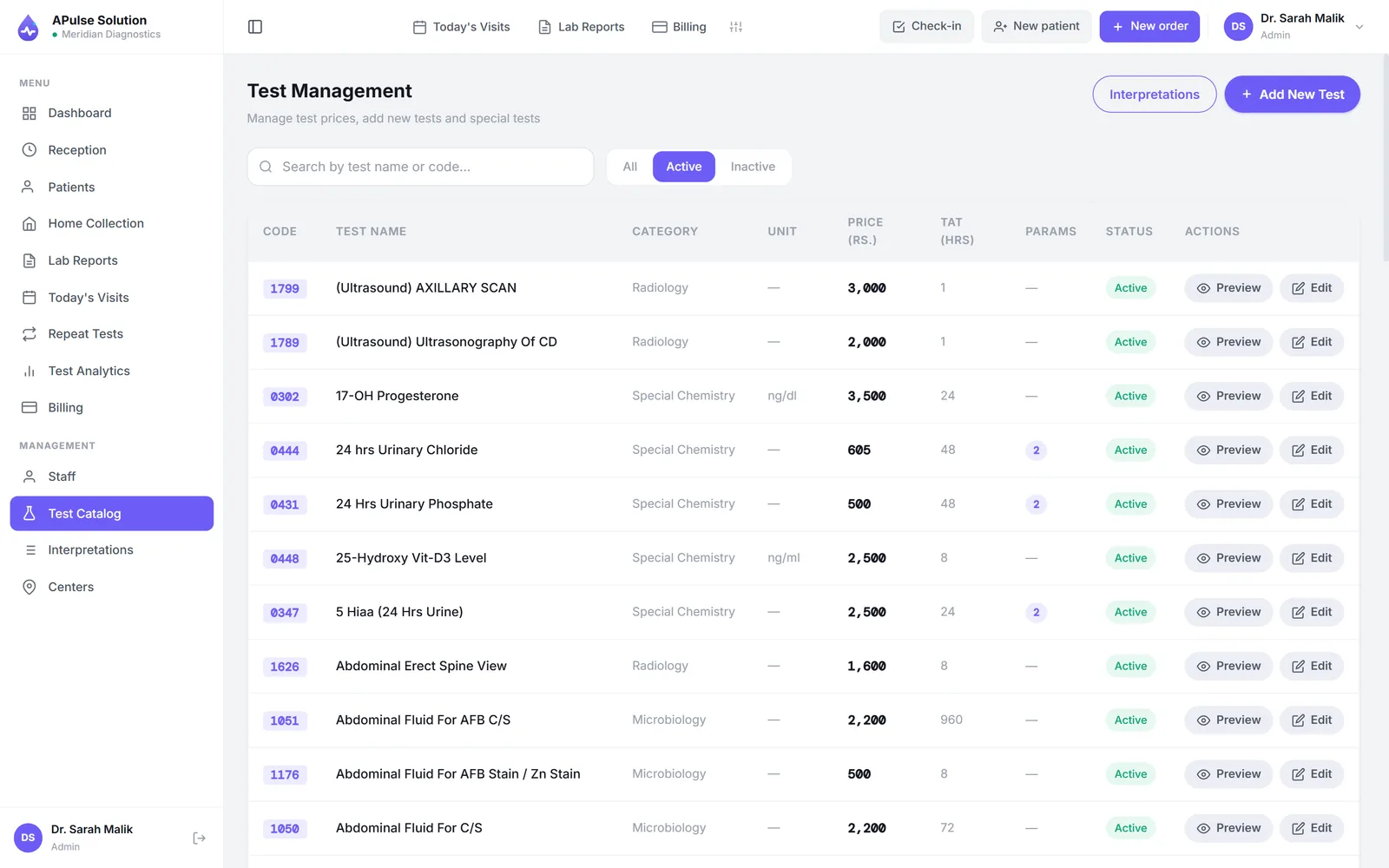
A test catalogue you control. Your test names, your prices, your reference ranges, editable by your own staff rather than through the vendor's support queue. Ask specifically who can add a test and change a price — this is one of the sharpest differences between products and it never appears on a feature list. Ours ships with roughly 880 common tests across eight categories as a starting point, so setup is editing rather than typing.
Result entry with automatic flagging. Values checked against the stored range for that test and that patient's sex, out-of-range results highlighted on entry, dropdown values for qualitative tests instead of free text, and an approval step before anything is released.
Billing at registration. Invoice raised with the order, prices from the catalogue, discounts and partial payments recorded against the visit, dues visible later. Billing that happens at report collection leaks money and you will not be able to prove how much.
Branded PDF reports generated from the entered values. No retyping into a Word template, and a layout that does not change between staff or between days.
Features That Matter as the Lab Grows
Not day-one requirements — but worth knowing which tier they live in before you sign, because moving tiers later is normal and migrating vendors is not.
- Doctor referral commission tracking computed from the referring doctor recorded on each invoice, with per-doctor share percentages and a printable share report. Anyone paying referral shares from a private notebook already knows why this matters at settlement. Medium and Premium in our plans; Premium alone adds an agreed price per test per doctor.
- Stock and inventory for kits, reagents and consumables with batches and expiry dates, so reordering stops being a decision made at the moment something runs out. Medium and above.
- Analytics beyond day-end totals: revenue and patient trends, test status breakdowns, monthly test analytics with CSV export. Medium and above.
- Multi-branch operation on one system, with patients, orders and invoices tagged per branch. Premium.
- A QR code on the billing slip, so the patient opens their own report online instead of returning for a printout. Every plan.
- Previous-result comparison, showing earlier dated results beside today's on one page. Every plan.
The pattern holds across most vendors: the core is in the entry tier and growth features are higher up. What varies enormously is which features count as growth, so map your own next-two-years list against each vendor's tiers rather than assuming.
Practical Features Nobody Puts on a Brochure
These rarely make the headline list and are noticed every day:
- Thermal slip printing on 80mm or 58mm rolls, if that is what your counter uses.
- A technician worksheet built from the day's orders, printable or exportable, because the bench still wants paper in most labs.
- Role-based access — admin, reception, technician, doctor — plus per-user permission overrides for the cases where a role is nearly right. Referring doctors who log in should see only their own patients.
- Repeat-test tracking, listing patients who test with you monthly with their next due date.
- Home collection booking, if you offer doorstep sampling, tracked from pending through scheduled to collected.
- Your own branding and web address, so the login page your staff and doctors see is yours rather than the vendor's.
Cloud or Installed
This is a structural choice rather than a feature, and it shapes everything else. Browser-based systems need no server and no per-machine installation, work on the computers the lab already owns, and let the owner see the day's numbers from anywhere — at the cost of depending on a connection at the counter. Installed software works offline and ties you to specific machines, with backups as your own discipline.
The question that decides it for most labs is not the internet: it is who takes your backups today, and when did anyone last test a restore? We have laid the comparison out properly in cloud vs desktop lab software.
Features That Sound Essential But May Not Be
Three that consume a lot of evaluation time and rarely deserve it at small-lab scale.
Patient portals. A login for patients to fetch their own reports sounds modern and matches how hospital networks work. At an independent lab it means one more password for somebody who visits twice a year, plus support calls when they forget it. Most labs in Pakistan simply share the PDF, and patients are asking for exactly that rather than for an account.
Analyser interfacing. Reading results directly off instruments is genuinely valuable at high volume, and genuinely expensive. Many systems for small and mid-size labs use manual entry against stored ranges. Ours does by default; analyser interfacing is switched on for your account on request, on any plan, and connecting each machine is setup work that depends on the analyser. Weigh it against your real daily test count, and treat any vendor calling interfacing plug and play as someone to question closely.
Elaborate dashboards. Useful in year two. Almost never the reason a lab succeeds or fails with software, and easy to be seduced by during a demo because charts are the most attractive thing on any screen.
Support and Pricing Are Features Too
You evaluate the software for two weeks and live with the support for years, so ask before you buy: which channel, which days, which language, and who actually answers — the team that built it or a call centre relaying messages. Then test it. Send a real question through the advertised channel before you pay and time the reply; it is the closest thing to seeing six months into the relationship. Ours runs on WhatsApp and email seven days a week, with updates included.
On pricing, insist on written numbers, and on the total first-year cost rather than the monthly headline. Ours are quoted in writing for your lab's size — report volume, staff and branches — before you commit; ask for a quote. The plans page has what each tier includes, and what decides lab software prices in Pakistan covers the pricing models you will meet elsewhere.
The Checklist to Take Into Every Demo
Print this. Score every vendor on the same items, and refuse to let the demo wander off it.
Watch them do these three things live, on your own tests:
- Load five tests from your own rate list, with prices and reference ranges, while you watch.
- Register a patient, then register them again as if they returned next month — does search find them, or have you just made a duplicate?
- Enter an out-of-range result and print the report — does the flag survive onto paper?
Then confirm, in writing: who can edit the catalogue and prices; whether billing is tied to registration; which tier holds referral tracking, inventory, branches and verification; the support channel, days and language; the total first-year cost; and what data you get back if you leave.
And close with the question from the opening: which of my daily steps does this remove? If the honest answer after a full demo is "none I could name", the feature list was never the problem.
Frequently Asked Questions
What is the single most important feature in lab management software? Registration with permanent record numbers, because everything else attaches to it. Result history, report reprints, referral tracking and billing all depend on one patient being one identity. Systems that get this wrong cannot be fixed by any other feature.
How many features does a small lab actually use? Fewer than it buys. Registration, catalogue, result entry with flagging, reports and billing carry almost all of the daily value at small scale. Growth features earn their place later, which is an argument for checking their tier rather than for paying for them now.
Should I choose software with analyser integration? Only if your volume justifies the cost, and only after asking exactly which analyser models are supported and what the interfacing itself costs. At small-lab volumes, manual entry against stored reference ranges is normal and workable.
Is a mobile app an important feature? For owners checking figures, a browser on a phone covers it. For registration and result entry, staff want a keyboard. Treat a dedicated app as a convenience rather than a criterion.
How do I stop a demo from becoming a sales pitch? Bring your own script and run it identically on every vendor: your rate list, your duplicate patient test, your hardest report format. And ask each one what their software does not do — a vendor who names their gaps quickly is telling you the truth about everything else.