Pathology Lab Software: From the Bench to a Signed Report
Routine chemistry and haematology, histopathology and cytology, culture and sensitivity, real-time PCR — entered, checked, signed and delivered in one pathology lab system, on your own letterhead.
A pathology report is a medical document
When results are copied from an analyser printout onto a Word template, every copy is a chance for a wrong value, a missed flag or a report handed to the wrong patient. When a clinician phones about last month's result, someone goes looking through files. And when an inspector asks who signed a report, the answer is a stamp.
A Pulse Solution is pathology lab software built around that report. The value is entered once, checked against the right range as it is typed, approved by a named pathologist and printed, never re-typed. The same system runs registration, billing and the records an inspector asks for.
Routine pathology: chemistry, haematology, serology
Your catalog, ready on day one
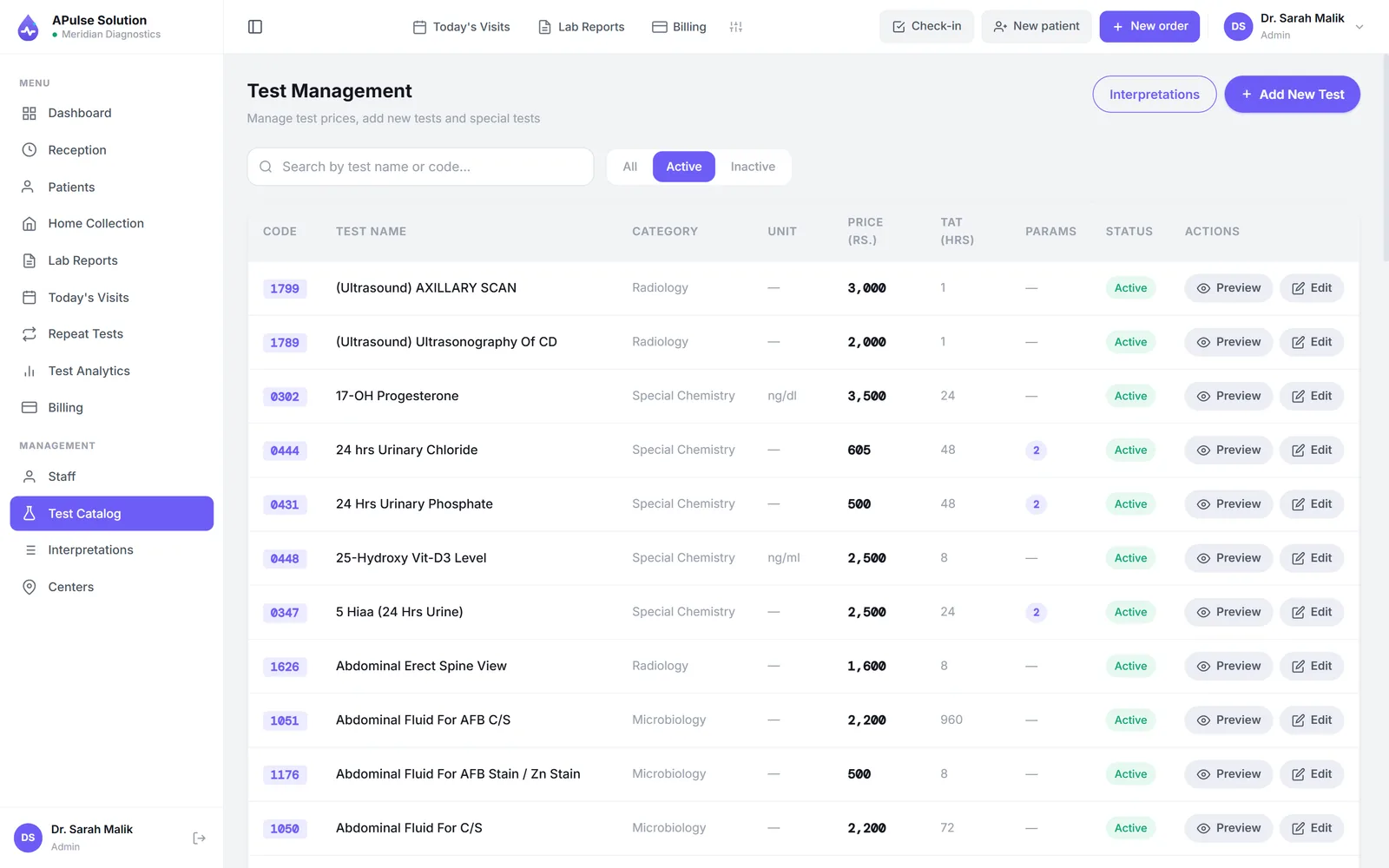
The test catalog arrives pre-loaded with more than 880 tests, grouped by department, and stays yours to edit: names, parameters, units, sample types, packages and rates. A parameter row deleted by mistake comes back with one click.
Ranges by age and sex, flags as you type
Each parameter carries ranges per sex and per age band. High and low values are flagged the moment they are typed and the flag prints on the report. Positive / Negative tests start on their normal value and stay marked default until a technician confirms or changes them, so nothing is reported by accident.
Calculated values and the differential count
LDL, VLDL, the A/G ratio, eGFR and other calculated rows work themselves out. A differential count that does not add up to 100 stops approval by default, or only warns if you prefer.
Critical values and the delta check
A panic value holds the report until someone records who was told, how and when. A result far from the same patient's previous one is flagged before approval, using the percentage and time window you set.
The worklist and batch entry
The worklist shows every open test and how long it has waited. Batch entry lets one technician enter one test for the whole list at once, each patient's own range under the box. Analyser results can also post directly: analyser interfacing is switched on per account on request, on any plan, and connecting the machine is part of setup and depends on the analyser. Until then, results are entered at the keyboard.
Histopathology and cytology, written as real reports
Biopsies, Pap smears, FNAC and fluid cytology are not squeezed into GROSS / MICROSCOPY / DIAGNOSIS grid rows. Each is written as a pathology report:
- Specimen and site, and clinical history
- Gross description with blocks and slides (histopathology), or specimen adequacy (cytology)
- Microscopic description, the diagnosis, and a diagnostic category: benign, inflammatory, atypical, suspicious, malignant or non-diagnostic
- A case number on the first save with a diagnosis, H-26-00001 or C-26-00001, which the system assigns and never reuses
Phrase templates such as Bethesda NILM, ASC-US, LSIL and HSIL for Pap smears are inserted by the pathologist with one click. They are never pre-filled, so a report is never signed with a phrase nobody chose. An atypical, suspicious or malignant category reads abnormal everywhere the report is listed.
Microbiology: culture and sensitivity
A culture is entered as growth, no growth, in progress or contaminated, with up to four organisms and their colony counts, and an S / I / R antibiotic grid (with MIC) for each organism. Picking an organism lays out the right panels: Gram-negative, Gram-positive, urine, fungi or anti-TB. Organisms and antibiotics come seeded and are edited in Settings, and every blood, urine, stool, sputum, pus, swab, fluid, AFB and fungal culture in the catalog is set up as culture and sensitivity.
The antibiogram then gives the percentage susceptible per organism and antibiotic over any period, from your own released culture results, counted the CLSI M39 way (first isolate per patient) and printable for your clinicians.
Molecular: real-time PCR
A PCR test records the patient's Ct or "No amplification". A quantitative test also records the run's standard curve, with PCR efficiency and R² worked out as you type. The viral load, log value and titre fill in, and the amplification and standard curves redraw live. The modelled curve is labelled as modelled, and the instrument's own plots can be attached as images. Interpretation bands ship for HCV, HBV and HIV-1, and the report shows the patient's earlier results for the same target with a viral-load trend.
Checked and signed before it leaves the lab
Approval, two-step release and signatures
A report is released only when someone approves it. With two-step release, one person verifies and a different person approves. The approving pathologist's name, qualification, council registration and signature print on the report, and the system keeps who signed and when. Changing a released result asks for a reason and keeps the old value.
Provisional reports, done properly
When a report has to go out before the pathologist can sign it, it can be issued as provisional, with a reason. It prints with a watermark and banner until a pathologist confirms it, and a confirmation worklist shows what is still waiting. A critical value still has to be reported first.
Quality control that can stop a report
Daily controls are checked against Westgard rules. A failed control that nobody has reviewed blocks approval of reports for that analyte, which is the point of running controls at all.
Send-out tests to a referral lab
A test going to another laboratory is assigned to it at the desk, as the order is taken, at that laboratory's price. Its report card shows where it went and when it is due, and once it comes back its values are entered on your report. A ledger lists every outsourced test with what the patient paid, what the laboratory charges and what is left, and worksheets, bills and a monthly statement print for each laboratory. All of that is on every plan; the turnaround scorecard per laboratory is on Medium and Premium. The other laboratory's result is still typed in by your staff. The guide to tracking outsourced tests walks through it.
Reports patients and doctors can read
Ten report designs on your own letterhead, with header and footer spacing set in millimetres. Interpretation notes print under the test, and up to five previous results sit side by side with a trend graph. Reports carry a QR code the patient scans to open their own report online for 30 days. Report links go out by WhatsApp, SMS or email: automatically on approval once you connect your own WhatsApp Business (Cloud API) or SMS gateway account, or with one tap by your staff without one. More on the lab report software page.
Online, offline, or both in parallel
Pathology software is usually sold as one or the other. Online software stops when the internet does. Offline software keeps working, but the owner cannot see the lab from outside and patients cannot open a report on their phone. A Pulse Solution comes as both, and the two can run side by side.
- Online (cloud edition): runs in the browser on any PC, tablet or phone, with nothing to install. It needs internet to reach your data.
- Offline edition: the same pathology software installed on a Windows PC in your lab, with its own database. Registration, results, approval, printing and billing all work with no internet.
- Both, connected: the lab PC is the working copy, everything goes up to your cloud account whenever there is internet, and what the owner changes online comes back down. The patient's QR link works once the order and the report have reached the cloud.
If the same result is changed in both places before they sync, the lab PC's version is kept, because that is the medical record, and the other version is listed for an administrator to review. The connection is switched on per account on request, it links one lab PC to one account, and the offline edition is licensed separately from the cloud plans. A phone does not sync; it uses the cloud account. Read pathology lab software, online and offline or the offline edition page for the detail.
Records for your PHC inspection
The records the Punjab Healthcare Commission's Minimum Service Delivery Standards ask a laboratory for are kept as you work: the signature log, critical-value calls, notifiable diseases, QC and EQA, CAPA, SOPs with staff sign-off, equipment and calibration, and staff files including pathologist hours. The software keeps the records; it does not make a lab compliant on its own, because premises, equipment and people are inspected too.
What it does not do
It does not diagnose: the pathologist interprets and signs. It is not a digital pathology or slide-scanning system, so images are attached, not analysed. And the reports are only as good as the ranges and templates your lab sets, so review the catalog's ranges against your own kits when you start.
The rest of the lab, in the same system
Patient registration with automatic MR numbers, billing and invoicing, doctor referral commissions, staff roles and permissions, and branches and collection centres on Premium. One login, one patient record, nothing typed twice.
Made for working labs
- Three plans, quoted for your lab's volume: see what each includes or ask for a quote
- Runs in the browser on the PCs you already have, and on phones as an installable app; or on your own Windows PC with no internet, as the offline edition
- Support in Urdu and English, 7 days a week, on WhatsApp and email
- Your lab's data in its own isolated database
- A 7-day free demo with every feature unlocked, no card
Create your free demo lab and take a CBC, a Pap smear and a urine culture from registration to a signed, printed report.
What our customers say
From the labs that run their registrations, reports and billing on APulse every day.
Before APulse every report was typed out and printed by hand. Now the patient is entered once and the report comes out on our own letterhead in a couple of clicks — it looks professional, and our patients have noticed.
The end of the day used to mean adding up receipts. Now I open the dashboard and today's registrations and revenue are just there — billing and discounts finally match what actually happened at the counter.
Doctor referrals and commissions used to live in a notebook. APulse records the referring doctor on every invoice, so settling commissions is quick and clear. And when we need anything, support answers on WhatsApp.
Frequently Asked Questions
Does the pathology software work online and offline?
It comes as two editions that can run side by side. The cloud edition runs online in any browser and needs internet to reach your data. The offline edition is the same software installed on a Windows PC in your lab, and it registers, reports, prints and bills with no internet. The lab PC can be connected to your cloud account, switched on per account on request, so everything goes up whenever there is internet and the owner sees the lab from anywhere. One lab PC connects to one account, and a phone does not sync; it uses the cloud account.
Can I track tests we send to another laboratory?
Yes, on every plan. A test is outsourced at the desk as the order is taken, at that laboratory’s price. A ledger shows every outsourced test with what the patient paid, the laboratory’s charge and what is left, and worksheets, bills and a monthly statement print per laboratory. The turnaround scorecard per laboratory is on Medium and Premium. The other laboratory’s result is still entered on your report by your staff.
Can I define my own test catalog and prices?
Yes. You build your own test catalog with your own categories and prices — CBC, LFTs, cultures, hormones, whatever your lab performs — and update prices whenever you need to.
How are abnormal results flagged?
Technicians enter values against pre-set reference ranges — including gender-specific ranges — and APulse flags abnormal results automatically on entry and on the printed report.
Does APulse handle qualitative tests?
Yes. Qualitative tests use dropdown result values (for example Positive / Negative / Trace), so results stay consistent across technicians and reports.
Does it handle histopathology and cytology reports?
Yes, on every plan. Biopsies, Pap smears, FNAC and fluid cytology are written as pathology reports: specimen and site, clinical history, gross description with blocks and slides or specimen adequacy, microscopy, diagnosis and a diagnostic category. Each case gets a number (H-26-00001 or C-26-00001) that is never reused, and phrase templates such as Bethesda NILM or HSIL are inserted by the pathologist, never pre-filled.
Can I report culture and sensitivity results?
Yes, on every plan. A culture records growth, up to four organisms with colony counts, and an S / I / R antibiotic grid with MIC for each organism, with panels for Gram-negative, Gram-positive, urine, fungi and anti-TB. The antibiogram then shows the percentage susceptible per organism and antibiotic for any period, from your own released results.
Can results come straight from our analysers?
Analyser interfacing is switched on per account on request, on any plan. The app reads ASTM and HL7 results, but connecting the physical machine is part of setup and depends on the analyser. Until it is switched on, results are entered at the keyboard, with flags, ranges and calculated values working the same way.
Can reports carry my own letterhead?
Every report carries your lab’s name, logo and colors on all plans, and every plan also gets the letterhead and report layout designer to control the exact layout.
Further reading
Background reading on how this software category works — written to inform, not to sell.
Ready to Get Started?
Create your free demo lab in seconds — every feature, 10 patients, no credit card. Or ask us for a quote and we'll set everything up for you.