Dental Clinic Software
A day calendar by chair, an FDI tooth chart with five surfaces on every tooth, X-rays on the patient's record, treatment plans that keep their own bill, and recalls that tell the desk who to call. Our team switches it on for your practice.
Made for the chair
The dental module is part of A Pulse Solution, the same software laboratories and hospitals run on, with its own menu, its own screens and its own reports. A dental practice runs it with no hospital department at all; a hospital runs it beside its OPD and wards. Either way the patient file and the billing desk are the ones the rest of the software uses, so a patient sent for a blood test or a scan is not registered twice.
Setup is yours to fill in: the dentists, each with a calendar colour from a set chosen to stay distinct for colour-blind staff; the chairs; and the procedure catalogue — code, category, your fee, the usual minutes, when the patient is due back for a recall, and when a post-operative check is due. Every fee starts at zero, because only you know your prices.
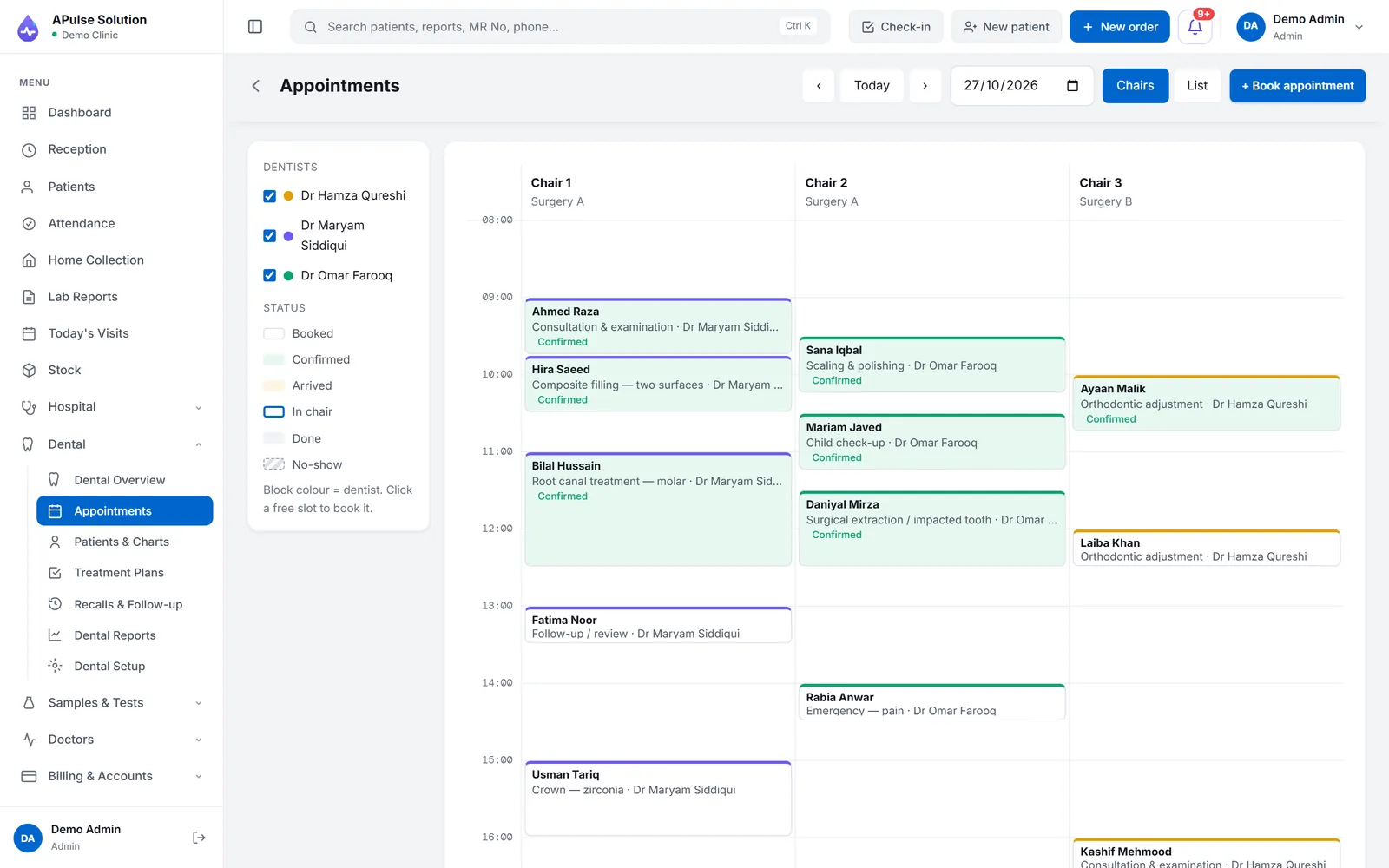
Appointments by chair
- A day calendar with one column per chair, each appointment in its dentist's colour; click a free slot to book
- Neither a chair nor a dentist can be booked twice for the same time, and the clash names the appointment in the way
- Booked, confirmed, arrived, in the chair, done — or a no-show or cancellation — so the desk and the chair side always see the same state
- A WhatsApp reminder on every appointment, sent from the desk with one tap: it opens WhatsApp with the message written, and staff press send
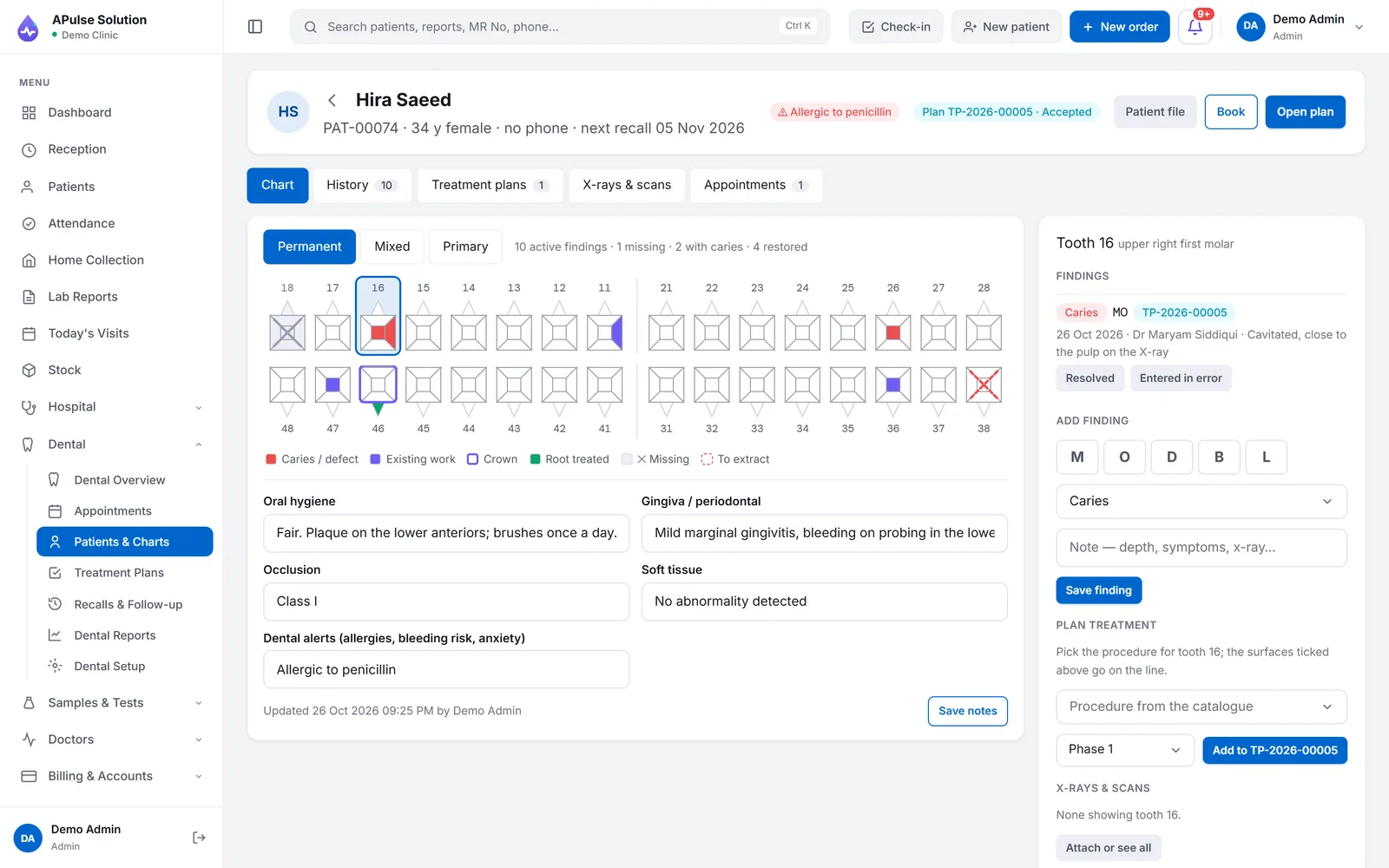
The tooth chart
- FDI numbering, for permanent, mixed and primary teeth
- Five surfaces on every tooth, painted from what is recorded: red for something to treat, purple for existing work, a ring for a crown, a green root for root-canal treatment, a grey cross for a missing tooth and a red one for a planned extraction
- Click a tooth to see its findings, add one with its surfaces and a note, or plan treatment on it — the finding resolves itself when that procedure is completed
- Whole-mouth notes for hygiene, gums, occlusion and soft tissue, and dental alerts that show on the patient's banner
X-rays and scans on the record
Periapicals, bitewings, OPGs, cephalometric films, CBCT and CT, clinical photographs and outside radiology reports are kept on the patient's record — PNG, JPEG, WebP or PDF, up to 10 MB each. Each one carries the date taken, the teeth it shows and a note; select a tooth on the chart and its films are listed beside it. An image is stored exactly as uploaded, never re-compressed, and opens only through a private link that expires. Removing one takes it off the record but keeps the file, because it is part of the medical record.
DICOM files cannot be viewed. Attach the images exported from the scanner's own software, or the radiologist's report.
Treatment plans with one bill
- Plans in phases — urgent, restorative, maintenance — each line a tooth, its surfaces, the procedure, the dentist and the fee from your catalogue; a different fee needs someone allowed to change prices
- Draft, presented to the patient, accepted — with the acceptance recorded on the plan — then in progress and completed as the lines are done; a declined or cancelled plan is kept as such
- Each line is booked, started, completed or declined on its own; a line added by mistake is voided, and a completed line never is
- One bill for the whole plan, raised once it is accepted and kept in step with it: a voided or declined line comes off, a re-priced line is re-priced, and the plan's discount is the bill's discount
- Part-payments over a long course of treatment go against that one bill, through the ordinary payment, receipt, refund and cash-close screens
Recalls and follow-up
- Hygiene recalls, post-operative checks, reviews, orthodontic and implant reviews, created from the catalogue when a procedure is completed
- An accepted plan with nothing booked comes back to the desk after the number of days you choose
- Due now, this week and overdue lists; every call or message is logged with its outcome, and after the number of unanswered attempts you set the recall is marked no response
- Snooze a recall, or book from it — finishing that appointment closes the recall
The day, and the numbers
The dental overview shows today's counts, every chair with who is in it and who is next, the waiting room, what is coming up, the recalls and follow-ups due, the plans waiting for an answer and — for staff allowed to see money — today's takings and what is owed on dental bills.
The reports give production (the fees of work completed) and collections, by dentist and by category, with the last six months of both side by side; the plan funnel from presented to accepted, started and completed; recall outcomes by month; chair time booked; new patients; no-shows; and how long money has been owed. The whole set downloads as one CSV for the dates you choose.
Who does what
A dentist signs in as a doctor linked to their own record and can filter to their own patients. Assistants and hygienists sign in as nurses. The desk books, confirms and marks arrivals and no-shows; the chair side seats and finishes; cancelling an appointment or voiding a plan line needs its own permission, which the practice gives to whom it chooses. On request the dental module can start with no access for anyone until each person is ticked.
What it does not do
Reminders are not sent automatically. Every appointment and recall reminder is one tap from the desk, through WhatsApp with the text already written. DICOM is not viewable, as above. And the module is new: it arrived in October 2026, and the release notes list what has changed since.
How to get it
The dental module is not part of any plan. Our team switches it on for your practice on top of whichever plan you are on, and includes it in your written quote; staff accounts follow the plan's limits, raised on request. It is off in a new free demo — tell us and we switch it on for your demo, so you can chart a patient and book a week of chairs before deciding.
Ask about the dental module on WhatsApp or open a free demo and ask us to switch dental on.
Frequently Asked Questions
Can a dental practice use it without a hospital?
Yes. A dental practice runs the dental module with no hospital department switched on. The patient file and the billing desk are the ones the rest of A Pulse Solution uses, so a patient sent for a blood test or a scan is never registered twice.
Which tooth numbering does the chart use?
FDI, for permanent, mixed and primary teeth, with five surfaces on every tooth. Findings paint the chart: red for something to treat, purple for existing work, a ring for a crown, a green root for root-canal treatment and a cross for a missing tooth or a planned extraction.
Can we keep X-rays and OPGs on the patient's record?
Yes. Periapicals, bitewings, OPGs, cephalometric films, CBCT and CT, clinical photos and outside reports — PNG, JPEG, WebP or PDF up to 10 MB each — are stored exactly as uploaded, tagged to the teeth they show, and opened through private links that expire. DICOM files cannot be viewed; attach the exported images or the report.
Does it send appointment reminders automatically?
No. Every appointment and recall carries a WhatsApp reminder that the desk sends with one tap: it opens WhatsApp with the message already written. Each call or message is logged against the recall with its outcome.
How is a long treatment plan billed?
With one bill for the whole plan, raised once the patient accepts it and kept in step with it: a voided or declined line comes off, a re-priced line is re-priced, and part-payments go against that bill through the ordinary payment and receipt screens.
Is the dental module part of a plan?
No. Our team switches it on for your practice on top of whichever plan you are on, and includes it in your written quote. It is off in a new free demo; ask us and we switch it on for yours.
Ready to Get Started?
Create your free demo lab in seconds — every feature, 10 patients, no credit card. Or ask us for a quote and we'll set everything up for you.