Laboratory Automation Software
No robots, no conveyor belts — the honest kind of automation: every number your staff used to copy between registers is generated, recalculated and range-checked by the software the moment it exists.
What lab automation actually means
"Laboratory automation" tends to conjure robotic arms and sample conveyors. For most pathology labs and diagnostic centres, that is not where the hours go. They go between registers — the same name copied into the registration book, the billing book, the worksheet and the report header; the same column of figures added twice because it refused to match the first time. A Pulse Solution automates that layer. It is laboratory workflow automation — the paperwork between the front desk and the signed report — handled as one piece of a complete laboratory management system.
Six manual steps that disappear
Each of these used to be a separate act of writing or arithmetic. This is what lab workflow management software means in practice: each step happens as a side effect of work someone was doing anyway.
Numbering the patient
MRNs and registration numbers are generated automatically during patient registration — no ledger to consult, no duplicate numbers to argue over later.
Writing the bill
The invoice is raised by the act of registration itself, priced from your own test catalog. There is no separate billing step to remember, so there is no billing step to forget.
Recalculating the discount
Apply a discount and the total updates on the record — visibly, and without anyone reaching for a calculator.
Checking the range chart
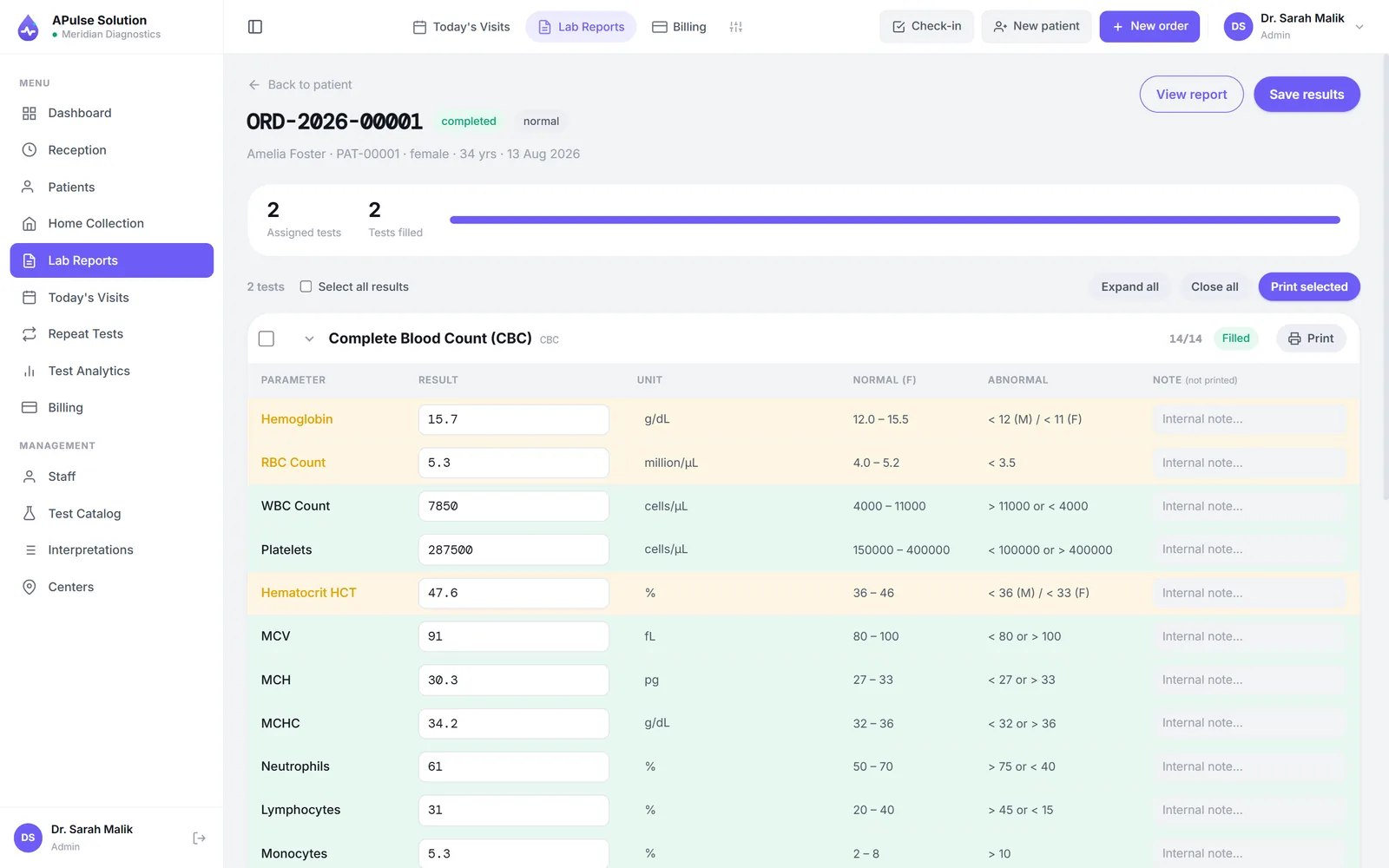
The moment a technician enters a value, it is checked against pre-set, gender-specific reference ranges, and abnormal results are flagged automatically. The chart taped to the wall retires.
Ruling the worksheet
The technician worksheet is generated from the day's orders — printable, exportable to CSV, columns arranged your way — instead of hand-ruled every morning.
Reconstructing the month
From the Medium plan up, the referring doctor's share accrues with each order as it happens, so settlement day means reading a commission report, not piecing a month together from registers. And the daily revenue summary is already on the dashboard — nobody totals receipts at closing time.
Fewer copies, fewer errors
A value written three times can be wrong twice. That is the quiet arithmetic behind most reporting mistakes — not carelessness, just copying. In an automated lab management system there is one record: registration creates it, orders extend it, results complete it, and the finished report reads from it. Nothing is re-typed between steps, so nothing can be mis-typed between steps.
- Auto-generated MRNs, invoicing at registration and abnormal flagging on every plan — see the plans
- Dropdown result values keep qualitative results consistent across technicians
- Worksheets printable and exportable to CSV, with customisable columns
- Commission accrual from the Medium plan; previous-result comparison on every plan
- A notification bell for the things that need a person — results ready to check, a report approved, a sample rejected, a dispatch arrived, a payment recorded — and an activity trail of who did what, on every plan
- Runs in the browser on any computer, tablet or phone — nothing to install, or install it as an app if you prefer
Where automation stops and judgement begins
Honesty matters here. Unless analyser interfacing is switched on for your account, results are entered at the keyboard by your technician and validated against the ranges you set. Analyser interfacing is switched on for your account on request, on any plan — instruments post their results in over ASTM E1394 or HL7 v2, and if somebody later changes what the machine reported, the change is flagged and a reason is required — but connecting each machine is specific to your analyser and is part of setup, not a switch you flip. Either way the software does the checking and the technician does the judgement. That is deliberate. Laboratory process automation should make the checking cheap and constant; it should never make the deciding automatic.
None of it requires technical staff, either. If your team can use a browser, they can use APulse — reception, technicians, doctors and admins each sign in to their own role and see only the screens their work needs.
Create a free demo lab and watch the invoice raise itself — every feature unlocked, up to 10 patients, no card — or see how the demo works first.
Frequently Asked Questions
What does lab automation software actually do?
In A Pulse Solution, automation means removing the copying and arithmetic between registers — MRNs and registration numbers are generated automatically, the invoice is raised at registration, discounts recalculate the total, abnormal results are flagged on entry, worksheets are generated from the day's orders, and daily revenue is summarised without adding up receipts. It is workflow automation, not bench robotics.
Does APulse connect to analyzers or lab instruments?
It can, on request: our team switches analyser interfacing on for your account, on any plan, and the analyser then posts results in over ASTM E1394 or HL7 v2. Connecting the physical machine is specific to your analyser and part of setup, not a switch you flip. Without it, results are entered at the keyboard by your technician and validated against pre-set, gender-specific reference ranges, with dropdown values for qualitative tests.
How does automation reduce reporting errors?
Every manual copy step is an error opportunity, and APulse removes most of them. A patient's details are entered once and flow to the order, worksheet, invoice and report from one record, so nothing is re-typed between steps — and every value is checked against its reference range the moment it is entered, with abnormal results flagged automatically.
Do my staff need technical skills to use it?
No. APulse runs in the browser on any computer, tablet or phone — nothing to install and nothing to maintain. Each staff member signs in to their own role (admin, reception, technician or doctor) and sees only the screens they need, and our team supports you on WhatsApp and email 7 days a week, in English and Urdu. Labs with a genuinely unreliable connection can choose the offline edition instead, which installs on a Windows PC and needs no internet.
Which plan do we need for these automations?
The core automations — auto-generated MRNs, invoicing at registration, discount recalculation, abnormal flagging, worksheets and the daily revenue summary — are on every plan, including Basic. The full analytics dashboard and doctor commission accrual come with Medium and Premium, and previous-result comparison is on every plan.
Further reading
Background reading on how this software category works — written to inform, not to sell.
Ready to Get Started?
Create your free demo lab in seconds — every feature, 10 patients, no credit card. Or ask us for a quote and we'll set everything up for you.