Offline Lab Software for Windows
The same A Pulse Solution, installed on your own PC with no internet connection at all — same screens, same reports, same billing. Built for labs whose connectivity is genuinely unreliable, not for labs that would rather avoid the cloud on principle.
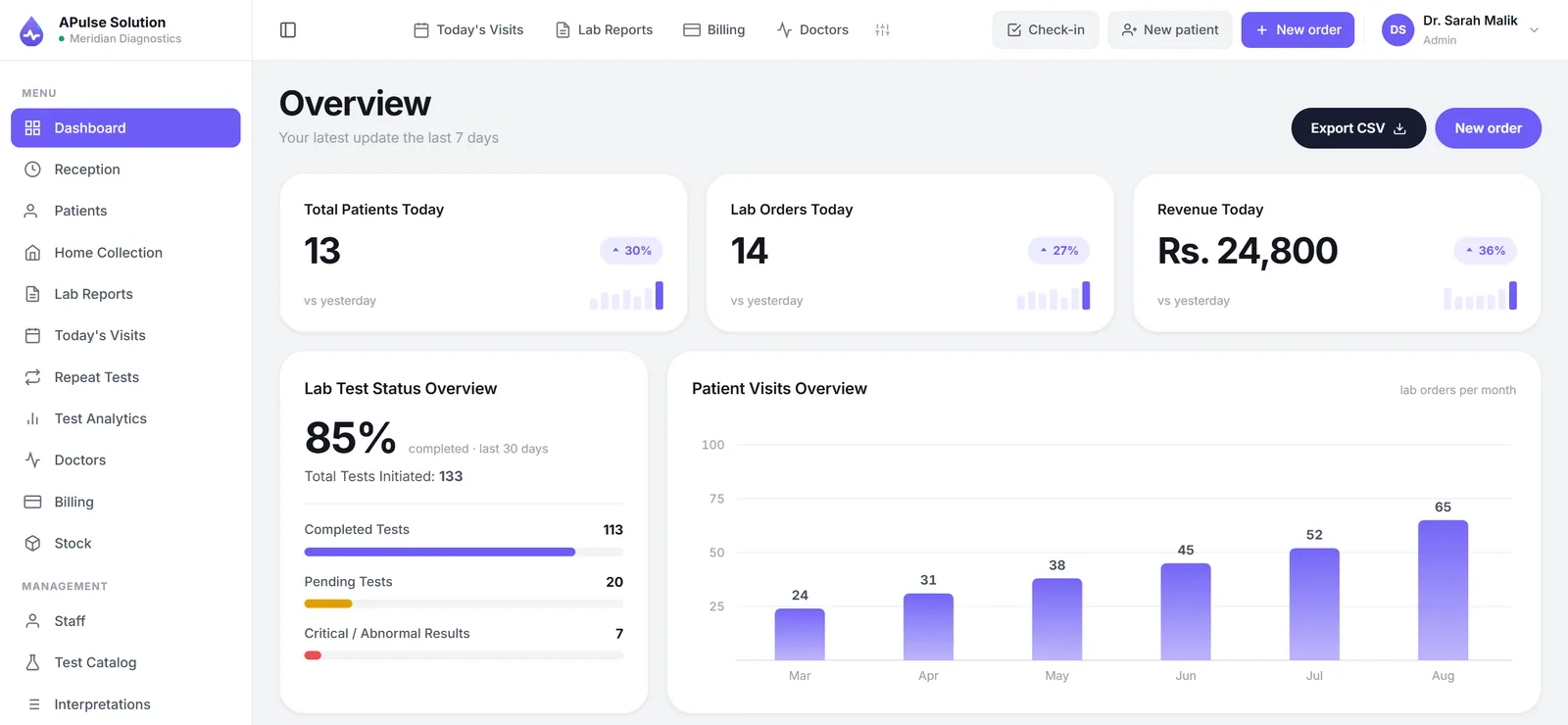
Two editions, one product
A Pulse Solution now runs in two ways. The cloud edition is the one the rest of this website describes: it runs in the browser on any computer, tablet or phone, your data lives on our servers with encrypted backups, and it is priced per month on the three published plans. The offline edition is the same application packaged as a Windows installer. It carries its own database inside it, runs on one PC in your lab, and never needs an internet connection — not for the install, not for the first run, not for anything after.
It is the same code. The offline installer is built from the same application as the hosted product, so a feature that ships to the cloud edition reaches the desktop by rebuilding the installer, not by someone remembering to copy it.
What is in the box
- One Windows installer, about 103 MB, that unpacks to roughly 362 MB
- The full application and a private PostgreSQL database, started and stopped for you — no configuration, no browser required
- A desktop shortcut that opens your lab's software in its own window
- Every module of the cloud edition: patients, orders, sample tracking and tube labels, result entry and approval, branded report sheets and PDFs, doctors and referral pricing, collection centres, stock, billing, staff and permissions
- The standard test catalogue of around 880 tests, loaded on first launch and yours to edit
- A daily automatic backup, keeping the last fourteen, with one-click restore
- A 30-day evaluation on a fresh install before a licence key is needed
What is not in it, and why
A few parts of the cloud edition only make sense with a hosting company behind them. The offline edition leaves them out rather than pretending:
| Not in the offline edition | Why |
|---|---|
| The QR code on the billing slip that opens the patient's report online | The link it carries can only be opened on your PC, so it would not work on a patient's phone. Printing and PDF export are exactly as before. |
| The free online demo and self-service sign-up | There is nothing to sign up to. Instead, a fresh install runs for 30 days as an evaluation copy. |
| Google sign-in and mobile OTP | Both need a third party on the internet. |
| Anything that arrives by email — forgotten-password links, staff welcome links | No mail relay. Passwords are set in person: the administrator adds staff with a password, and resets a colleague's from Staff → Set password. |
| Online payment, subscription screens and the platform admin panel | They manage a hosted service. On your PC, Settings → Plan & Billing becomes Management → Licence. |
Two consequences worth stating plainly. Patients do not get a self-service link to their report — staff print it or share the PDF, exactly as most labs already do. And the administrator password cannot be reset by email, because there is no email; whoever runs the software types it at setup and keeps it safe.
What the PC needs
| Minimum | Comfortable | |
|---|---|---|
| Windows | 10, 64-bit | 11, 64-bit |
| Memory | 4 GB | 8 GB |
| Free disk | 5 GB | 20 GB or more |
| Rights | Administrator, for the install only |
The disk figure is for your data and the fourteen rolling backups, not the install itself. Report PDFs are rendered with the Microsoft Edge that every normal Windows 10 or 11 machine already has. No internet connection is needed at any point, including the first run.
Backups — the part we will say out loud
The software backs itself up once a day and keeps the last fourteen copies. That protects you against a mistake inside the software. It does not protect you against the PC being stolen, dropped or failing, because the backups live on that same PC. Copy the newest file from the backup folder to a USB stick once a week and keep the stick somewhere else; Management → Licence → Open backup folder opens it ready to drag. Restoring is on the same screen: it asks twice, and takes a safety copy of the current state first, so a restore chosen by mistake can itself be undone.
This is the honest difference between the two editions. In the cloud edition, the backups are our job and are kept away from your premises. In the offline edition, the last step is yours.
Several PCs in one lab
The default install serves one PC. A lab with a reception desk, a bench and a doctor's room can nominate the PC that stays switched on as the server; the others then open the software in a browser over the lab's own network. The database itself never listens on the network — only the application does — and none of it is reachable from outside the building. We set this up with you on installation.
Licence and evaluation
A fresh install runs for 30 days as an evaluation copy, with every feature and your own data — that is the offline edition's answer to the cloud demo. After that it needs a licence key: one line of text we send you on WhatsApp, pasted into Management → Licence. Nothing is checked over the internet; the key carries its own expiry date and a signature that cannot be edited.
If a licence lapses, the software keeps opening for 14 days with a reminder, then waits for a new key. Your data is untouched throughout. A key normally works on any PC, so a lab replacing a dead machine at 8 am does not need to ring anyone first — install, restore the backup, enter the key.
Which edition should your lab choose?
The cloud vs desktop guide gives five questions that settle it. The short version: if the lab has more than one location, wants the owner to see the day from outside the building, or wants patients to open their report from the slip, choose the cloud edition. If the connection is genuinely poor and unfixable — not merely annoying on a bad morning — choose the offline edition and take the USB backup seriously.
Either way it is the same software, so a lab that starts offline and later gets a reliable connection is moving a database, not learning a new system.
Price
The three published plans on the pricing page are for the cloud edition. The offline edition is licensed separately; message us on WhatsApp with your lab's name and how many PCs you run, and we will send the licence terms and price in writing.
Ask about the offline edition on WhatsApp or try the cloud edition free for 7 days to see the software itself — the screens are the same.
Frequently Asked Questions
Is the offline edition the same software as the cloud edition?
Yes. The Windows installer is built from the same application as the hosted product, so the screens, reports, billing, sample tracking, doctors, stock and staff permissions are identical. A feature shipped to the cloud edition reaches the offline edition by rebuilding the installer.
What does the offline edition leave out?
The QR code on the billing slip that opens the patient’s report online (the link could only be opened on your PC), the free online demo and self-service sign-up, Google sign-in and mobile OTP, everything that arrives by email such as forgotten-password links, and the online payment and subscription screens. Printing and PDF export are unchanged.
Does it really need no internet at all?
None — not for the install, the first run, or daily use. The database ships inside the installer and runs on your PC. Report PDFs are rendered with the Microsoft Edge that Windows already includes.
Can I try it before buying?
A fresh install runs for 30 days as an evaluation copy with every feature and your own data. After that it needs a licence key, which we send on WhatsApp and you paste into Management → Licence. There is no hosted demo account for the offline edition.
How are backups handled offline?
The software takes a backup once a day and keeps the last fourteen on the same PC, with one-click restore that takes a safety copy first. Because those backups sit on the same machine, copy the newest one to a USB stick once a week and keep it elsewhere — this is the one job the offline edition leaves with you.
Can several PCs in the lab use it?
Yes. One PC is nominated as the server and the others open the software in a browser over the lab’s own network. The database never listens on the network, only the application does, and nothing is reachable from outside the building.
What happens when the licence expires?
The software keeps opening for 14 days with a reminder and a button to enter the new key. After that it waits for a valid key before opening. Your data is untouched throughout, and a key normally works on any PC, so a replaced machine only needs a backup restore and the same key.
How much does the offline edition cost?
The published plans on the pricing page are for the cloud edition. The offline edition is licensed separately — message us on WhatsApp with your lab’s name and the number of PCs and we will send the licence terms and price in writing.
Ready to Get Started?
Create your free demo lab in seconds — every feature, 10 patients, no credit card. Or ask us for a quote and we'll set everything up for you.