Laboratory Patient Management Software
One registration creates the patient's permanent record — every later visit, order, invoice and report attaches to it, and the whole history is still one search away years from now.
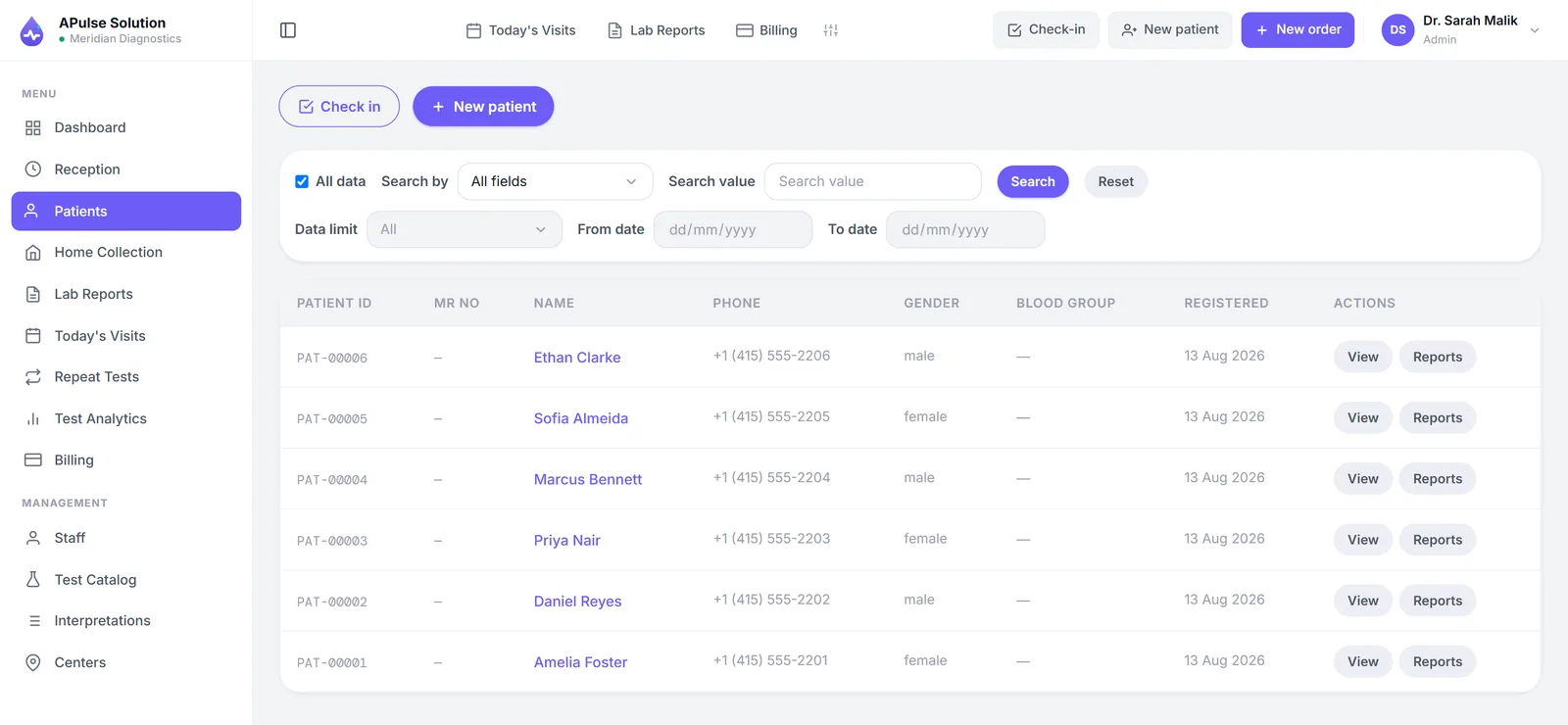
One record per patient, forever
In most labs a patient doesn't have a record — they have entries. A line in the 2023 register, a receipt in a drawer, a photocopy of a report that left with the patient. When they return, nobody connects the visits, so the lab starts again with a blank form and a fresh serial number.
A Pulse Solution turns that around. The first registration creates the patient's permanent record with an auto-generated MRN, and everything that happens afterwards — every visit, lab order, invoice and PDF report — attaches to that same record. The front-desk mechanics live on the patient registration page; what matters here is what registration leaves behind: one file that grows with the patient. A returning patient never fills the same form twice, and the numbering never collides or skips.
Found in seconds, not filing cabinets
Search by patient, doctor or reference, and the record surfaces while the caller is still on the line. Reception confirming whether a report is ready, a technician checking what was ordered, the owner tracing last month's invoice — it is the same search box for all of them, and because APulse runs in the browser, the answer is the same on the front-desk PC, a tablet in the sampling room or a phone. Every report the lab has ever issued stays available online, not in a cupboard.
The end of duplicate files
Duplicates start when finding the old record is slower than opening a new one. When search takes seconds, reception looks first and registers only genuinely new patients — so a history stays in one record instead of splitting into three part-files under three spellings of the same name.
History that means something
A single result says where the patient is; a history says where they are heading. Because every order sits on the same record, APulse can place today's values beside the patient's previous ones in a comparison report on every plan — a fasting glucose that has crept upward across three visits tells the doctor something no single reading can.
Every result is entered against pre-set, gender-specific reference ranges, abnormal values are flagged automatically, and the finished report is a branded PDF under the lab's own name and logo — detailed or short view, previewed, printed or downloaded. The record makes the report trustworthy; the report makes the record useful.
Private by architecture
A record this complete is worth protecting, and in the wider lab management software the protection is part of how the system is built, not a setting someone has to remember to switch on.
- Each lab's data lives in its own isolated database schema — never mixed with another lab's
- Connections are encrypted with TLS; backups are encrypted on a rolling ~30-day window
- Role-based access — admin, reception, technician and doctor each see what the job needs
- Per-user permission overrides on Medium and Premium plans — see pricing
- Your lab owns its data — the security page explains the details
- Existing records move in with you: migration from Excel or another system is a small one-time cost on any plan
Create your demo workspace now — every feature unlocked, up to 10 patients, no card — or read how the free demo works first.
Frequently Asked Questions
How does APulse organise patient records?
Around one permanent record per patient. The first registration creates the record with an auto-generated MRN, and every later visit, lab order, invoice and report attaches to it — so the full history lives in one place instead of across register books and folders.
How do I find a returning patient without creating a duplicate?
Search by patient, doctor or reference and the existing record surfaces in seconds. Reception looks first and registers only genuinely new patients, so a returning patient never fills the same form twice and duplicate files don't build up.
Can I compare a patient's new results with previous ones?
Yes — previous-result comparison reports on every plan place today's values beside earlier ones, so trends are visible at a glance. On every plan, results are entered against gender-specific reference ranges and abnormal values are flagged automatically.
Who at the lab can see patient data?
Access is role-based: admin, reception, technician and doctor roles each see what the job needs, so reception handles registration without browsing results. Medium and Premium plans add per-user permission overrides for finer control.
Do patients log in to view their own records?
There is no portal to log into, and patients never create an account — but they do not have to wait for staff either. On every plan the billing slip carries a QR code; scanning it opens that patient's own report online for 30 days. Reports are also branded PDFs your lab prints, downloads and shares, for example on WhatsApp. Report links can also go out by WhatsApp or SMS automatically, on every plan, once the lab connects its own WhatsApp Business or SMS gateway account.
Who owns the patient data?
Your lab does. Each lab's records live in their own isolated database schema, never mixed with another lab's, connections are encrypted, and backups are kept encrypted on a rolling ~30-day window. If you need anything done with your data, our team is a WhatsApp message away, 7 days a week.
Further reading
Background reading on how this software category works — written to inform, not to sell.
Ready to Get Started?
Create your free demo lab in seconds — every feature, 10 patients, no credit card. Or ask us for a quote and we'll set everything up for you.