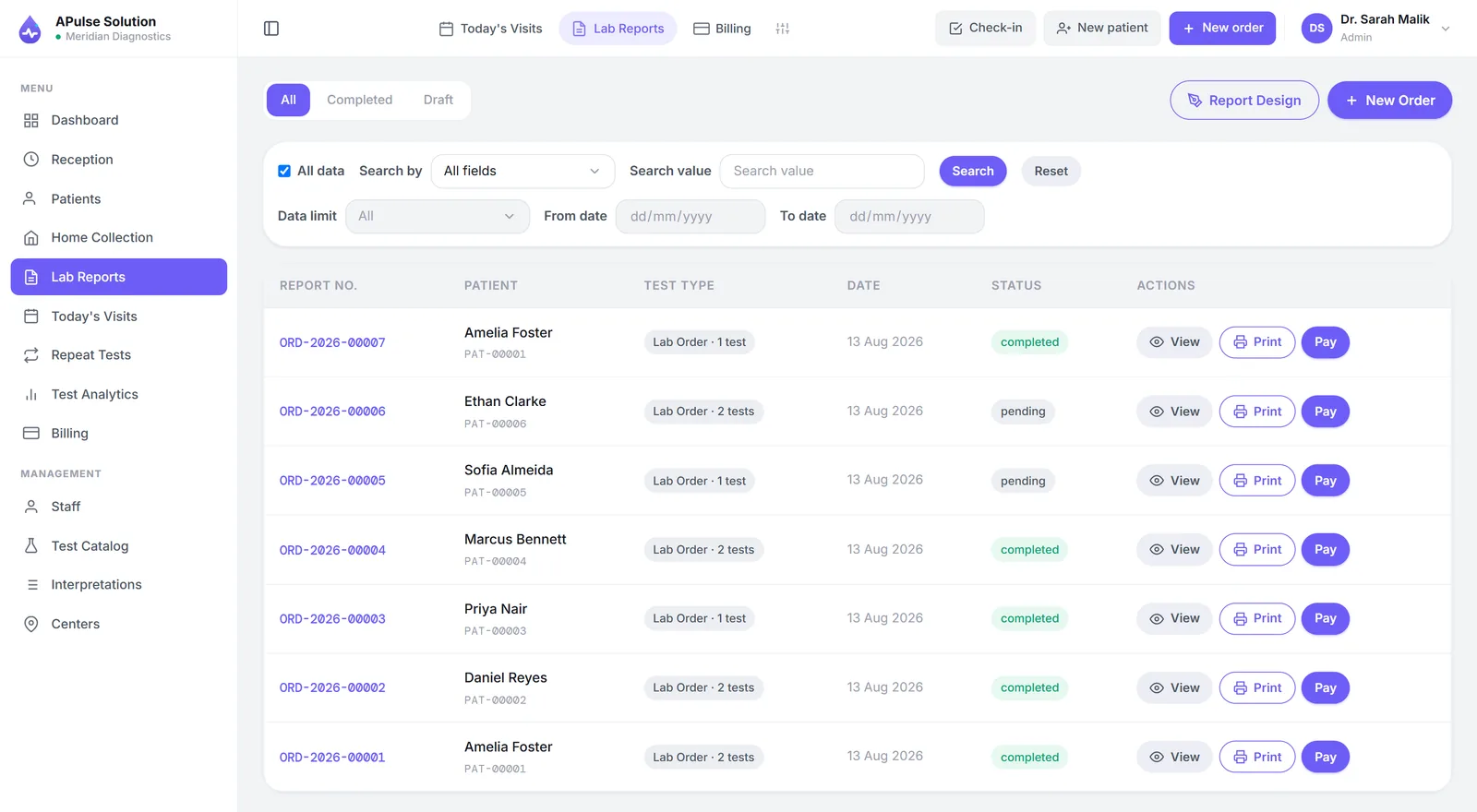
A lab that keeps patients in one register and money in another is not running two records. It is running two systems that never quite agree, and it is paying someone — usually the owner — to referee the disagreement every evening.
The symptom is familiar: a cash total that does not match the day's entries, and no way to tell whether the difference is a test performed for free, a discount nobody wrote down, or an arithmetic slip. The cause is structural. Two books, kept by different people at different moments, with no shared identifier between them, cannot be reconciled except by hand.
This article is about what integration actually replaces — not the feature list, but the specific failures that come from separation. Some of it applies just as much to a lab running Excel for patients and a cash book for money, which is the same problem with better handwriting. We build A Pulse Solution, which puts both halves in one entry, so read the specifics as one implementation of the idea.
Why the Two Belong in One System
Separate tools fail in four predictable ways, and none of them is a matter of staff being careless.
Work performed with no invoice. A test gets added verbally after registration, or run as a favour, and there is no document anywhere saying money was owed. This is the most expensive failure and the hardest to detect, because the evidence is something that does not exist.
A discount with no record. Agreed at the counter, written in a margin or not at all. Individually defensible; in aggregate, an amount most owners have never seen totalled.
A receipt with no matching patient entry, or the reverse. Each book is internally consistent and they disagree with each other, and resolving that means reading handwriting.
Double data entry. The same name, age and phone typed into two places, doubling both the work and the chances of a spelling difference that makes the two records impossible to match later.
There is a fifth cost that is quieter than the rest. When each visit is a fresh slip, repeat patients have no history — so the lab cannot answer clinical questions about its own regulars and cannot see, commercially, who its regulars even are.
What the Patient Side Should Cover
Four requirements, and the first one carries the rest:
- A permanent medical record number issued at first registration, not a serial number per visit. This is the shared identifier that makes everything else reconcilable.
- Demographics captured once and reused on every later visit, invoice and report header.
- History retrievable by record number, name or phone, fast enough to use while the patient is at the counter.
- The referral source recorded at registration, because a doctor's name that was not captured at the moment of the visit cannot be reconstructed accurately a month later.
More on this side in how lab software improves patient management.
What the Billing Side Should Cover
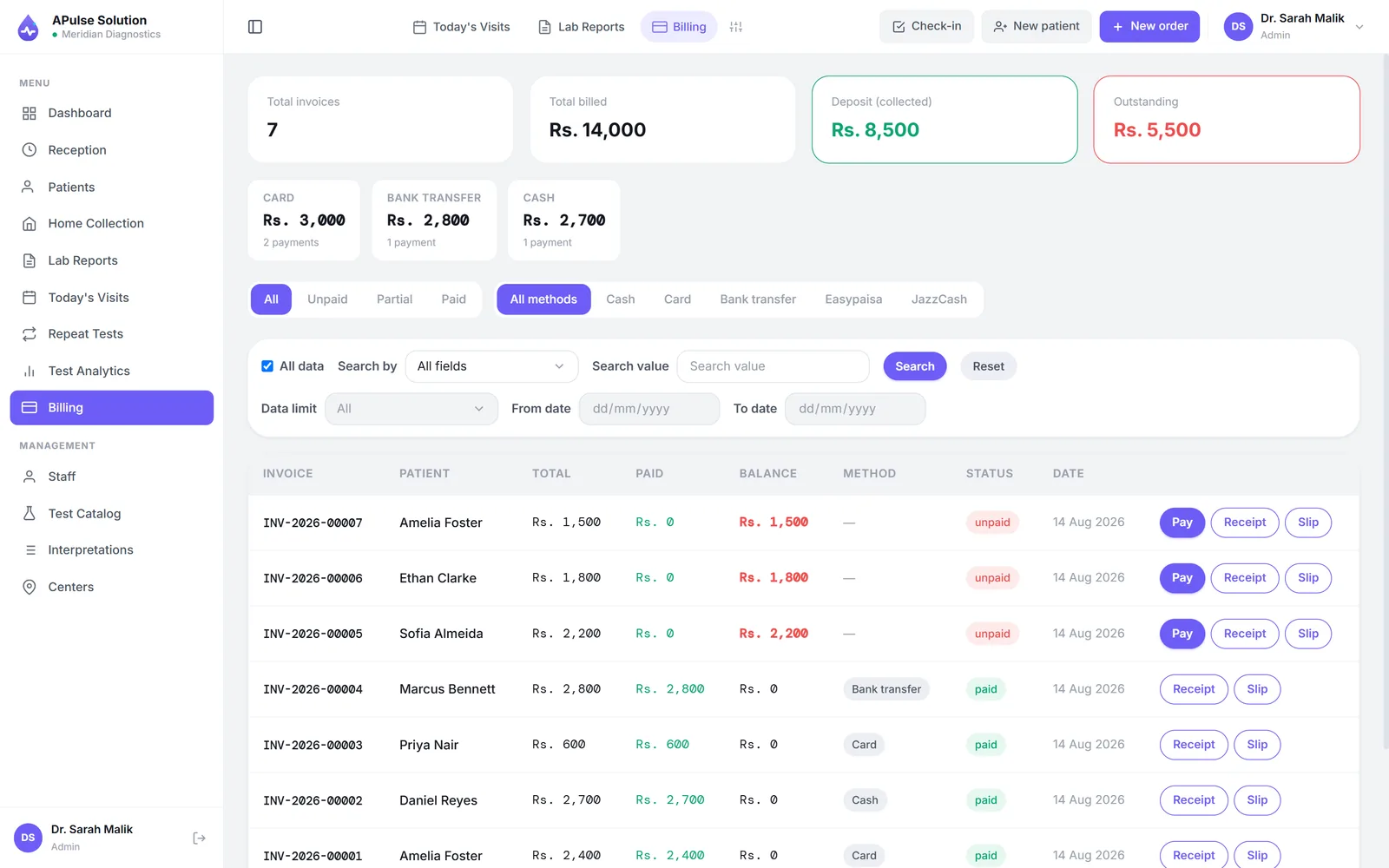
- The invoice raised at registration, before sampling — not reconstructed when the report is collected.
- One maintained rate list as the single source of prices, with discounts recorded per invoice rather than agreed verbally.
- Dues and partial payments tracked against the patient, so an outstanding balance is a queryable fact rather than something the receptionist remembers.
- Day-end totals for any date range that a manager can compare against the cash drawer without opening a second book.
More on this side in how lab billing software reduces manual work.
How the Two Work Together in Practice
Integration is not two modules that exchange data. It is one entry that both halves read from.
At the counter, registering the patient and ordering the tests raises the invoice, populates the technician's worklist, and fixes the report header — all from the same keystrokes. The patient's name is typed once and appears in four places because they are views of one record, not copies of it.
Downstream, results attach to the same record number, so no one retypes the header onto a report. Where a lab wants it, report release can be held until dues are cleared — a policy decision the system can enforce, which is only possible because it knows both the balance and the report.
And referral commissions compute themselves from real invoices, because the doctor was captured at registration and the money was captured on the same record. In A Pulse Solution that is a Premium feature: per-doctor routine and special share percentages, per-doctor test prices, and a printable daily, weekly or monthly share report. The point is not the arithmetic. It is that both sides read the same document at settlement, which is what stops a monthly conversation from becoming a monthly argument.
Signs Your Current Setup Is Costing You Money
Four diagnostics you can run this week, without buying anything:
- Take yesterday's worklist and match every test to a payment. Anything on the bench that is not in the cash count was work you gave away. Do it for one ordinary day, not a quiet one.
- Ask what last Tuesday's billing was. If the answer takes more than a minute, you do not have a reporting problem — you have a record-keeping problem, and every management question you might want to ask is behind the same wall.
- Total the month's discounts. Most labs running on paper cannot, which means the figure is unmanaged rather than small.
- Compare your referral tally with a referring doctor's own count for the same month. If the two disagree, the relationship is being maintained on goodwill rather than on evidence, and goodwill is a depreciating asset.
Any one of these coming back badly is worth more than a feature comparison, because it is your own lab's number rather than a vendor's claim.
Questions to Ask Before Choosing Integrated Lab Software
- Is billing genuinely part of registration, or a separate screen someone opens afterwards? Watch it done live before believing the answer — this is the one claim that looks identical in every brochure.
- Cloud or installed? A browser-based system means the owner can see the day's billing from home or from a second branch; an install ties the lab to one machine and makes backups your own discipline. We compare the models in cloud vs desktop lab software.
- Who can change a price, and who can approve a discount? Role-based limits turn discounting from a habit into a decision.
- Which tier holds what? In our plans, registration, billing, results and reports are core; inventory, analytics and referral commissions start at Medium; multi-branch, report verification and per-doctor prices are Premium. Every vendor tiers differently, so map your next two years before signing.
- Support: which channel, which days, which language, and who answers? Labs work weekends. Test the channel with a real question before you pay.
- Pricing in writing, with the first-year total. We quote in writing for your lab's report volume, staff and branches before you commit — ask for a quote. The plans page has what each plan includes.
What Integration Will Not Do For You
Two honest limits.
It cannot see a patient who was never entered. An off-system walk-in handled as a favour is invisible to every report in this article, which makes "everyone gets entered" a management rule rather than a software feature — and the single thing that determines whether your numbers become trustworthy.
And it will not decide your pricing or your discount policy. It will record both faithfully and show you the total, which is frequently the first genuinely surprising number a lab sees after switching. What to do about that number is still your call.
If you want to watch registration, billing and reporting run as one entry on your own test menu, the free demo opens in the browser for 7 days with up to 10 patients.
Frequently Asked Questions
What is integrated laboratory billing and patient management software? One system where registering a patient and raising their invoice are the same action, so patient records, tests, results and money share a single identifier. The alternative is separate books — or separate software — that have to be reconciled by hand.
Can I keep using my existing accounting software? Usually yes, for the accounts side. What matters is that the lab's own record of who was billed for what lives with the patient record rather than in a second book. Most labs export totals to their accountant rather than trying to make one system do both jobs.
Does integration mean I can stop keeping a cash book? Eventually, and not on day one. Run both briefly, compare the drawer against the system's total each evening, and set an end date in advance. The cash book becomes redundant when the two agree consistently, which mostly depends on whether every patient is being entered.
Can the system stop a report being released when payment is outstanding? It can, where the lab wants that policy — it is one of the practical benefits of the two halves sharing a record. Whether to enforce it is a business decision, and plenty of labs choose not to.
Which plan do I need for referral commission tracking? In A Pulse Solution, Medium or Premium. The referring doctor is captured at registration on every plan; the automatic share calculation and the printable share report arrive with Medium.
How long does it take to switch from two registers to one system? The software setup is quick. Entering your test menu, prices and reference ranges is the real work and scales with the size of your menu, and a short parallel run afterwards is worth planning for. How to digitize a medical laboratory sets out the sequence.