A woman comes to the counter and says she had a thyroid test here about two months ago, and her doctor wants it repeated. In a paper lab, what happens next is a decision the receptionist makes under pressure: spend three or four minutes going back through the register looking for her, or register her again as a new patient and get the queue moving.
Almost everyone chooses the queue. That choice, repeated, is why paper labs end up holding two or three fragmentary histories for their most loyal patients — and why "do you have my old report?" is such an uncomfortable question to be asked.
Patient management in a laboratory is mostly about making the first option faster than the second. Everything else follows from that. We build patient management into A Pulse Solution, so the examples below are ours; the principles are not proprietary.
What Patient Management Means Inside a Lab
It is worth scoping this honestly, because the phrase is borrowed from hospital software where it means something much larger.
A laboratory's patient management is four things: identity (one person, one record), history (every visit and result under that record), the counter transaction (registration, tests ordered, money taken), and delivery (getting the report to them). It is not appointments across departments, not admissions, not pharmacy, not a clinical record of their treatment. A lab system that claims all of that is either much bigger than you need or much shallower than it sounds.
The data model underneath is simple and worth picturing: one patient, many visits, many results under each visit. Paper inverts this — the visit is the primary object, written into a register in date order, and the patient is just a name that appears repeatedly. That inversion is the source of nearly every problem in this article.
One Patient, One Record Number
At first registration the patient is issued a medical record number, and it never changes. Every subsequent visit, result, report and invoice attaches to it.
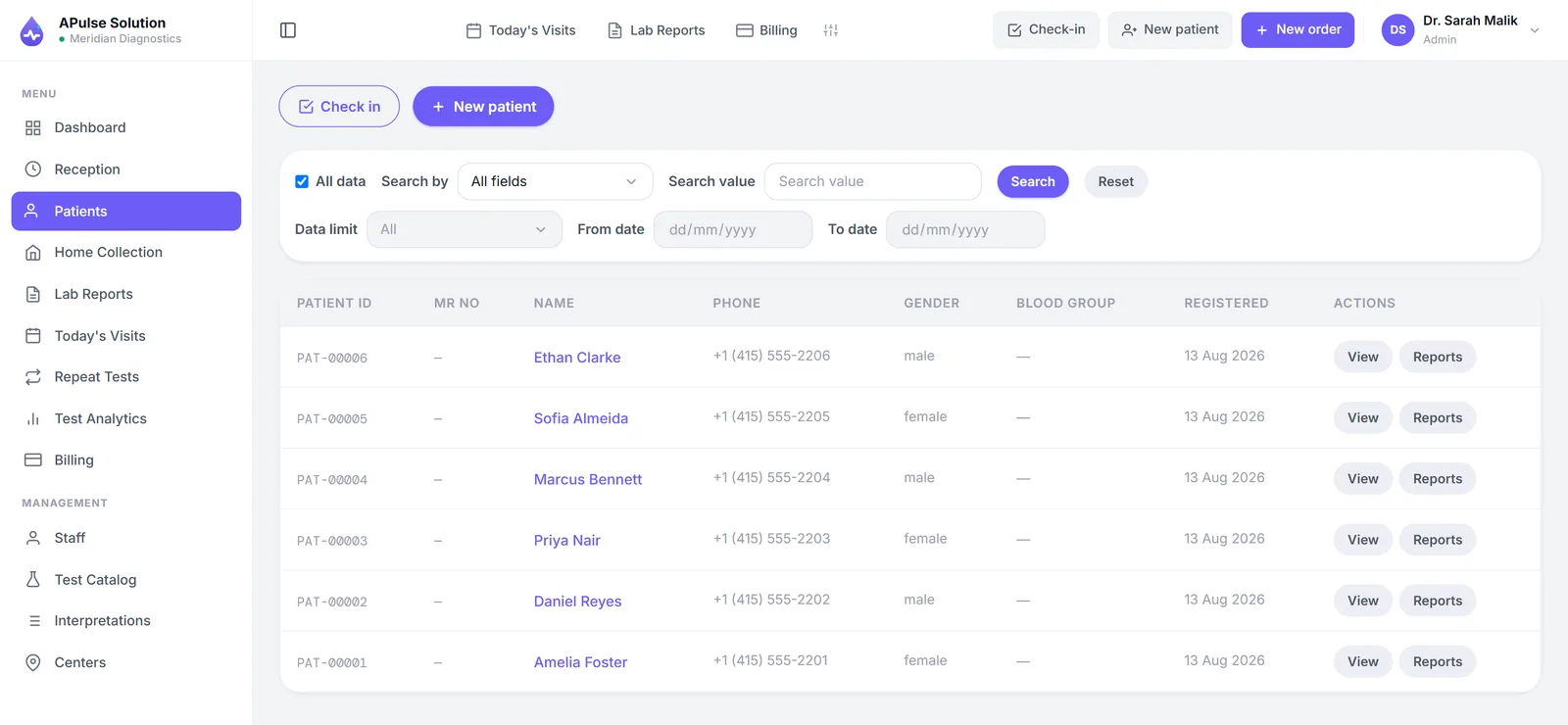
What duplicate records actually cost, in order of how much they hurt:
- Split histories. Today's result cannot be compared against a value that is filed under a different identity. The comparison a doctor wants is the thing that was lost.
- Repeated data entry. Name, age, sex and phone typed again, with a fresh chance to misspell them, which then makes the duplicate even harder to find next time.
- Awkward moments with regular patients. Being treated as a stranger by a lab you have used for years is a small thing that patients notice and mention.
The prevention is not a policy telling staff to search first. It is search that is genuinely fast — by name, phone, national ID or record number — so that finding the patient is the path of least resistance. If search is slow, staff will create duplicates no matter what the policy says, and the fault is the software's rather than theirs.
One practical habit worth building at the desk: confirm the phone number out loud at registration, every time. It is the field that identifies returning patients most reliably, and it is also how the report will reach them. Getting it right takes four seconds at the counter and saves considerably more than that later.
Registration and Billing in One Step
Demographics, selected tests, referring doctor and payment all belong to the same counter moment, and capturing them together is what makes the record complete from the start.
The alternative — register now, bill at collection — creates a gap that money falls through, and a record that has to be reconstructed later from memory. Tests get performed for people who never return, discounts get agreed and then forgotten, and the referring doctor's name is remembered only if someone happens to write it down.
Capturing the referral at registration is what makes commission tracking possible at all without a parallel notebook. We have covered the billing side of this in detail in how lab billing software reduces manual work.
History That Is Actually Usable
A patient database earns its cost the moment somebody asks a question that paper cannot answer quickly.
At the counter, while the patient is standing there. Previous visits and results are retrievable in seconds — which turns "come back tomorrow, I'll look for it" into a reprint issued immediately. Reprints are one of the most common counter requests in any lab, and one of the most disproportionately expensive to service on paper.
At the bench, clinically. A technician or pathologist can see the same patient's earlier values rather than only the reference range. A result inside the normal range can still be a significant change for that individual, and it is invisible without their history. Previous-result comparison reports — earlier dated results printed beside today's on one page — are on every plan in ours, and they exist because the trend is often the finding.
For the lab commercially. Repeat-test tracking lists patients who test with you regularly along with a next-due date. Chronic patients on monthly monitoring are a substantial and predictable part of most labs' work, and they are effectively invisible in a register.
Results, Reference Ranges and Flagging
Patient management and result accuracy meet at the point where a value is typed in.
Each value is checked against that test's stored range for that patient's sex as it is entered, and out-of-range results are highlighted immediately rather than noticed later. Qualitative tests use dropdown values rather than free text, so your reports do not contain four different spellings of the same finding.
Being straightforward about the limits: by default, entry is manual. The technician reads the analyser and types the values. Analyser interfacing can be switched on for your account on request, on any plan, but connecting the machine is part of setup and depends on the analyser — it is never plug and play. Without it, at small-lab volume that is a normal arrangement rather than a shortcoming — but it does mean the checking step is what protects the patient from a transposed digit, which is why the approval step before release exists and why it should not be treated as a formality. There is more on this in how to reduce manual errors in lab reporting.
The output is a branded PDF report with your logo, colours and contact details, laid out identically for every patient every time.
Getting the Report to the Patient Without a Second Visit
The last mile of patient management is delivery, and in Pakistan it has settled on one answer: the lab shares the PDF with the patient, most commonly over WhatsApp, to the number captured at registration.
Being precise, because sales language blurs this: there is no patient portal and no automated pipeline. The patient creates no account and remembers no password. Delivery happens one of two ways: a staff member sends the file, or the patient scans the QR code on their billing slip and opens their own report online, which works for 30 days and is on every plan. The system can also send the report link by WhatsApp or SMS on approval, on every plan, once the lab connects its own WhatsApp Business or SMS gateway account.
That simplicity suits how most labs here operate, and it suits patients better than a login they would use twice a year. Printed copies stay available at the counter for anyone who prefers paper — the two coexist in every real lab. The practical rules that keep it safe are short: send only to the confirmed number, be deliberate about shared family phones on sensitive tests, and keep the master copy in the system rather than as loose files on a desktop. How to send lab reports on WhatsApp covers the procedure properly.
What This Looks Like at the Counter
An illustrative sketch rather than a case study — the same returning patient, both ways.
On paper. She gives her name. The receptionist asks when she last visited, opens the register at roughly that date, scans two pages, does not find her, apologises, and registers her fresh. Her details are written again. Her old thyroid value is somewhere in the building but not in this conversation, so the doctor will compare today's number against nothing.
On a system. The receptionist types her phone number. Her record appears with her previous visit and result. The new test is ordered under the same record number, the invoice is raised in the same action, and the earlier value is available to whoever reviews today's result. The exchange is shorter, and the clinical picture is better.
Neither version requires better staff. They require different tools.
Frequently Asked Questions
What is a medical record number and why does it matter? A permanent identifier issued at first registration and reused for every later visit. It is what turns a pile of individual visits into a patient history, and it is the one thing a register cannot provide, since registers are organised by date rather than by person.
Can lab software stop duplicate patient records? It can make duplicates avoidable by making search faster than re-registration — by name, phone, national ID or record number. It cannot force staff to search, which is why fast search matters more than any policy about it.
Is this the same as a hospital management system? No. Lab patient management covers identity, visit history, the counter transaction and report delivery. Admissions, wards, pharmacy and OPD scheduling belong to a hospital system, which is a different product.
Do patients get their own login? Not in A Pulse Solution. The lab shares the PDF report with the patient, usually over WhatsApp. Patient portals exist mainly at large hospital networks, where the volume and repeat-visit pattern justify them.
Can we see a patient's previous results next to today's? Yes, on every plan, as a comparison report with earlier dated results printed beside the current ones. The earlier results are also visible in the patient's record.
How much of our old paper data should we enter? Active patients, the rate list and your referring doctors are worth entering. Years of historical result registers usually are not — keep the paper archive and start clean records from go-live. How to digitize a medical laboratory works through the decision.