The clearest view of what manual billing costs a laboratory is not at nine in the morning. It is at nine at night, with the cash book open, a calculator, and a total that does not match the drawer — hunting through a day's handwriting for the entry that explains the difference.
That evening is produced by the day that preceded it. Work backwards through it and you find the same handful of manual steps repeating a hundred times, each one small enough to feel harmless and collectively large enough to eat an evening and some unknown amount of money.
This article is about where that time and money actually go, and what changes when billing is part of the same entry that registers the patient. We build lab billing software, so treat the product specifics as one worked example rather than as the only way it can be done.
Where Manual Billing Actually Costs Time
The typical paper counter runs on four objects: a rate list taped to the wall or kept in a folder, a receipt book, a patient register, and a cash book. A single patient touches all four.
The repeated micro-tasks are these, and none of them takes long on its own:
- Looking up prices, once per test, from a list that may not be the current one.
- Arithmetic on a multi-test invoice, then again after a discount is agreed.
- Rewriting the patient's details onto the receipt after already writing them in the register.
- Noting the discount somewhere — usually the margin — in a form only the person who wrote it can interpret.
- Recording a partial payment and remembering, personally, that a balance is outstanding.
Multiply by the day's patients and the cost stops being trivial. But the time is the smaller half of the problem. The larger half is that none of those four objects can be reconciled against each other automatically, so any disagreement between them has to be resolved by a person reading handwriting.
The Error Patterns of Handwritten Billing
Four failure modes recur, and they are structural rather than a matter of staff carelessness.
The wrong price, from the wrong copy of the rate list. Prices change. Copies of the rate list do not all change at the same time, and a second copy at a second counter — or a remembered price from before the last revision — quietly undercharges or overcharges for weeks before anyone notices.
Arithmetic slips on compound invoices. Four tests plus a percentage discount is exactly the kind of sum that goes wrong occasionally, under time pressure, in front of a waiting patient.
"Pay when you collect the report." A reasonable accommodation that becomes a permanent loss when the patient collects on WhatsApp, or does not collect at all. Nothing in a paper system chases it, because nothing in a paper system knows it is outstanding.
Tests performed but never billed at all. The most expensive pattern and the hardest to see, because the evidence is an absence. Something was run as a favour, or added verbally after registration, and no document was created that says money was owed.
Notice what these have in common: they are not caught by working harder. They are caught by having one record instead of four.
Billing at Registration: One Entry Instead of Three
The core change is a sequencing decision. The patient is registered, the tests are selected, and the invoice is generated in the same action, before sampling — not reconstructed at report collection.
That single step does several things at once:
The price comes from the catalogue, not from memory. There is one rate list, it is the one in the system, and changing it changes what every counter charges from that moment. The second stale copy on the wall stops being authoritative.
The arithmetic is done by the system, including discounts, so a compound invoice is not a mental exercise performed in front of a queue.
The discount is recorded on the invoice, with the visit, permanently, visible to whoever looks at it later. It stops living in the receptionist's head.
Dues become facts rather than memories. Partial payments and outstanding balances attach to the patient's record, so recovery is a list to work through rather than a recollection.
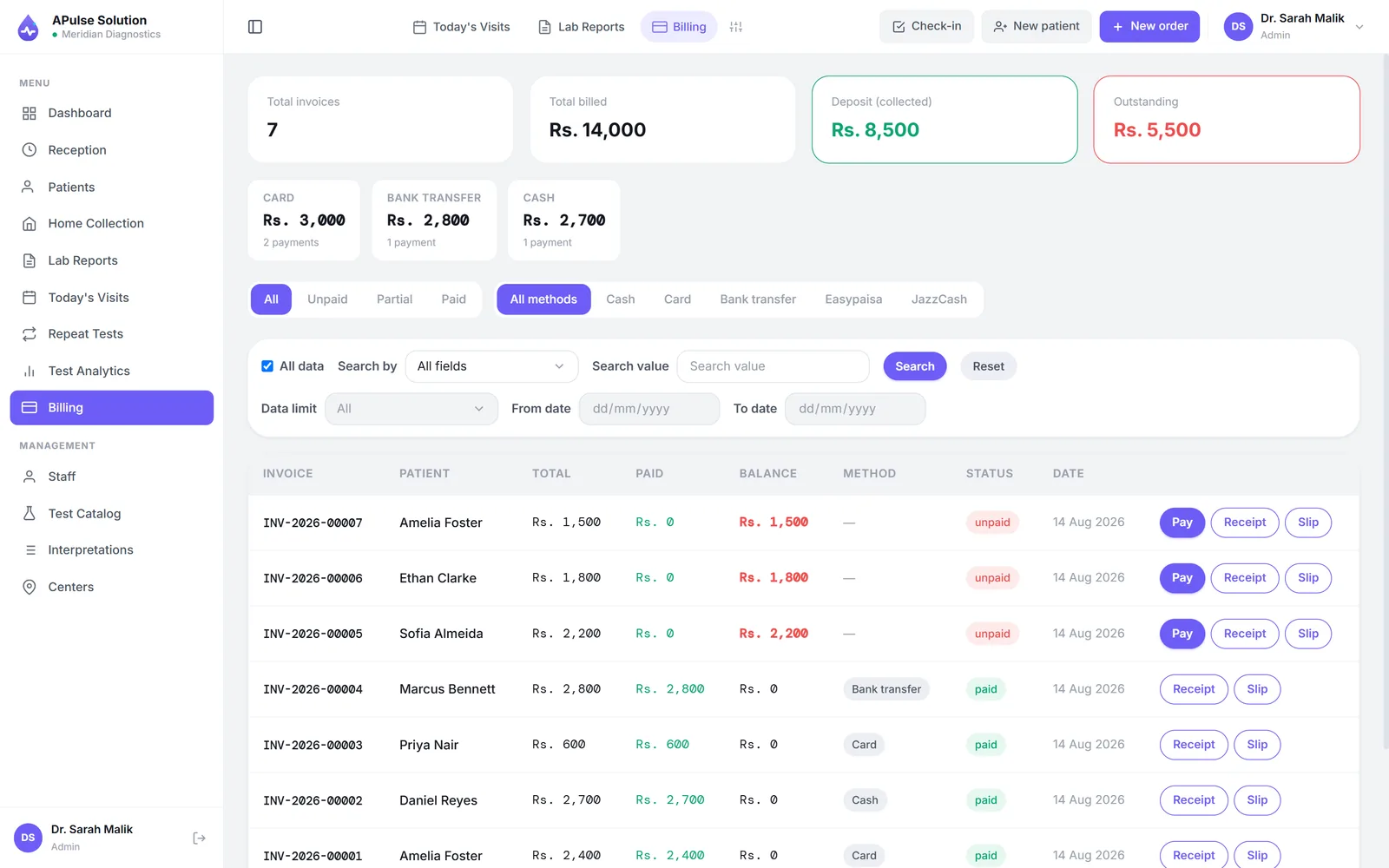
And the entry is reused rather than repeated. The same registration feeds the technician's worklist, the result entry screen, the report header and the day's totals. The patient's name is typed once and appears everywhere it is needed, which is the actual mechanism behind almost every time saving in this article.
End-of-Day Closing Without the Calculator
The evening described at the top of this article becomes a comparison rather than an investigation.
The day's billed, collected and outstanding amounts are a report — for today, this week, this month or any date range you ask for. Reconciliation is then one question: does the cash in the drawer match the number on the screen? A difference surfaces the same evening, while the day is still remembered by the people who worked it, rather than at month end when it has become an unsolvable mystery.
Because the system runs in a browser, the owner can look at that number without being in the building — which changes the relationship between owner and counter more than any single feature on a pricing page. Information stops arriving second-hand.
Where the Billing Data Goes Next
Once billing is structured, other things stop requiring their own paperwork.
Doctor referral commissions. The referring doctor is tagged on the invoice at registration, so the month's share is computed from the actual billing record rather than reconstructed from a register — or from a notebook that only one party maintains. In our plans this is a Premium feature, with routine and special share percentages per doctor and a printable daily, weekly or monthly share report. The commercially important part is not the arithmetic but that both sides read the same document at settlement, which is what keeps the arrangement comfortable. We have written that up in how labs calculate doctor referral commissions.
Revenue by test and by day. Which tests actually carry the lab, how discounting is trending, what a slow week looked like. Available from Medium upward, and the honest note is that this matters in year two more than in month one.
Stock consumption against tests performed (Medium and above), so reagent reordering is driven by usage rather than by discovering an empty box.
What Billing Software Will Not Fix
Three limits worth stating plainly, because a rollout that expects otherwise disappoints.
It only knows about patients who were entered. If a walk-in is handled off-system as a favour, the system is blind to it. Discipline about entering every patient is a management decision, not a software feature, and it is the single biggest determinant of whether the numbers become trustworthy.
Staff need training and a short parallel run. The most common rollout mistake is switching the register off on day one. Run both for a fixed, pre-announced period — compare the cash total against the system total each evening — and set the end date in advance, or the parallel run never ends and you have two systems forever.
Pricing strategy, discount policy and recovery of old dues stay human. The software will record a discount faithfully and tell you exactly how much you gave away. Deciding whether to give it is still your job.
How to Evaluate Laboratory Billing Software
A checklist rather than a ranking. Every item should be a yes:
- Billing tied to registration, not a separate module someone opens afterwards.
- A rate list your own staff can edit, with a clear answer about who is allowed to change a price.
- Discount controls — recorded on the invoice, and ideally restricted by role so any discount is a decision rather than a habit.
- Dues and partial payments tracked against the patient, with a way to list what is outstanding.
- Day-end reports for any date range, without exporting to a spreadsheet first.
- Browser-based access, so the owner is not tied to one PC in the lab.
- Support on a channel your staff already use, on the days you actually work — including weekends, because labs do.
Then test the three things that reveal the rest: load your own rate list during the demo, apply a discount and watch the day's total update, and ask what happens to an invoice when a test is added after registration.
If you want to try it against your own counter, the free demo runs for 7 days with up to 10 patients — enough to register, bill, discount and reconcile a real morning's work. Our plans page shows what each plan includes, and we quote in writing for your lab's size so you can budget before you commit.
Frequently Asked Questions
What does laboratory billing software actually do? It raises the invoice as part of registration, prices tests from your own catalogue, records discounts and partial payments against the visit, tracks outstanding dues, and produces day-end totals for reconciliation — so the day's money is a report rather than an evening of arithmetic.
Can it stop tests being performed without payment? It can make it visible rather than impossible. Every test ordered generates an invoice line, so unbilled work shows up as a due rather than disappearing. Some labs also hold report release until dues are cleared. What the software cannot do is see a patient who was never entered.
Do I still need a cash book? Most labs keep one for a while, and a short parallel run is a good idea. The point at which it becomes redundant is when the system's total and the drawer agree consistently — usually within a few weeks, if every patient is being entered.
How are discounts handled? Recorded on the invoice itself with the visit, so they are visible later and countable in aggregate. That aggregate is often the first genuinely surprising number a lab sees after switching.
Does billing software handle doctor commissions? It provides the data. In A Pulse Solution the referring doctor is captured at registration and commission tracking is a Medium-and-above feature that computes shares from real invoices. Whether your vendor includes it, and in which tier, is worth confirming before you buy.
How long does it take staff to get comfortable? Reception is the role to train first and the one that adapts fastest, because registration is a sequence they already perform — it just moves from paper to a screen. Plan for a short parallel period rather than a hard cutover, and expect the first busy morning to be the real test.