Laboratory Management System
Centralize your laboratory operations with software designed to simplify patient management, laboratory workflows, reporting, billing, and branch operations — the owner's view of the whole lab, without standing at the counter.
Managing the laboratory, not just the tests
There are two jobs inside every lab. One is producing results — registration, orders, result entry, the printed report — the patient journey we walk through on the lab management system page. The other is running the place: staffing the counter, keeping reagents in stock, settling with referring doctors, knowing what today earned. Registers can just about carry the first job. They are nearly useless for the second, because everything a manager needs is scattered across receipt books, worksheets and memory.
A Pulse Solution keeps both jobs in one system. It runs in the browser on any computer, tablet or phone, with nothing to install, so the manager's view travels with the manager — check the day from the lab, from home, or from the road.
Every role sees exactly what it needs
Staff accounts come with roles: admin, reception, technician and doctor. Reception works the registration screen and today's visit queue and raises invoices; technicians work the worksheet and result entry. The counter does not need to edit results, and the bench does not need to see money — and because access is role-based, neither can. That separation is what makes the records trustworthy.
When your lab is not textbook
On Medium and Premium plans, per-user permission overrides handle the exceptions — the senior technician who also approves stock requests, the branch manager who needs the revenue view. Roles set the default; overrides fit the people you actually have.
Stock, worksheets and the daily rhythm
The technician worksheet is printed from the system, with customizable columns per test and a CSV export — so the list on the bench is the same list the software is tracking, not a parallel version in someone's handwriting. Home collections (Medium and Premium) run on the same principle: each booking moves from pending to scheduled to collected, and you can see which visits are stuck without waiting for the patient to ring.
On Medium and Premium plans, stock and inventory joins the rhythm: staff raise requests for reagents and consumables, and the person accountable approves them, so usage becomes a record instead of a conversation. Much of the rest of the day runs itself — invoices raised at registration, abnormal results flagged on entry — the quiet housekeeping described on the lab automation page.
The manager's dashboard
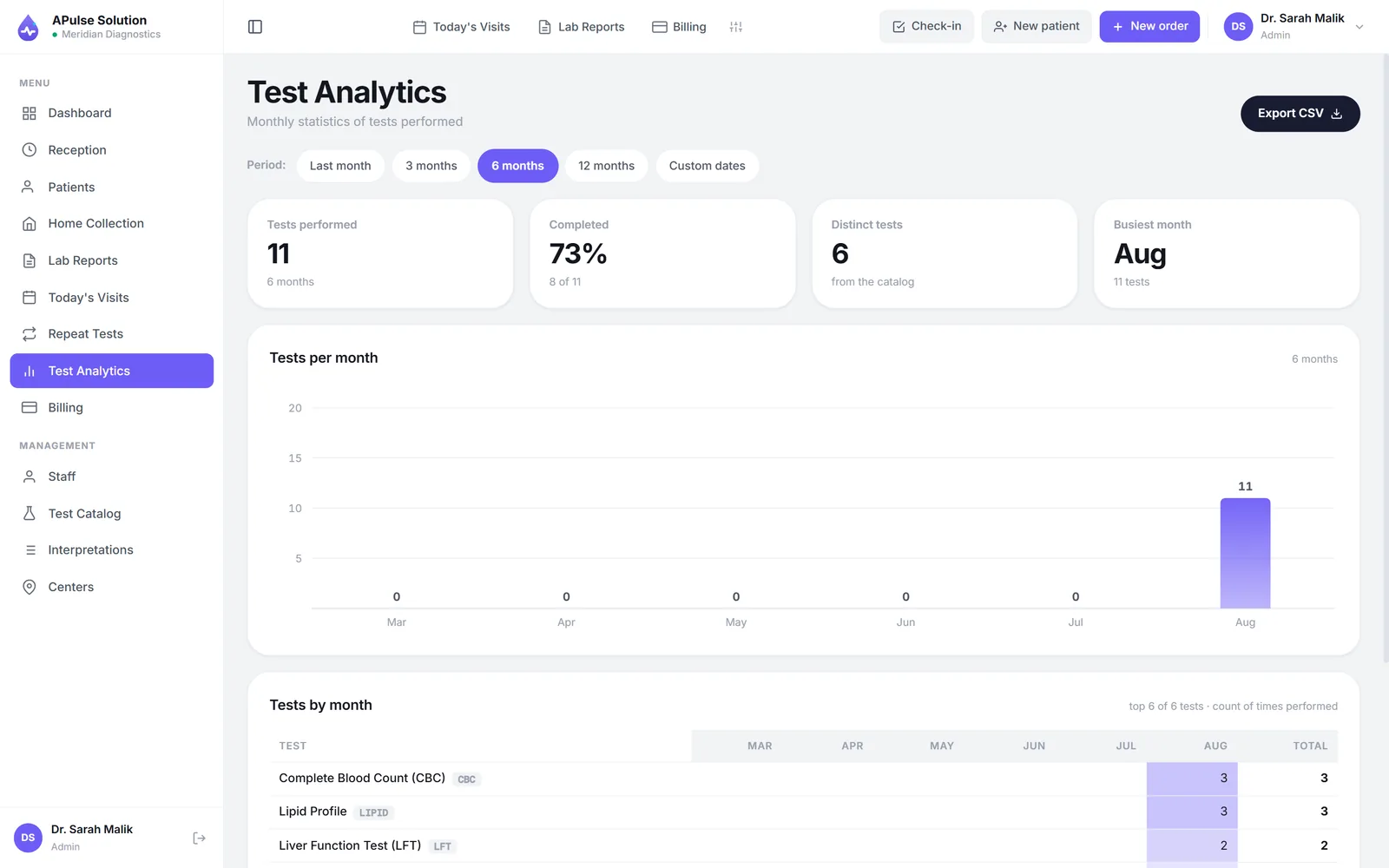
Every plan shows today's revenue as it happens and closes the day with a daily summary, built on the same disciplined billing and invoicing that raised each invoice at registration. Medium and Premium plans add the full analytics dashboard — revenue trends over weeks and months, test status over time — so a growing backlog shows up in a chart before it shows up as complaints. The same plans also track doctor referral commissions against each invoice, so every doctor's share is on the record long before settlement day.
And when a number looks odd, you are one search away from the paperwork — reports can be found by patient, doctor or reference in seconds.
One system across branches
The Premium plan extends the same view across locations. Patients, orders and invoices are tagged to their branch, up to 5 branches and collection centres are included (more on request), and one account sees the whole network — a slow Tuesday at one branch and a record day at another, side by side, without ringing anyone at closing time. The details live on the multi-branch lab software page.
- Staff roles on every plan; per-user overrides on Medium and Premium
- Printable technician worksheet with CSV export
- Stock and inventory with request approvals on Medium and Premium
- Daily revenue summary everywhere; full analytics on Medium and Premium
- Up to 5 branches and collection centres and 25 staff accounts on Premium, more on request — see pricing
Open a free demo lab — every feature unlocked, up to 10 patients, no card — or browse the full feature list to see what each plan includes.
Frequently Asked Questions
What is the difference between managing tests and managing a laboratory?
Test management is the patient journey — registration, orders, result entry, the printed report. Managing the laboratory is everything around it: who can do what, whether reagents will last the week, what today earned and how each branch is doing. A Pulse Solution covers both in one system, so the operational picture comes from the same records the bench is already creating.
How do staff roles and permissions work?
Every plan includes roles for admin, reception, technicians and doctors, so each person's screen shows their own work — registration and billing at the counter, worksheets and result entry at the bench. On Medium and Premium plans, per-user permission overrides adjust access for individuals without inventing new roles.
Where do the records a PHC inspection asks for live?
In the same system, on every plan including Basic. Quality control with Levey-Jennings charts and Westgard multirules, the equipment log book with next-due dates derived from the service history, versioned SOPs acknowledged per staff member, incidents, complaints, CAPA, the waste handover manifest, personnel files with council registrations and expiry dates, training, mock drills, the critical value register and the notifiable disease line list — eighteen registers, recorded as the work happens rather than assembled the week before an inspection. It keeps the records the Punjab Healthcare Commission's 37 standards and 118 indicators ask for; passing the inspection is still the laboratory's own work.
Does APulse manage stock and inventory?
Yes — on Medium and Premium plans. Staff raise requests for reagents and consumables, and each request goes through approval, so usage is recorded and accountable rather than remembered. Labs on the Basic plan can start without it and upgrade when stock control starts to matter.
What does the analytics dashboard show?
Every plan shows daily revenue at a glance with a clear end-of-day summary. The full analytics dashboard on Medium and Premium plans adds revenue trends over weeks and months and test status over time, so a slow week or a growing backlog is visible early.
Can I see all my branches in one place?
Yes — the Premium plan tags patients, orders and invoices to their branch and shows the whole network from one account, with up to 5 branches and collection centres and 25 staff accounts (more on request). You can compare locations from anywhere instead of ringing each one at closing time.
Further reading
Background reading on how this software category works — written to inform, not to sell.
Ready to Get Started?
Create your free demo lab in seconds — every feature, 10 patients, no credit card. Or ask us for a quote and we'll set everything up for you.