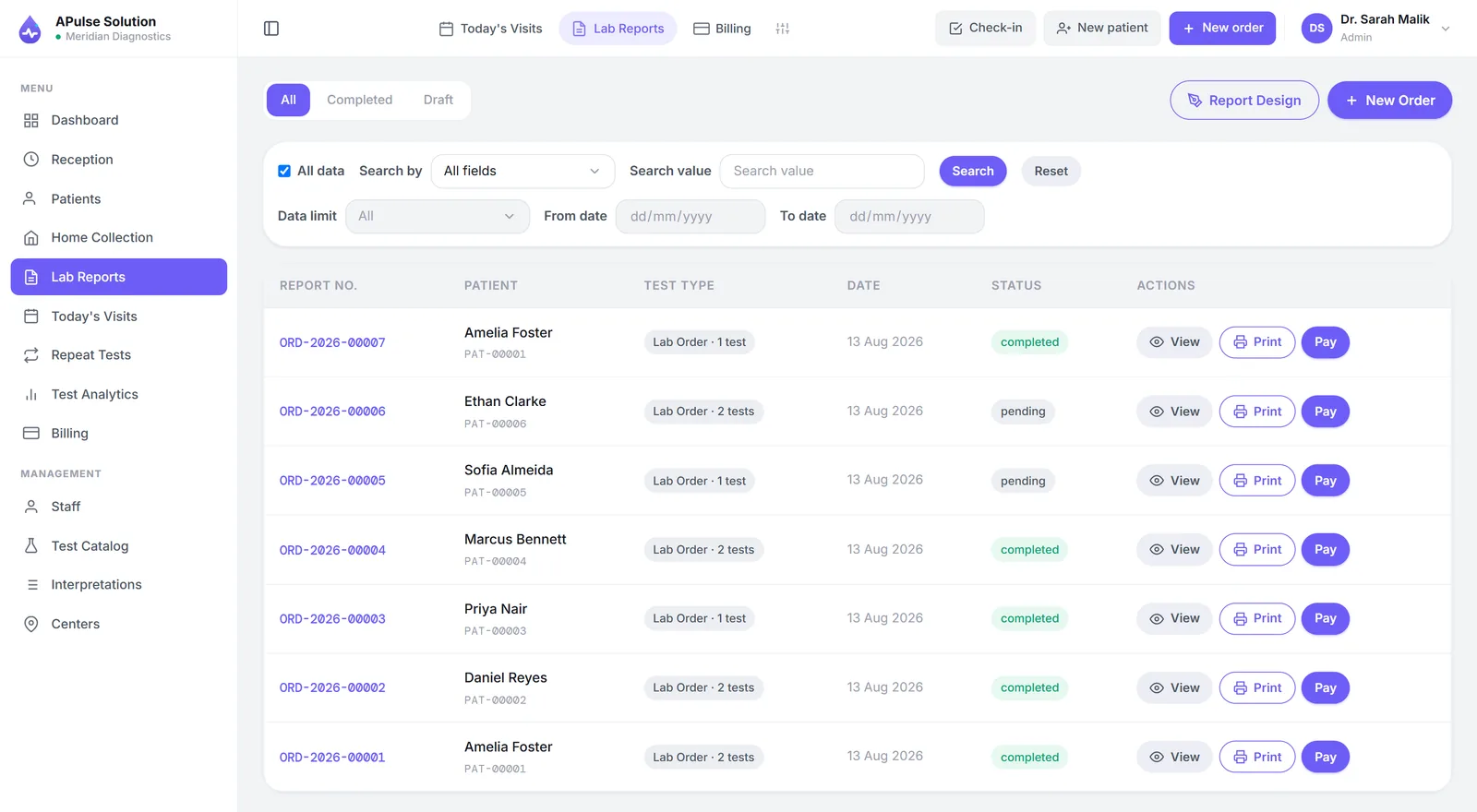
Most explanations of lab management software are feature lists, which tell you what the software has rather than what it does. This one follows a single patient from the front desk to the delivered report, and stops at each point where the software actually intervenes.
One thing to establish before the walkthrough: everything below happens in a browser. There is no server in the back room and nothing that has to be installed on the counter PC, though the app can be installed to the home screen or desktop if a lab prefers that. We build A Pulse Solution that way, and the description that follows is of our own system, so read it as one worked example rather than as a description of every product on the market.
Step 1 — Registration and the Medical Record Number
A patient arrives. Reception types their name, age, sex and phone number once, and the system issues a medical record number — a permanent identifier that will carry every visit, result and invoice this person ever generates at your lab.
That permanence is the whole point, and it is what a per-visit serial number in a register cannot do. On the next visit, reception searches by name, phone, national ID or record number, finds the existing patient in a second or two, and books the new tests under the identity that already holds their history.
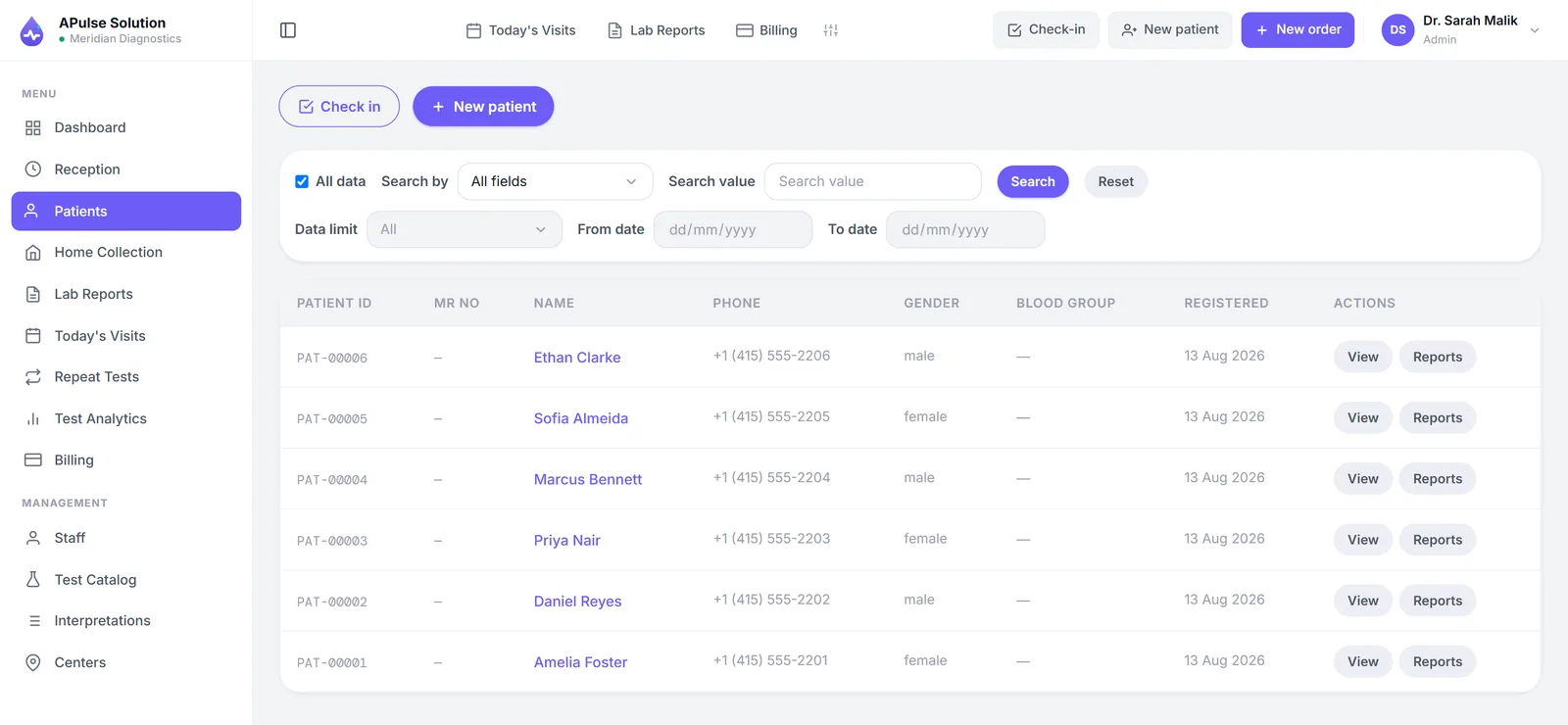
The reason this matters more than it sounds: in a paper lab, finding a returning patient is slower than re-registering them, so under pressure staff re-register them. The lab then holds two half-histories for one person, and neither is the one a doctor asks about.
Tests are chosen from the lab's own catalogue — your test names, your prices, your reference ranges. Ours arrives pre-loaded with around 880 common tests across eight categories, so the setup task is editing and re-pricing rather than typing a menu from nothing. A referring doctor can be recorded on the visit at this point, which is what makes commission tracking possible later without a parallel notebook.
Step 2 — Billing Happens at the Counter, Not at Collection
The invoice is raised in the same action that registered the patient, before the sample is taken. The prices come from the catalogue rather than from a wall chart or somebody's memory, the arithmetic on a multi-test invoice is done by the system, and any discount is recorded on the invoice rather than in the margin of a receipt book.
This single sequencing decision — bill at registration rather than at report collection — is where a surprising amount of leaked revenue is recovered. When billing happens at handover, every test performed for someone who never came back to collect is a test performed for free, and nobody notices because there is no document that says it should have been paid.
Partial payments and dues are recorded against the visit, so an outstanding balance is a fact in the system rather than a thing the receptionist remembers. Thermal slips print on 80mm or 58mm rolls for labs that use them, and a payment receipt is available for those that prefer paper.
Step 3 — The Sample Moves to the Bench
The ordered tests appear on the technician's list. There are no chits to carry, and — this is the part front-desk staff notice first — the counter can see the status of any order without walking to the bench to ask.
A daily technician worksheet can be printed or exported as a CSV for labs that still want paper at the bench, which most do. The software is not trying to remove paper from the bench; it is trying to stop the bench being the only place a fact exists.
Step 4 — Result Entry Against Reference Ranges
The technician reads the analyser's screen or printout and types the values in. Being direct about that: by default this is manual entry. A Pulse Solution can take results off an analyser, but only once analyser interfacing is switched on for your account — on request, on any plan — and the machine has been connected as part of setup, which depends on the analyser. Any vendor offering analyser interfacing as plug and play should be asked for specifics before you believe it.
What the software contributes at this step is structure and vigilance. Each value is checked against that test's stored range for that patient's sex as it is entered, and anything out of range is highlighted immediately.
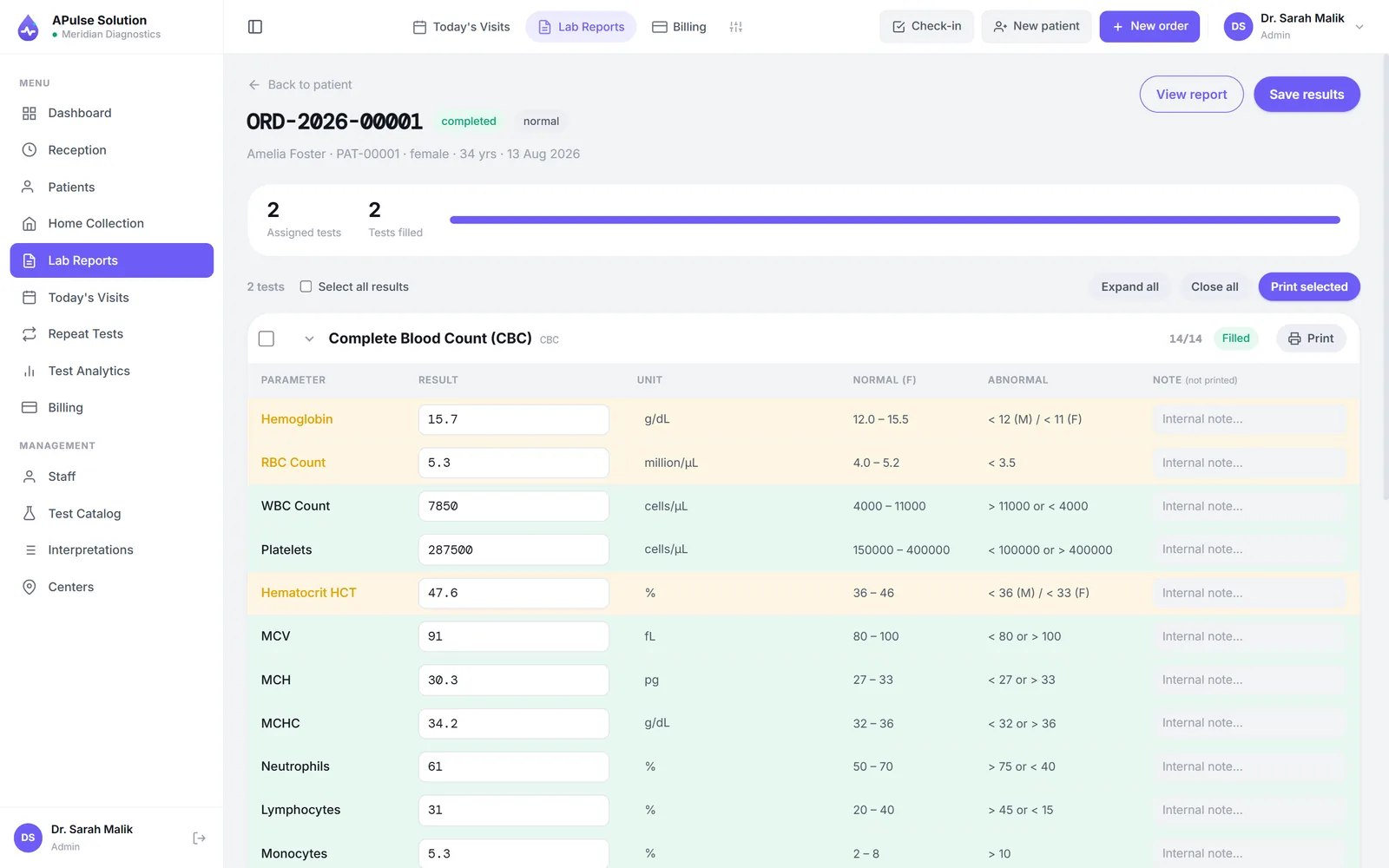
Qualitative tests use dropdown values rather than free text, which removes a whole category of spelling and phrasing inconsistency from your reports. And nothing is released to a patient on one keystroke: results go through an approval step before they can leave the system. That review is short by design — a second look at the flagged and critical values, not a re-reading of every line — because a verification step nobody has time to follow is a verification step that does not happen.
Step 5 — The Report, and How It Reaches the Patient
Once approved, the values are rendered into your report layout: your logo, your colours, your lab name and contact details, each test with its unit and reference range, and clear marks on anything abnormal. Detailed and short views are available for the same result set.
The layout does not vary. Not between the first report of the day and the two-hundredth, not between the senior technician and the newest hire. That consistency is worth more commercially than it sounds, because a referring doctor reads dozens of reports a week and the ones they trust at a glance are the ones that always look the same.
Delivery, described honestly: a staff member shares the PDF with the patient, most commonly over WhatsApp to the number captured at registration — or the patient scans the QR code on their billing slip and opens their own report online, which needs no staff and works for 30 days. There is no portal to administer and no account for the patient to create. The system can also send the link itself on approval, on every plan, but only through the lab's own WhatsApp Business or SMS gateway account — worth stating plainly, because "automatic" in a sales conversation frequently turns out to mean "your staff send it from inside the software". We have written up the whole delivery question in how online lab reports work.
Behind the Scenes: What the Owner Sees
The same entries that ran the patient's visit also answer the owner's questions, without anyone assembling a report by hand.
The day's money. Billed, collected and outstanding for today, this week, this month or any date range. Reconciliation becomes a comparison between the drawer and a number, done the same evening rather than at month end.
Referral commissions (Medium+) are computed from the doctor recorded on each invoice — routine and special share percentages per doctor, an agreed price per test per doctor on Premium, and a printable daily, weekly or monthly share report. The value is not the arithmetic, which is easy; it is that both sides are reading the same document at settlement.
Stock (Medium and above) tracks kits, reagents and consumables with batches and expiry dates, so reordering stops being a guess made when something runs out.
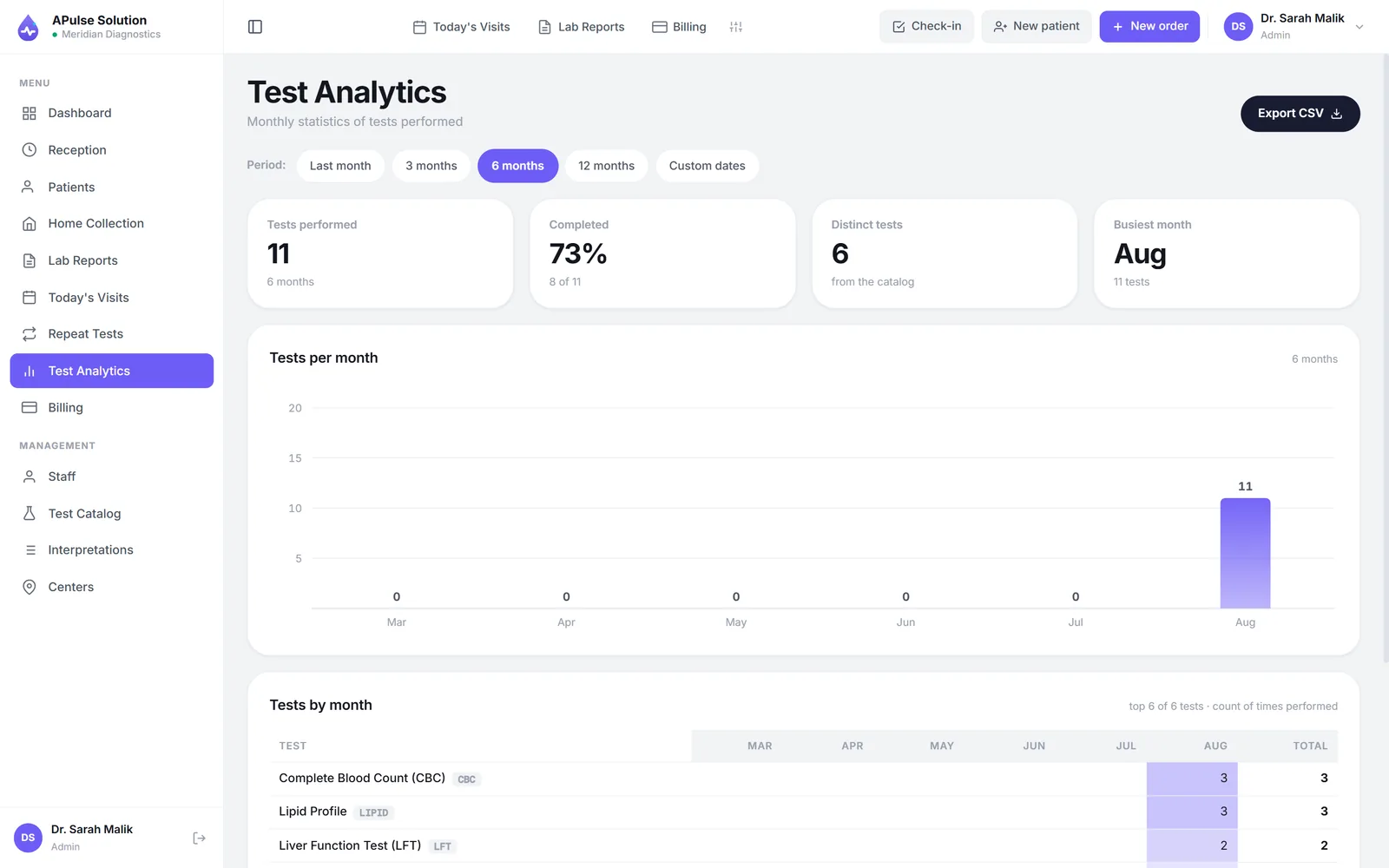
Analytics (Medium and above) covers revenue and patient trends, test status breakdowns and monthly test analytics with CSV export.
Branches (Premium) tag patients, orders and invoices per branch, with per-branch stats — so a multi-site owner sees each location separately without phoning anyone.
What "Automation" Means Here, Precisely
The word gets stretched, so here is the line as we would draw it for our own product.
Automated: issuing record numbers, applying the right reference range and flagging out-of-range values, laying out the report, invoice arithmetic, commission calculation, day-end totals, stock deduction against tests performed.
Not automated by default: capturing result values from analysers, and sending reports to patients. Both are done by a person unless analyser interfacing is switched on for your account (on request, on any plan, with the machine connected during setup), and unless the lab connects its own WhatsApp Business (Cloud API) or SMS gateway account, which sends report links automatically on approval.
That distinction is the single most useful thing to carry into a vendor comparison, because the price difference between a system that flags results and a system that reads them off instruments is large, and the marketing language for both is identical. We have written more about where the line sits in what lab automation actually covers, and the full feature list is public if you want to compare line by line.
Frequently Asked Questions
Does lab management software need a server in the lab? Browser-based systems do not. A Pulse Solution runs on the computers and phones the lab already owns, with the data held centrally rather than on any one machine. Installed desktop software is the alternative model, and it does tie you to specific hardware.
Does the software read results from the analyser automatically? Not in most systems priced for small and mid-size labs, and not in A Pulse Solution by default: the technician enters values against stored reference ranges, and the software checks and flags them. Analyser interfacing is switched on for your account on request, on any plan; it takes ASTM E1394 or HL7 v2 results that a bridge posts to it, and connecting the machine is part of setup and depends on the analyser. Ask any vendor this exact question rather than accepting the word "integrated".
How long does registration take once the system is running? Long enough to type the details once and pick the tests. The saving is not really in the first registration; it is in every subsequent visit by the same patient, and in never rewriting those details onto a receipt, a worksheet and a report.
Can staff see only what their role allows? Yes. Admin, reception, technician and doctor roles each see a different slice, and referring doctors who log in see only their own patients. Per-user permission overrides are available from the Medium plan for cases where a role is nearly right but not quite.
What happens when the internet drops? A browser-based system needs a connection to reach your data. A Pulse Solution can be installed to the home screen or desktop as an app, so it still opens on a weak signal and shows a banner saying the connection is down, and anything already on screen can be printed — but registering a patient or entering a result waits for the connection to come back, because nothing clinical is stored on the device. Most labs cover short outages with a phone hotspot. If your connectivity is genuinely poor and cannot be fixed, weigh installed software honestly instead — we compare the two in cloud vs desktop lab software.
Can I try the workflow before buying? Yes, and you should insist on it with any vendor. The free demo gives you your own workspace for 7 days and up to 10 patients — enough to load part of your rate list and run a real patient through registration, result entry and reporting.