Online Lab Reports
The report exists as a branded PDF the moment results are approved — ready to preview, print, download or send to the patient's phone. Or the patient scans the QR on their billing slip and opens it themselves, with no login.
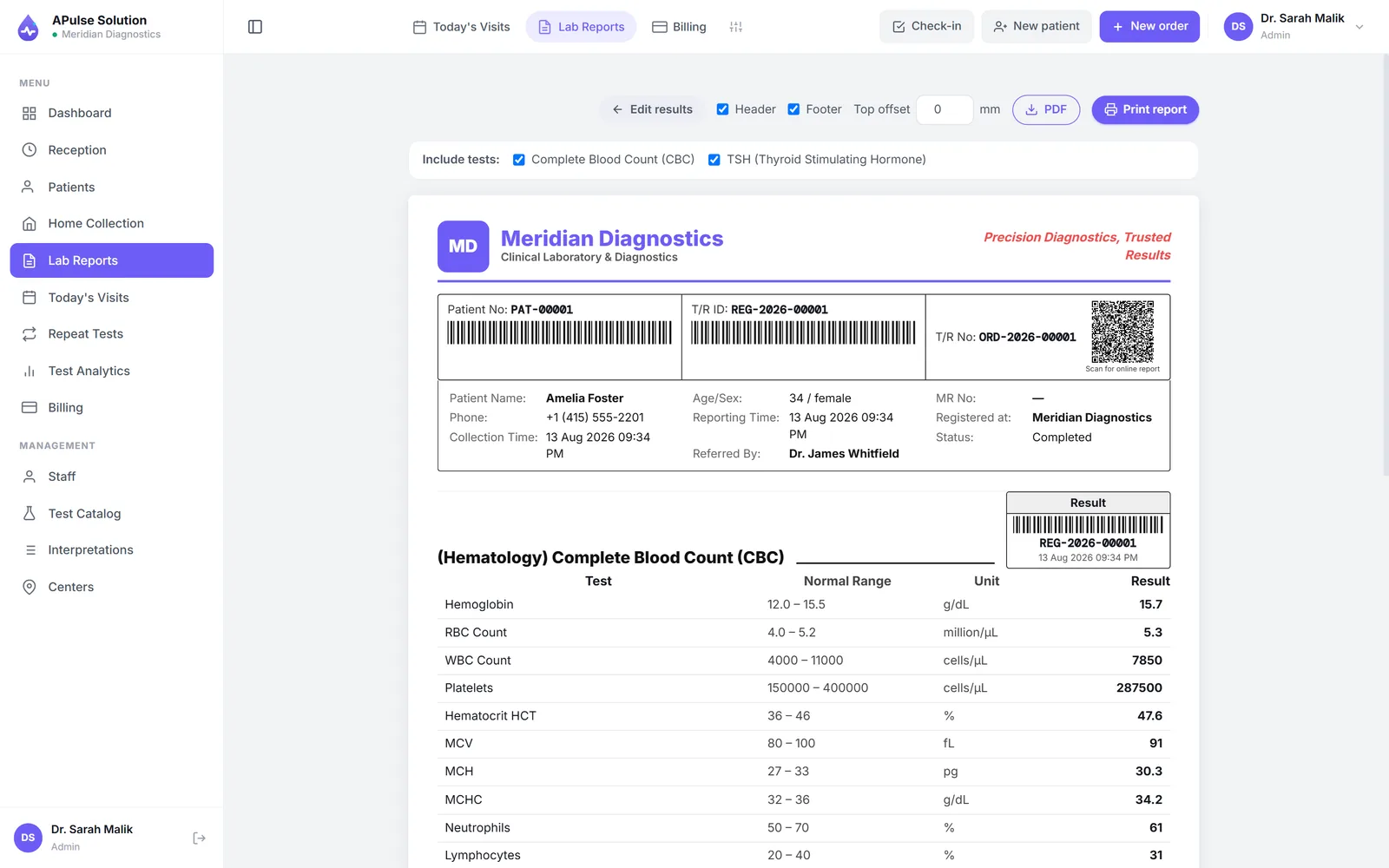
Reports that are born digital
In a paper-first lab, the report becomes real when the printer produces it — and everything downstream inherits the limits of paper. The patient comes back to collect it. The doctor waits for it. A lost printout means a reprint request and an apology. A Pulse Solution turns that order around: the report is digital from the start, and paper becomes just one way of handing it over.
The moment a technician enters results against pre-set reference ranges and they are verified, the report exists as a branded PDF — your lab's name, logo and colors, in a detailed or short view, with abnormal values already flagged. How that report is built, down to the letterhead designer, lives on the lab report software page; this page is about what happens next.
From verified result to the patient's phone
No second trip
Most patients don't want another account and password — they want the report on their phone. Your staff download the PDF and send it over WhatsApp in the time it used to take to find the printout, and the second trip to collect paper simply stops happening. Patients who do want paper still get it: the same PDF prints on demand.
Found in seconds, months later
Because every report lives on the patient's record, "can you resend my report from March?" is a search, not an excavation. Look it up by patient, doctor or reference number, open the report, send it again. Each lab's data sits in its own isolated database schema with encrypted backups, so the archive is still there years on.
Any device your staff already have
APulse runs in the browser, so the receptionist can send a report from the front-desk computer and the owner can do the same from a phone at home. Nothing to install, nothing to sync.
The patient fetches it themselves, with no login
The billing slip you hand over at the counter carries a QR code. The patient scans it with their phone camera and their own report opens online, ready to read or download. There is no account to create, no password and nothing to install — the link is signed and unguessable, and it works for 30 days.
Scanned before the report is ready, the same link says so plainly instead of showing nothing: payment pending, with the balance still owed, while the bill is unpaid, or your tests are in process until a reviewer has approved the report. So the slip answers "is it ready yet?" without anyone phoning the lab.
This is on every plan, Basic included. It is also why the counter decongests: a patient who can collect their own report never queues for paper.
Online lab reports, in practice
- Branded PDF the moment results are verified — no separate "make the report" step
- Preview, print, download, or share over WhatsApp — the lab stays in control
- Every past report searchable by patient, doctor or reference
- A QR on the slip opens the patient's own report for 30 days — every plan, no login
- Works in the browser on any computer, tablet or phone
- Included in the free demo — every feature unlocked, no card
Sending the report link
Report links go out by WhatsApp, SMS or email on every plan — automatically on approval once you connect your own WhatsApp Business (Cloud API) or SMS gateway account, or with one tap by your staff without one. The automatic route uses the lab's own account, so the messages come from your number and the provider's charges are yours; many labs keep it manual on purpose, so staff decide when a sensitive result goes out.
What we have deliberately not built is a patient portal — an account each patient registers for and signs into. Asking someone to create a login to read one report adds friction without adding anything, which is why the QR on the slip does the same job with nothing to remember. For a pathology lab or diagnostic centre, that distinction matters more than a feature list.
Send your first report from the free demo — every feature unlocked, up to 10 patients, no card — or explore the full lab management software behind it.
Frequently Asked Questions
How do patients receive their lab reports online?
The lab shares them. The moment results are verified, the report exists as a branded PDF — your staff preview, print or download it and send it to the patient over WhatsApp or however you prefer. No second trip to collect paper.
Is there a patient portal where patients log in to see reports?
No, and that is deliberate — most patients never want another account and password. They still get their report without waiting for staff: on every plan the billing slip carries a QR code, and scanning it opens that patient's own report online for 30 days, with nothing to install and no password. Your lab can also send the branded PDF, usually over WhatsApp. (On the offline edition the link works once the lab PC is connected to its cloud account; an unconnected PC has no online report link.)
How does the QR code on the billing slip work?
Every billing slip carries a QR code for that order, on every plan. The patient scans it with their phone camera and their own report opens online, ready to read or download; the link is signed, cannot be guessed, and works for 30 days. Scanned before the report is released it says payment pending, with the balance owed, or that the tests are still in process — so the slip answers "is it ready?" without a phone call to the lab.
Can report delivery be automated?
Report links go out by WhatsApp, SMS or email on every plan — automatically on approval once you connect your own WhatsApp Business (Cloud API) or SMS gateway account, or with one tap by your staff without one. Many labs keep it manual on purpose, so staff decide when a sensitive result goes out.
Can online reports carry our own letterhead?
Yes. Every report carries your lab's name, logo and colors on all plans, and every plan includes the letterhead and report layout designer so you control the exact layout. APulse stays behind the scenes.
Further reading
Background reading on how this software category works — written to inform, not to sell.
Ready to Get Started?
Create your free demo lab in seconds — every feature, 10 patients, no credit card. Or ask us for a quote and we'll set everything up for you.