Medical lab software is the system a clinical laboratory runs on: it holds the patient record, carries the test catalogue, validates results as they are entered, and produces the report that leaves the building. In A Pulse Solution all of that happens in a browser, with the data stored in the cloud.
The definition is the easy part. What matters when you're evaluating one is how it works — where the data lives, what happens at the moment a technician types a value, and what the software checks on your behalf. That's what this guide covers.
What Is Medical Lab Software?
Medical lab software sits between two things your lab already has: patients arriving with requests, and reports going out with results on them. Its job is to make everything in between traceable and consistent.
Three things distinguish it from general-purpose software a lab might otherwise improvise with (Excel, Word templates, an accounting package):
- It knows what a test is. Each test carries its own units, its reference ranges and its permitted result values. A spreadsheet doesn't know that a haemoglobin of 8.1 is low for an adult woman; software with reference ranges does.
- It knows what a patient is. One durable identity that accumulates visits, orders, invoices and results, rather than a new row each time.
- It produces a clinical document. A report is not just a printout — it is the thing a doctor makes decisions from, and it needs consistent structure, correct flagging and verifiable provenance.
Terms overlap in this market. "Medical laboratory software", "pathology lab software" and "laboratory management system" are used more or less interchangeably by vendors, and the underlying product for a diagnostic lab is usually the same. What varies is depth in specific areas: reporting, billing, multi-site operation.
How Does Medical Lab Software Work?
Follow one specimen through and the architecture becomes obvious.
Step 1 — Identity is established once. A patient is registered, and the software issues an MRN and a registration number automatically rather than asking a human to pick the next one. This is the step everything else hangs from, and it's why searching before registering matters: find the existing record and the patient's history stays continuous.
Step 2 — The order is attached, and so is the money. Tests are selected from your catalogue at their current prices, and the invoice is generated in the same action. Billing is not a separate downstream task, which is what stops tests being run and never charged.
Step 3 — Work reaches the bench in a usable form. The day's orders become a working list, and a printable worksheet can be generated from them, with the columns you want for each test. It's exportable to CSV. The point is that the bench document is derived from the orders rather than copied out by hand.
Step 4 — Values are validated at the instant of entry. This is the clinically important step. When a technician types a value:
- It is compared against that test's reference range for that patient's sex, where the range differs.
- If it falls outside, it is flagged automatically — visible immediately on screen, and carried through to the printed report.
- For qualitative tests, there is nothing to type: the result is chosen from a fixed list (for example Positive, Negative, Trace), so "Neg", "negative" and "-ve" can't all end up in your records meaning the same thing.
That last detail sounds small and isn't. Consistency across technicians is what makes a lab's historical data usable later; free-text results quietly destroy it.
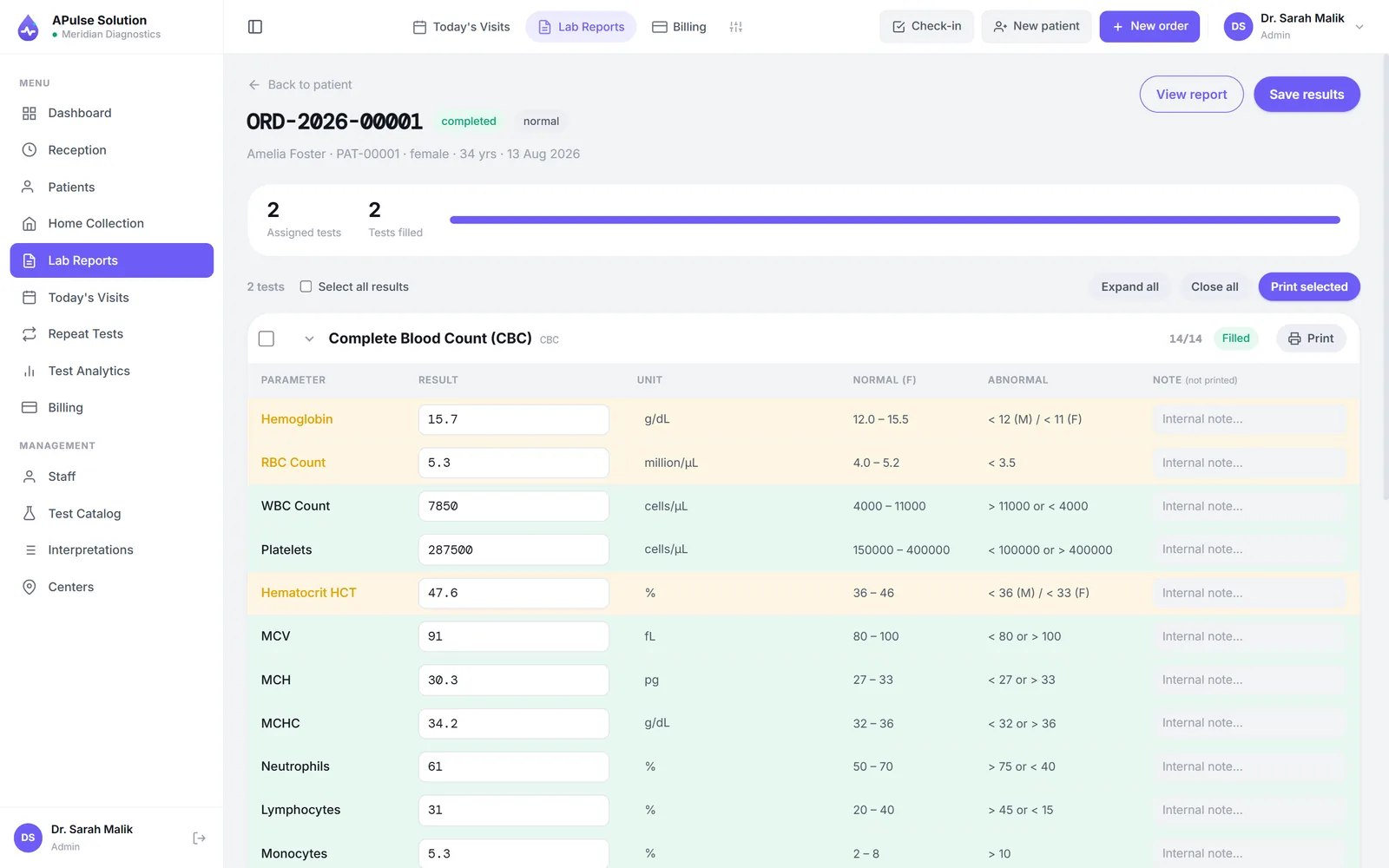
Step 5 — Review, then release. Results are reviewed and the report is generated as a branded PDF: your lab's name, logo, colours and address, in a detailed or short layout. On every plan, a previous-result comparison can place today's values next to the same patient's earlier ones.
Step 6 — The record stays queryable. Afterwards, reports and records are searchable by patient, by referring doctor or by reference — which is what turns a pile of past work into something you can actually retrieve from.
One thing to be clear about: by default, results are entered by your technician, not read from your analysers. Analyser interfacing is switched on for your account on request, on any plan: A Pulse Solution then takes ASTM E1394 or HL7 v2 results that a bridge posts to it, and connecting the machine is part of setup and depends on the analyser — never plug and play. Either way the software does the range checking automatically, and the judgement stays with your staff. Bidirectional analyser integration is a genuinely different (and much more expensive) category of system, and pretending otherwise would waste your time.
What Can Medical Lab Software Manage?
Patient Management
The organising principle is one permanent record per patient. First registration creates it with an auto-generated MRN; every subsequent visit, order, invoice and report attaches to that same record, so the full history is in one place instead of distributed across register volumes and folders.
Practically, this shows up in two ways. Reception searches by name before registering, so a returning patient doesn't fill the same form twice and duplicate files don't accumulate. And because the history is attached, previous results can be compared rather than remembered. Access is role-based — admin, reception, technician and doctor roles each see what the job requires, with per-user permission overrides on Medium and Premium.
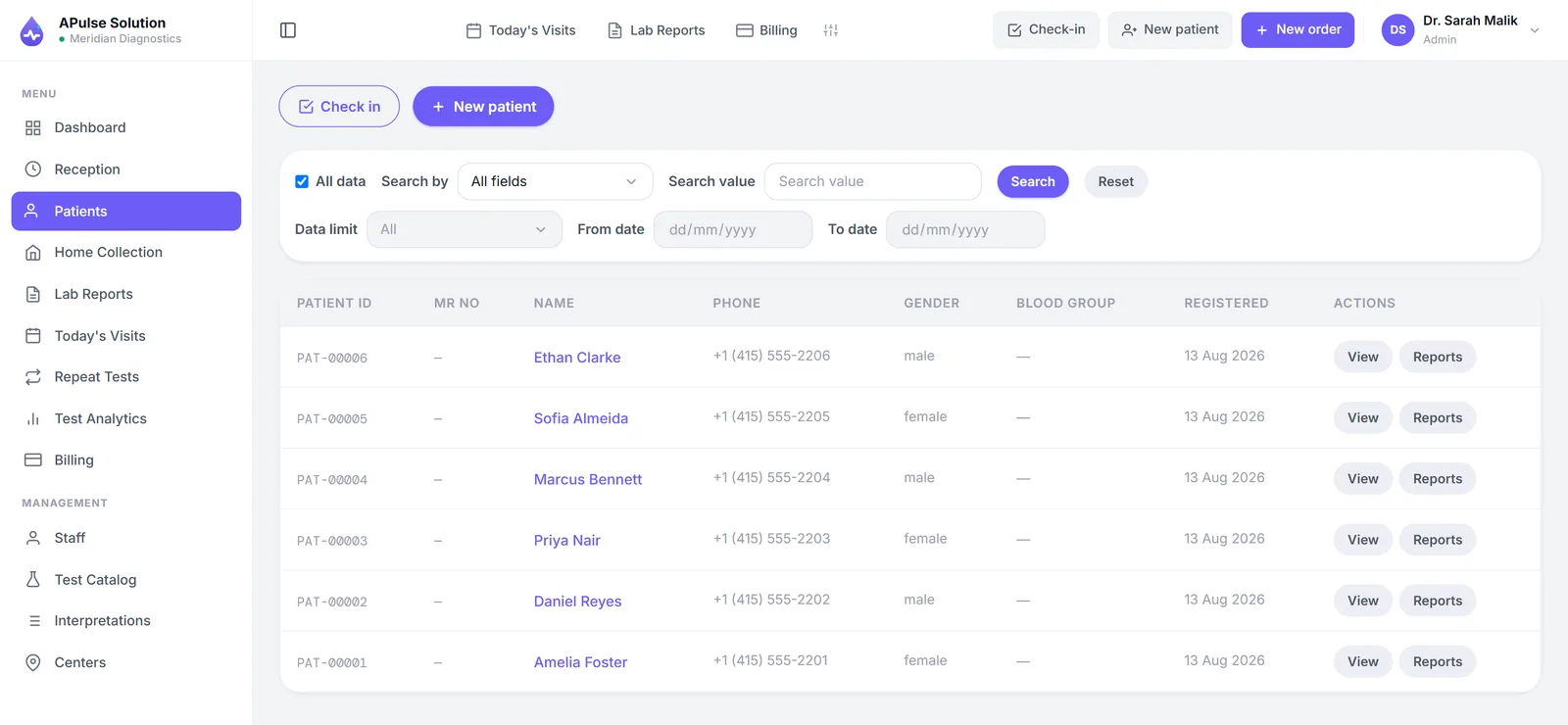
There's a dedicated page on patient records and history.
Laboratory Operations
The catalogue is yours to define: your categories, your test names, your prices, updated whenever your rate list changes. Each quantitative test holds its reference ranges; each qualitative test holds its list of allowed values.
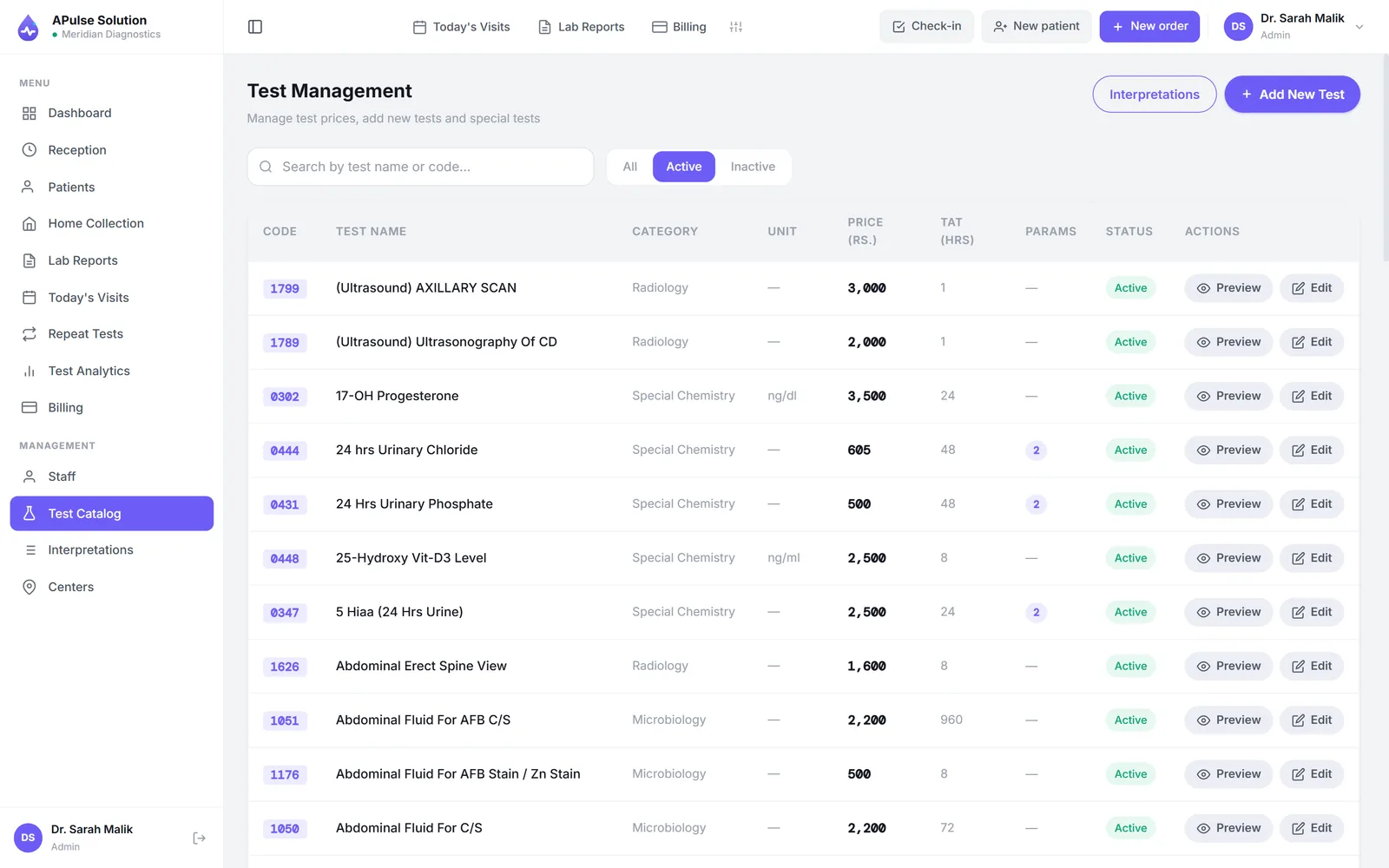
Day-to-day operations covered on every plan include the visit queue for walk-ins, home collection booking tracked from pending through scheduled to collected, technician worksheets, and the daily revenue summary. Stock and inventory — where staff raise requests for reagents and consumables and each request goes through an approval — is available on Medium and Premium. So is the full analytics dashboard, which adds revenue trends over weeks and months and test status over time.
Online Reports
Be careful with this phrase when comparing vendors, because it is used for two quite different models.
A Pulse Solution's model is lab-shared PDFs, not a patient login. The moment results are verified the report exists as a branded PDF; your staff preview, print or download it and send it to the patient — usually over WhatsApp. On every plan the billing slip carries a QR code, so a doctor holding a printout, or a patient holding a PDF that has been forwarded several times, can scan it and confirm the report genuinely came from your lab and hasn't been altered.
What it is not: there is no patient portal, and patients never create accounts — the QR on their slip needs none. Automated WhatsApp and SMS delivery is planned for the Premium plan and is not available on any plan today — sharing is currently a deliberate manual step, which some labs prefer for sensitive results anyway. If patient self-service login is a hard requirement for you, check it now. The online reports page explains the reasoning.
Billing
Invoicing is bound to registration rather than bolted on afterwards. Apply a discount and the total recalculates. The referring doctor's share is recorded against the invoice as you go. The day ends with a revenue summary rather than an evening spent adding receipts, and Medium and Premium add trends over longer periods.
Doctor referral and commission tracking is included from the Medium plan, with dedicated commission reports for settlements. The value here is less about arithmetic than about evidence: when the referring doctor is recorded on every order and the share is tracked with every invoice, month-end stops being a reconstruction. See laboratory billing and doctor commissions.
Multi-Branch Management
On the Premium plan, patients, orders and invoices are tagged to the branch that created them, and the entire network is managed from one login — up to 5 branches and collection centres and 25 staff accounts, with more on request. That means a collection point and the main lab, or two sites across a city, appear in one place and can be compared without phoning each one. Basic and Medium cover a single location. Detail on multi-branch operation.
Laboratory Workflow Automation
"Automation" in clinical software of this kind means eliminating copying and arithmetic between steps, not robotics at the bench. Concretely, on every plan:
- MRNs and registration numbers generated, not assigned by hand
- The invoice raised as part of registration
- Discounts recalculating totals
- Reference-range checks and abnormal flagging on entry
- Worksheets generated from the day's actual orders
- The daily revenue summary calculated from invoices
From the Medium plan, commissions accrue as orders are recorded; on Premium, previous-result comparison is generated rather than assembled. Further reading: laboratory automation.
Benefits of Medical Lab Software
Each of these follows from a mechanism above rather than from optimism:
- Errors caught at entry, not at review. Range checking happens as the value is typed, which is the cheapest possible moment to catch a mistake.
- Results that stay comparable over years. Fixed result values for qualitative tests and consistent ranges for quantitative ones mean your own historical data remains usable.
- Reports that look the same every time. Same layout, same branding, whoever produced it.
- Reports the patient can fetch. A QR on the billing slip, on every plan, answers "where is my report?" without a phone call to your lab.
- A patient history you can actually retrieve. Searchable by patient, doctor or reference.
- Billing that reconciles by construction. Because invoices come from registrations.
- No single machine to lose. Cloud storage removes the scenario where the lab's records and the lab's only working PC are the same fragile thing.
- Defined access. Roles mean staff see their own work, and permissions can be tightened per person on higher plans.
Cloud-Based Medical Lab Software
A Pulse Solution is browser-based, which has real consequences worth understanding in both directions.
What you get. Nothing to install, nothing to license per machine, and no server to buy or maintain. Any computer, tablet or phone the lab already owns works. Updates simply appear — they're free on every plan — so there's no upgrade project. Data sits in the cloud with encrypted backups on a rolling window of roughly 30 days, and each laboratory gets its own isolated database schema, so one lab's records are never mixed with another's. Traffic is encrypted with TLS. The security page sets out the specifics.
What you take on. A dependency on internet connectivity. If the lab's connection is down, the lab's software is unreachable — that is the honest trade-off against desktop software, which works offline but ties you to one machine, manual backups, and a very bad day when the hard disk fails. Neither model is free of risk; they simply relocate it. Most labs find a phone hotspot an adequate fallback for a browser-based system, which is not an option when your records live on a dead PC.
Worth knowing: A Pulse Solution is not a hospital HIS or EMR, and on its own it runs standalone for the laboratory itself. A hospital system can connect to it through its API and webhooks — switched on for your account on request, on any plan — but someone on the hospital's side has to build their half of the link, and results are shared only once a report is released. It doesn't suit an organisation looking for one system that does everything.
How to Choose Medical Lab Software
Bias every step towards seeing rather than being told.
- Enter your own tests, with your own ranges. Then deliberately type an abnormal value and confirm the flagging behaves as your pathologist expects. This is the single most informative five minutes of any evaluation.
- Produce a report on your own letterhead. Look at it as a doctor would.
- Have your receptionist register a patient unaided. If the busiest screen needs a manual, that cost repeats every day.
- Ask what it cannot do. Analyser interfacing, EMR integration and patient portals are the common gaps. A Pulse Solution has no patient portal, and states so plainly; analyser interfacing and the API for EMR links are switched on per account on request, and both need setup work on your side. A vendor who answers this straight is a better long-term partner than one who agrees to everything.
- Get every cost in writing — plan price, setup, migration, per-user or per-report fees.
- Test the support channel you'd actually use, with a real question, before paying.
- Confirm data ownership and export. Your records should be yours to take.
- Check the growth path. Can you add branches or staff without starting over?
The free demo exists for exactly this: your own workspace, every feature unlocked, up to 10 patients over 7 days, no card. Whatever you enter carries over if you upgrade, so setup effort isn't wasted. The feature list and plans are both public if you prefer to read before trialling.
Medical Lab Software in Pakistan
A few things matter more in this market than a generic feature comparison.
Reports on your own letterhead, on every plan. Branding isn't cosmetic here — the report is your lab's public face, and many labs' first complaint about cheap software is that it looks like cheap software. Your name, logo and colours are on reports at every tier, with layout control on Medium and Premium.
A quote in writing. A Pulse Solution quotes in PKR, by plan, for your lab's report volume, staff and branches, and puts it in writing before you commit — ask for one. International labs are quoted in USD on request. If any vendor won't put the number and what it covers in writing, that itself tells you something.
Billing that fits. Payment by bank transfer with same-day activation, no card required — which is how most labs here actually want to pay.
Support in Urdu or English, seven days a week, on WhatsApp (+92 340 0450008) from our own team, with email answered within 24 hours. Onboarding happens the same way: someone walks your staff through it.
Your existing Excel. Migration is an optional service at a small one-time cost on any plan. Raise it during evaluation.
Deeper coverage: medical lab software in Pakistan for the buying decision, and lab management system in Pakistan for how the day-to-day operation looks locally.
Frequently Asked Questions
Does medical lab software require training to use? Some, but less than most owners expect, because each role only sees its own screens — reception handles registration and billing, technicians enter results. Our team walks staff through it over WhatsApp in Urdu or English. The practical setup work is loading your test catalogue and rate list, not learning the interface.
How does the software handle male and female reference ranges? Each quantitative test can carry separate ranges by sex. When a value is entered it's checked against the correct range for that patient, and flagged if it falls outside — both on entry and on the report.
What happens with serology, cultures and other qualitative tests? They use dropdown result values rather than free typing — Positive, Negative, Trace, and so on, as you define them. This keeps results consistent regardless of which technician entered them, which matters when you later want to compare or audit.
Can I compare a patient's current results with their previous ones? Yes, on every plan, via previous-result comparison reports. The history is also attached to the patient record and searchable.
Is my lab's data mixed with other laboratories' data? No. Each laboratory has its own isolated database schema. Connections use TLS, backups are encrypted on a rolling ~30-day window, and access within your lab is role-based.
Does it work on a phone or tablet? Yes — it runs in the browser, so any reasonably modern phone, tablet or computer works. There is no app to install and no per-machine licence.
What if we outgrow our plan? You move up and your data comes with you. Basic covers one lab, 3 staff accounts and 300 reports a month; Medium raises it to 2,000 a month and adds inventory, home collection, analytics and commission tracking; Premium adds unlimited reports, multi-branch, per-doctor prices and up to 25 staff accounts. Upgrades are activated the same day.
Do you support labs outside Pakistan? Yes — the software is in English and works anywhere with a browser, billed in USD, with AED quotes for the UAE. Support runs from GMT+5, which overlaps Gulf, African and South Asian hours well. See international.