Most articles about laboratory management software list benefits without explaining what produces them, which makes the claims impossible to check. A benefit that doesn't trace back to a specific mechanism is just a hope.
So this guide does it the other way round. For each benefit: the manual task that disappears, the software behaviour that replaces it, and what that looks like on an ordinary Tuesday. At the end, the things laboratory software does not improve — because knowing the boundary is what makes the rest trustworthy.
Why Laboratories Need Management Software
A laboratory's records have a peculiar property: they must stay useful for years, but they're created in a hurry, by different people, under interruption.
That's the tension paper cannot resolve. A register is excellent at capturing something quickly and terrible at giving it back. Ask a paper-based lab a retrospective question — how many patients did Dr. Sohail refer last month, what did we collect on the 14th, has this patient had this test before — and the answer requires someone to physically search, if it's recoverable at all.
Software's core contribution is that writing something down and being able to find it again become the same act. Everything below follows from that.
There's a second, less discussed reason: continuity of staff. When the process lives in one long-serving receptionist's memory, the lab is one resignation away from chaos. When it lives in software, the next person inherits a process rather than a mystery.
10 Benefits of Laboratory Management Software
1. Centralized patient management
What goes away: a new register line — and often a new patient file — every time someone returns, because finding last year's entry is harder than starting again.
What replaces it: one permanent record per patient, created at first registration with an automatically generated MRN and registration number. Every later visit, order, invoice and report attaches to it.
On a Tuesday: a man comes in for a repeat lipid profile. Reception types three letters of his name, opens the record he's already had for two years, and books the test. He doesn't recite his details again, and no second file is created. His previous results are attached to the same record — so the new ones can be read in context.
2. Faster laboratory workflows
What goes away: re-copying the same information between the registration register, the bench notebook, the report template and the billing book.
What replaces it: a single flow. Registering the patient books the tests, raises the invoice, and puts the work on the day's list. The technician's worksheet is generated from those orders rather than transcribed.
On a Tuesday: the queue moves at the speed of the counter, not the speed of copying. The saving isn't dramatic per patient — it's a minute here and there — but it lands on the busiest hour of the day, which is where a minute is worth most.
3. Digital reporting
What goes away: reports assembled in Word from a template, where layout drifts depending on who typed it and how long the test name was.
What replaces it: reports generated from the recorded results, carrying your lab's name, logo, colours and address in a consistent layout — detailed or short. Abnormal values are marked on the printed output, not only on screen. On every plan a letterhead and report-layout designer controls the exact arrangement.
On a Tuesday: every report leaving the lab looks like it came from the same organisation, because it did. For a referring doctor reading twenty reports, that consistency is the difference between scanning and deciphering.
4. Online patient reports
What goes away: the second trip. The patient who returns in the evening to collect paper.
What replaces it: the report exists as a branded PDF the moment results are approved, and your staff share it directly — in practice, usually over WhatsApp. On every plan the billing slip also carries a QR code, so a patient who would otherwise queue for a printout scans the slip already in their hand and opens their own report online instead.
Worth being precise about: there is no patient portal in A Pulse Solution — patients never get logins. Report links can go out by WhatsApp or SMS automatically on approval, on every plan — but only once the lab connects its own WhatsApp Business (Cloud API) or SMS gateway account. Without one, sending is a one-tap manual step, which some labs actively prefer for sensitive results. How online reports work here covers the model in full.
5. Automated billing
What goes away: a separate billing step that can be skipped, and an evening spent adding up receipts to find out what the day earned.
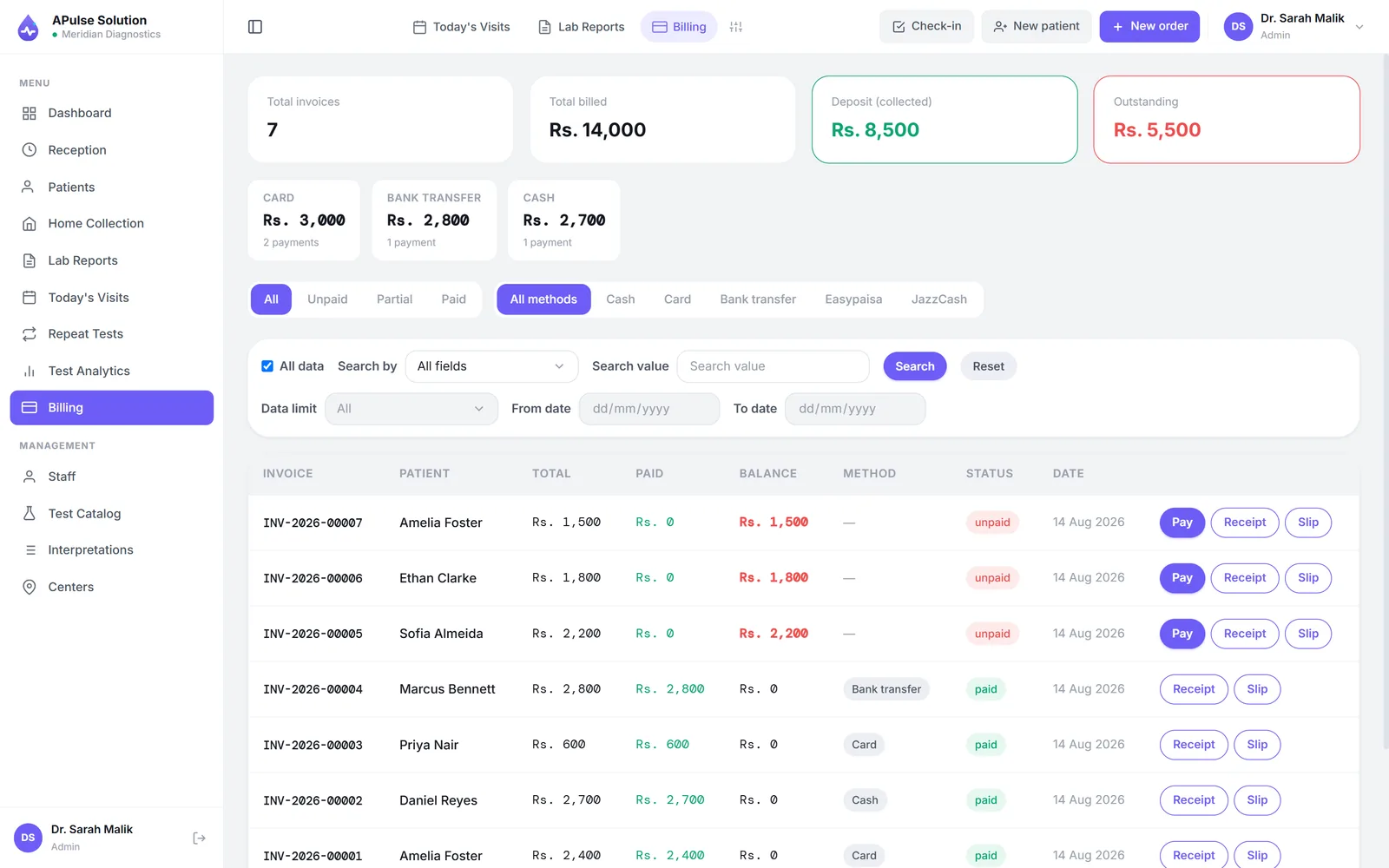
What replaces it: the invoice is raised as part of registration, so a test can't quietly be performed unbilled. Discounts recalculate the total. The referring doctor's share is recorded against the invoice. The day closes with a revenue summary calculated from the invoices themselves.
On a Tuesday: a patient is given a 15% concession. The total adjusts, and the day's figure still reconciles, because the discount is part of the record rather than a note in a margin. Detail on laboratory billing.
6. Multi-branch visibility
What goes away: phoning each location at closing time and assembling a picture by hand.
What replaces it: on the Premium plan, patients, orders and invoices are tagged to the branch that created them, and one login shows the whole network — up to 5 branches and collection centres and 25 staff accounts, with more on request.
On a Tuesday: the owner sees that the second branch has eleven pending results at 4pm and the main lab has two, and moves someone. That's a decision that simply isn't available when the information arrives the next morning.
7. Reduced manual work
What goes away: arithmetic and copying — assigning the next MRN by hand, totalling invoices, working out a commission at month-end, comparing a value against a printed range chart on the wall.
What replaces it: identifiers generated, totals calculated, ranges checked at the moment of entry, worksheets built from orders, commissions accruing as orders are recorded (Medium+).
On a Tuesday: nobody does mental arithmetic on anything that matters. The value of this is less about time than about the class of mistake it removes — every manual copy is a chance to transpose a digit, and there are far fewer copies.
8. Better organization
What goes away: "who has the register?", and the discovery that two people recorded the same qualitative result three different ways.
What replaces it: structure enforced at entry. Qualitative tests use fixed dropdown values — Positive, Negative, Trace, as you define them — instead of free typing. Quantitative tests carry their reference ranges, including separate male and female ranges. Staff work in defined roles (admin, reception, technician, doctor), with per-user permission overrides on Medium and Premium.
On a Tuesday: two technicians on different shifts produce records that mean the same thing, which is what makes the lab's own history worth keeping.
9. Easier access to laboratory information
What goes away: questions that go unanswered because answering them is too much work.
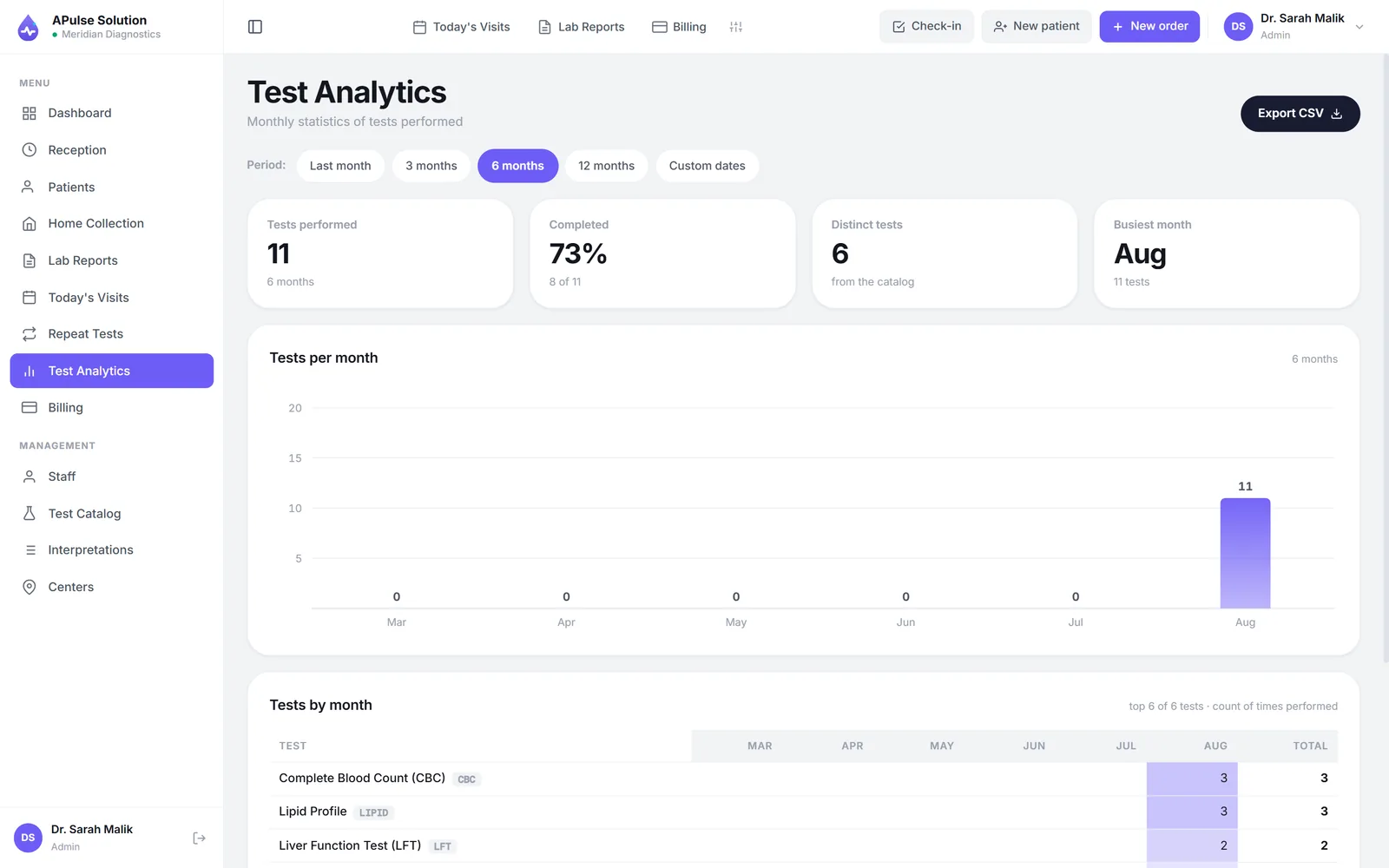
What replaces it: reports and records searchable by patient, referring doctor or reference. A dashboard showing the day's patients, pending results and revenue. On Medium and Premium, an analytics dashboard adding revenue trends over weeks and months and test status over time.
On a Tuesday: a doctor rings about a report from three weeks ago. It's found during the call rather than promised for later.
10. Scalable laboratory operations
What goes away: the ceiling where growth means proportionally more clerical staff.
What replaces it: capacity that grows by changing a plan rather than rebuilding a process. Basic covers one lab with 3 staff accounts and up to 300 reports a month; Medium raises the cap to 2,000 a month and adds inventory, home collection, analytics and commission tracking; Premium adds unlimited reports, per-doctor prices, multi-branch (up to 5 branches and centres) and up to 25 staff, with more on request. Upgrades keep your existing data.
On a Tuesday: nothing happens — which is the point. Growth is uneventful because the system it runs on doesn't need replacing.
What laboratory software does not improve
Balance, so the ten above mean something:
- It doesn't perform or interpret tests. Results are typed by technicians unless analyser interfacing is switched on for your account (on request, on any plan, with the machine connected as part of setup), and the clinical judgement stays with your staff.
- It doesn't fix an undefined process. Software enforces a workflow; it can't invent one. A lab unsure who verifies results will be equally unsure afterwards.
- It doesn't remove data entry. It removes duplicate data entry. Someone still types the patient and the results once.
- It doesn't integrate with hospital systems by itself. It runs standalone; an API and webhooks can be switched on for your account on request, on any plan, but someone on the hospital's side still has to build their half of the link.
- It doesn't survive bad data discipline. Rushed registration still produces an unfindable patient.
How Laboratory Software Supports Multi-Branch Laboratories
Running two locations is not simply twice one location. Three specific problems appear, and they're the ones software addresses.
Whose patient is this? With separate registers per site, a patient tested at branch A and returning to branch B is effectively a new patient — history lost, tests possibly repeated unnecessarily. When records are central and each is tagged to the branch that created it, identity is shared while attribution stays clear.
Which branch actually earns? Per-site revenue is guesswork when invoices live in separate books. Tagging invoices to branches makes comparison a matter of looking rather than assembling — and comparison is what tells you whether a location is genuinely underperforming or simply smaller.
Who can see what? A branch supervisor probably shouldn't view the whole network's finances. Role-based access with per-user overrides (Medium and Premium) lets access follow responsibility.
In A Pulse Solution, multi-branch management is a Premium feature: up to 5 branches and collection centres and 25 staff accounts (more on request), patients and orders and invoices tagged per branch, all managed from one login. Basic and Medium are single-location plans. If a second site is likely within a year or two, factor that into the plan you choose rather than the plan you need today — multi-branch operation sets out the specifics.
A practical note: a collection point that only registers patients and forwards samples counts as a branch too. Labs often forget this when estimating what they need.
How Laboratory Automation Reduces Manual Work
"Laboratory automation" is used for two unrelated things, and conflating them leads to disappointed buyers.
Bench automation is hardware — analysers, track systems, robotic sample handling. It's capital equipment, and software of this kind neither provides nor controls it.
Workflow automation is the elimination of clerical steps between the work the lab already does. That's what A Pulse Solution provides, and concretely it means:
| Manual step | Automated behaviour | Plan |
|---|---|---|
| Assigning the next MRN and registration number | Generated at registration | All |
| Writing a separate invoice after the test | Invoice raised within registration | All |
| Recalculating a discounted total | Total recalculates automatically | All |
| Checking a value against a printed range chart | Checked on entry against sex-specific ranges; abnormal flagged | All |
| Copying the day's orders onto a bench sheet | Worksheet generated from orders, CSV exportable | All |
| Adding up receipts at closing | Daily revenue summary calculated | All |
| Reconstructing referral commissions at month-end | Doctor's share tracked with each invoice as it's created | Medium+ |
| Pulling old files to compare results | Previous-result comparison report | All |
| Tallying revenue trends by hand | Analytics dashboard | Medium, Premium |
| Tracking reagent usage in a notebook | Stock requests with approval workflow | Medium, Premium |
The pattern is consistent: each row removes a step where information was copied or computed by a person. That's where clerical errors originate, so removing the step removes the error class rather than just the effort.
What remains manual is deliberate: entering results, verifying them, and deciding when a report goes out. Those are judgement steps, and automating them would be the wrong kind of automation. There's more, including the boundaries, on laboratory automation.
How to Choose the Right Laboratory Management Software
Briefly, because the criteria matter more than the brand:
- Match the plan to your real volume. Count last month's reports and staff before comparing tiers. Buying for imagined scale wastes money; buying under your actual volume causes a mid-year migration.
- Insist on entering your own tests. Your catalogue, your prices, your reference ranges. Then type an abnormal value and check the flagging.
- Print a report on your own letterhead and read it as a referring doctor.
- Let the person who'll use it most drive the demo. If your receptionist can't complete a registration unaided, that friction repeats every day for years.
- Get total first-year cost in writing — subscription, setup, migration, training.
- Ask what the software doesn't do. Analyser interfacing, EMR integration and patient portals are the usual absences. A Pulse Solution has no patient portal and says so; analyser interfacing and an API for EMR links are switched on per account on request, and both need setup work on your side.
- Test support before paying, on the channel you'd genuinely use.
- Confirm you can export your data if you ever leave.
For a fuller treatment, including cloud versus desktop and what drives pricing in this market, see how to choose medical lab software in Pakistan. If you're still establishing what this category is, start with what a laboratory management system is.
The most reliable evaluation is a real trial with your own data. A Pulse Solution's free demo unlocks every feature for up to 10 patients over 7 days with no card, and anything you enter carries over if you continue. The complete feature list and plans are public, and we quote in writing for your lab's size.
Frequently Asked Questions
Will laboratory management software reduce my staffing costs? Usually it changes what staff spend time on rather than how many you need. Clerical work — copying, totalling, searching — shrinks; sample handling, result entry and patient interaction don't. Labs commonly report absorbing growth without adding administrative staff, which is a different benefit from cutting current ones. Treat any vendor promising specific headcount savings with scepticism.
How quickly will we see a difference? The reporting and billing changes are immediate — the first report you print is already consistent and branded. Benefits that depend on accumulated history, like previous-result comparison and trend analytics, arrive as the data builds over weeks and months.
Do the benefits apply to a small single-room lab? Most of them. Centralised records, consistent branded reports, billing tied to registration and abnormal flagging all matter at any size. Multi-branch visibility obviously doesn't, and inventory management may not until reagent spend is worth controlling. That's why the entry plan omits those.
Is training a barrier for staff who haven't used software before? Less than expected, because each role sees only its own screens rather than the whole system. Onboarding happens over WhatsApp in Urdu or English. The bigger task is the initial catalogue setup, which our team helps with.
What happens to our existing paper and Excel records? They can be migrated, at a small one-time cost on any plan. How straightforward it is depends on how consistently your existing records are structured, so ask during evaluation rather than after.
Does it work without reliable internet? It needs a connection, being browser-based. Most labs keep a phone hotspot as a fallback for outages. If your connectivity is poor and can't be improved, desktop software is the more honest fit — accepting that backups then become your responsibility.
Can we start small and expand later? Yes, and it's the sensible path. Begin on the plan matching today's volume; upgrading keeps your account and data intact and is activated the same day. Multi-branch and a larger staff allowance (up to 25 accounts) arrive with Premium when you actually need them.