There is no single best medical lab software in Pakistan, and any article that names one without knowing your lab is selling something. A single-room collection centre and a four-branch diagnostic chain need different things, and the system that suits one will frustrate the other.
What does exist is a best fit for your lab, and a reliable way to find it. This guide sets out the criteria that actually separate good lab software from bad, how to test each one before you pay, what drives the price, and the questions worth asking every vendor — including us.
We build A Pulse Solution, so we have an obvious interest here. We've tried to write the guide we'd want to read as a buyer, which means being explicit about where our software is the wrong choice.
What Should You Look for in Medical Lab Software?
Twelve things matter. For each, what to look for and — more usefully — how to check it in a demo rather than take it on trust.
Patient management
Look for: one permanent record per patient that accumulates visits, orders, invoices and results, plus a fast search so a returning patient is found rather than re-registered.
Test it: register a patient, then pretend they've come back next month. Can reception find them in a few seconds by name? If the search is slow or partial, duplicate records will build up, and duplicate records are how patient history quietly becomes useless.
Test management
Look for: a catalogue you control — your categories, your test names, your prices — with reference ranges attached to each quantitative test, including separate male and female ranges where clinically relevant, and fixed result options for qualitative tests.
Test it: load five of your own real tests with your own ranges and prices. Then change a price. If maintaining your own rate list requires a support ticket, that's a recurring cost.
Reporting
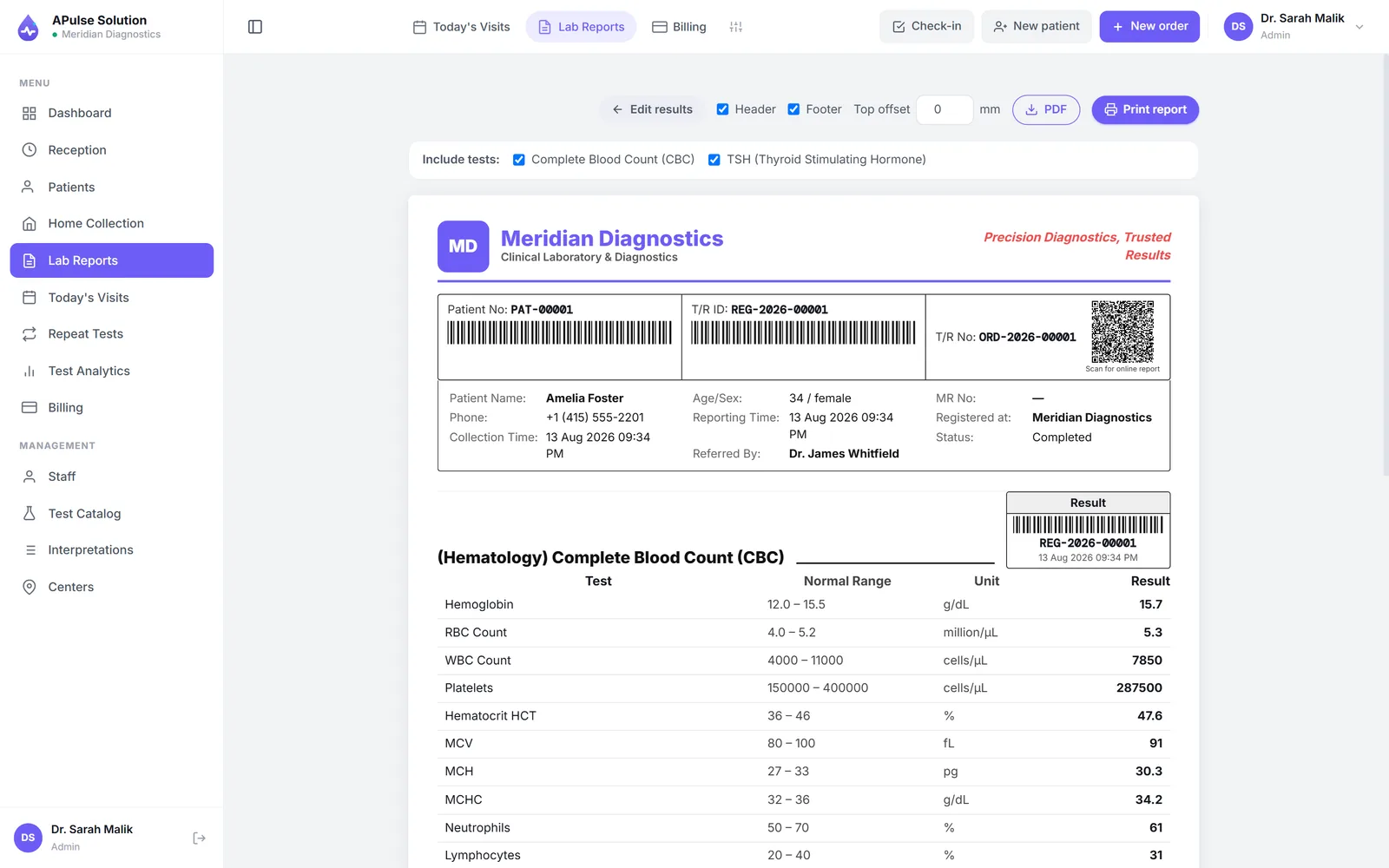
Look for: reports that carry your lab's identity — name, logo, colours, address — and look the same every time regardless of who produced them. Abnormal values should be flagged on the printed output, not just on screen.
Test it: generate a report with your own logo on it and read it as a referring doctor would. This is where inexpensive software most often reveals itself.
Online reports
Look for: clarity about which model you're being sold, because "online reports" covers two very different things — a patient portal where patients log in, versus a shareable PDF the lab sends out. Both are legitimate; they're not interchangeable.
Test it: ask directly, "do patients get a login?" Then ask how a report reaches a patient who is at home. If you want automated delivery, ask whether it exists today or is on a roadmap — this distinction is frequently blurred.
Billing
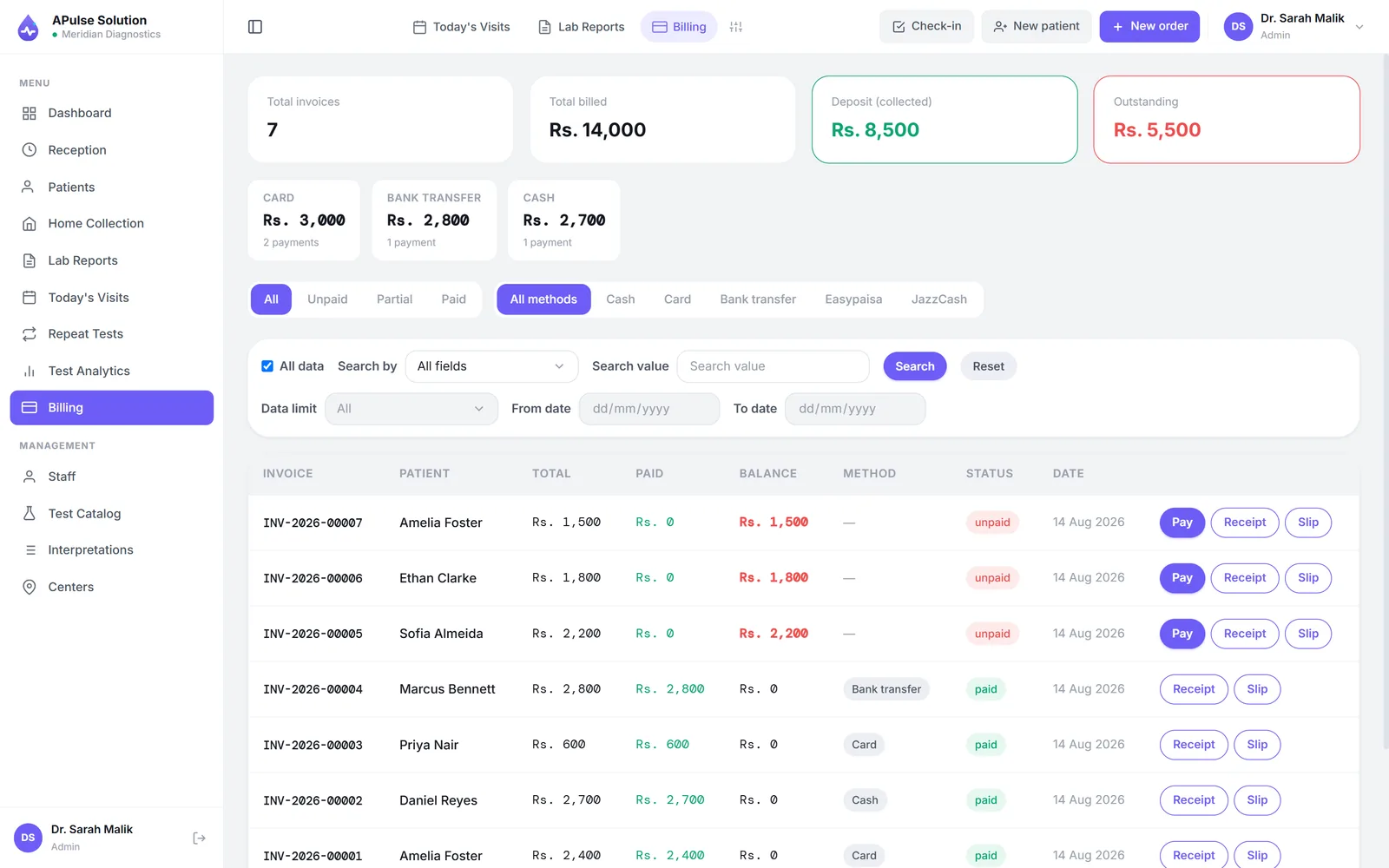
Look for: invoicing tied to registration, so tests can't be performed without being billed; discount handling that recalculates totals; and a daily revenue summary you don't have to assemble. If you pay referral commissions, look for the referring doctor recorded on the order and the share tracked with the invoice.
Test it: register a patient with two tests, apply a discount, and see whether the day's total reflects it correctly without manual arithmetic.
Multi-branch support
Look for: patients, orders and invoices tagged to the branch that created them, and one login that shows the whole network. Check whether branches cost extra and whether there's a limit.
Test it: if you have any intention of opening a second location within two years, ask what changes — plan, price, and whether existing data needs restructuring.
Automation
Look for: the removal of copying and arithmetic — identifiers generated automatically, invoices raised as part of registration, reference-range checks applied on entry, worksheets built from the day's orders, revenue summarised without a calculator.
Test it: count how many times a patient's name is typed to get from arrival to finished report. Once is right. More than once means the software is a filing cabinet, not a system.
Be sceptical of: "fully automated laboratory" claims. Ask plainly whether the software reads results from your analysers. Most affordable systems in this market do not, and that's a reasonable trade-off — but you should know before you buy, not after.
Security
Look for: your data separated from other customers' data, encrypted connections, encrypted backups with a stated retention period, and role-based access so not everyone sees everything. For a lab holding patient records, this is not optional.
Test it: ask three questions — is my lab's data isolated from other labs'? how often are backups taken and how long are they kept? who at your company can see my patient data? Vague answers are answers.
Cloud accessibility
Look for: access from any device the lab already owns, with nothing to install, if you want cloud. Confirm it genuinely runs in a browser rather than being a desktop app with remote access bolted on.
Test it: open it on a phone. Then on a different computer. If it only really works on one machine, it isn't cloud software regardless of the marketing.
User management
Look for: distinct roles for the jobs you actually have — administrator, reception, technician, doctor — so each person's screen matches their work, plus the ability to adjust one individual's access without inventing a new role.
Test it: create a reception account and confirm it can't reach what it shouldn't. Also check how many staff accounts your plan includes; per-user pricing can quietly become the largest line on the bill.
Scalability
Look for: headroom in the two dimensions labs actually grow along — report volume and staff count — and an upgrade path that carries your data with it.
Test it: ask what happens when you exceed your plan's report limit. "Reports stop" and "you're moved up a tier" are very different answers.
Support
Look for: support on the channel you'd genuinely use, in a language your staff are comfortable in, during hours that match a lab's working day — which includes weekends.
Test it: before paying, send a real question through the channel they advertise and time the reply. This is the most predictive test in the whole evaluation, because support quality is what you'll actually experience for years.
Why Laboratories in Pakistan Are Moving to Digital Management
The shift isn't mainly about technology enthusiasm. The pressures are practical.
Patients expect a report that looks professional. A neatly formatted PDF on the lab's own letterhead, delivered to a phone, has become the baseline expectation rather than a differentiator — particularly where a patient is choosing between two labs a street apart.
Referring doctors expect legibility and consistency. A doctor reading twenty reports a day gravitates towards labs whose reports are easy to read and consistently structured, with abnormal values clearly marked.
Commission arrangements need evidence. Where labs pay referral shares, the arrangement only stays comfortable while both sides trust the count. A record created as the work happens prevents month-end disagreements that a notebook cannot settle.
Owners want to know the numbers without an evening of arithmetic. Daily collections, pending results, how this month compares to last — questions that are impractical to answer from registers.
Single-machine risk becomes obvious eventually. Many labs' first serious data scare is a failed hard disk on the one PC holding everything, or a register that went missing. It tends to be the event that prompts the search.
Staff turnover. A documented process in software survives a receptionist leaving; a process living in one experienced person's head does not.
None of this means every lab should digitise immediately. If you handle a handful of patients a day, know every one of them, and your reports already look good, a register may still be the rational choice. Software solves problems of scale and continuity — buying it before you have those problems is how labs end up with a system nobody opens.
Cloud-Based vs Desktop Lab Software
This is the most consequential structural decision, and both options involve real trade-offs. Anyone presenting it as one-sided is arguing rather than advising.
| Cloud (browser-based) | Desktop (installed) | |
|---|---|---|
| Setup | Nothing to install; works on existing devices | Installed per machine; may need a server |
| Access | Any computer, tablet or phone with internet | Usually the machine it's installed on |
| Internet | Required — no connection, no access | Works offline |
| Backups | Handled by the provider | Your responsibility, and easily neglected |
| Hardware failure | Records unaffected; use another device | Records may be lost with the machine |
| Updates | Arrive automatically, typically included | Often a manual or paid upgrade |
| Multi-branch | Naturally supported — one system, many sites | Difficult; usually separate installations |
| Ongoing cost | Recurring subscription | Larger upfront, plus hardware and maintenance |
| Data location | On the provider's servers | On your premises |
Choose cloud if you have more than one machine or location, want your reports available from wherever you are, don't want to run backups yourself, and have reasonably reliable internet. A phone hotspot is an adequate fallback for a browser-based system.
Choose desktop if your internet is genuinely unreliable and you cannot work around it, you operate from exactly one machine, or you have a firm requirement that data stays physically on your premises. Accept that backups are then your discipline to maintain, and test them.
The honest summary: cloud trades hardware risk for connectivity risk. For most labs the connectivity risk is easier to mitigate — a hotspot costs little, whereas a dead disk with no backup is unrecoverable.
How Much Does Medical Lab Software Cost in Pakistan?
Most vendors in this market, us included, quote each lab rather than publish a price list. So rather than invent an average, here is what determines the number you'll be quoted.
What drives the price:
- Report or patient volume. Most plans cap monthly reports at lower tiers. Estimate your real monthly volume before comparing quotes.
- Number of staff accounts. Per-user pricing scales quickly in a lab running shifts. Check what's included.
- Number of branches. Multi-site operation is almost always a higher tier.
- Feature tier. Inventory, analytics, commission tracking, letterhead design and QR verification are commonly reserved for upper plans.
- One-time setup or implementation charges. Ask whether this exists and whether it recurs.
- Data migration. Moving years of Excel is often quoted separately, and the price depends on how tidy your existing records are.
- Training and onboarding. Included, or hourly?
- Billing period. Annual commitment is usually discounted.
- Updates and maintenance. Included, or an annual percentage?
- Currency. Local pricing in PKR vs international pricing in USD.
- Hardware. Desktop systems may need a server or a dedicated machine; browser-based systems generally use what you have. Count this in the total.
How our plans are sized. A Pulse Solution follows the same logic: Basic (one lab, 3 staff accounts, up to 300 reports a month), Medium (up to 2,000 reports a month, inventory, analytics, home collection) and Premium (unlimited reports, per-doctor prices, multi-branch for up to 5 branches and centres, up to 25 staff, more on request). There is no maintenance charge, and updates are included on every plan. The plans page shows what each includes, and we quote in writing for your lab's size — ask on WhatsApp or through the contact page.
Whoever you're considering, get written quotes and compare total first-year cost, including setup and migration, rather than headline monthly figures. A cheaper subscription with a large implementation fee often loses over a year.
Questions to Ask Before Choosing Lab Software
Take this list to every vendor. The pattern of answers is as informative as the answers.
On the product
- Can I load my own test catalogue, prices and reference ranges myself?
- Will reports carry my lab's name, logo and colours — on the plan I'm buying?
- Does the software read results from my analysers, or does a technician type them?
- Do patients get a login, or does my staff share reports?
- Is automated WhatsApp or SMS delivery available today, on the plan I'm buying?
- How are abnormal results flagged, and can I set male and female ranges separately?
- What happens when I exceed my plan's report limit?
On cost
- What is the total first-year cost, including setup, migration and training?
- Which features are excluded from my tier?
- Are updates included, or charged?
- What does adding a branch or a staff member cost?
On data and risk
- Is my lab's data isolated from other customers'?
- How often are backups taken, and how long are they retained?
- If I leave, can I export my data — and in what format?
- Who at your company can access my patients' records?
On support
- Which channel, which languages, which hours — including weekends?
- Who sets up my test catalogue, me or you?
- How long has the company been operating, and can I speak to a lab using it?
The most revealing question: what does your software not do? Any mature product has gaps. A vendor who names theirs is telling you the truth about the rest.
A Pulse Solution
For completeness, here is our own software measured against the guide above — including the parts that will rule it out for some labs.
What it is. Browser-based laboratory software for medical, pathology and diagnostic labs. Patient registration with auto-generated MRNs, your own test catalogue, result entry validated against sex-specific reference ranges with automatic abnormal flagging, branded PDF reports, billing raised at registration, a daily revenue summary, the letterhead and report-layout designer, previous-result comparison, technician worksheets and role-based staff access on every plan. Medium and Premium add inventory with request approvals, home collection booking, the full analytics dashboard and doctor referral commission tracking. Premium adds multi-branch management (up to 5 branches and collection centres), per-doctor test prices and up to 25 staff accounts, with more of either on request.
How it's priced. By plan, sized to your report volume, staff and branches, and quoted in PKR in writing before you commit. Payment by bank transfer with same-day activation — no card required. USD quotes for international labs.
How it's supported. WhatsApp and email, seven days a week, Urdu and English, from our own team. Email answered within 24 hours. Onboarding happens over WhatsApp.
On data. Each laboratory gets its own isolated database schema. TLS in transit, encrypted backups on a rolling window of roughly 30 days, role-based access. Your lab owns its data.
Where it is the wrong choice — plainly:
- You need your analysers connected on day one with no setup work. Analyser interfacing is switched on for your account on request, on any plan, and takes ASTM E1394 or HL7 v2 results that a bridge posts to it — but connecting each machine is part of setup and depends on the analyser. Until then, technicians enter results at the keyboard.
- You need a ready-made HIS or EMR integration. The API and webhooks are switched on for your account on request, on any plan, but someone on the hospital's side has to build their half of the link, and results are shared only once a report is released.
- You need a patient portal with logins. Patients do not create accounts. What they get instead is a QR code on their billing slip that opens their own report online for 30 days, on every plan, plus a PDF your staff can send.
- You want automated report delivery without a provider account of your own. Automatic WhatsApp and SMS sending works on every plan, but through the lab's own WhatsApp Business (Cloud API) or SMS gateway account; without one, staff send each link with one tap.
- You're a research, pharmaceutical or industrial lab. There's no electronic lab notebook and no batch or QC module. This is built for clinical work.
If any of those five is a firm requirement, a different category of system will serve you better, and it's cheaper to learn that now.
How to check the rest. The free demo creates your own workspace with every feature unlocked, up to 10 patients for 7 days, no card. Load a few of your own tests, print a report on your letterhead, and run it against the twelve criteria above. Whatever you enter carries over if you decide to continue.
Frequently Asked Questions
Which medical lab software is best in Pakistan? There isn't a defensible single answer, and treat any source that gives one with suspicion. The right question is which fits your lab's volume, branch count, budget and must-haves. Use the twelve criteria above, get written quotes, and trial at least two systems with your own tests before committing.
How long does it take to move from registers to software? The account itself is immediate. The real work is entering your test catalogue and rate list, which scales with how many tests you offer — an afternoon for a small menu. Historical patient records are a separate migration task, and worth asking about specifically.
Can I try lab software before paying? You should insist on it. A free trial that unlocks real features is the only reliable way to judge software you'll use daily. Be wary of a guided sales demo as a substitute — a salesperson driving is not the same as your receptionist driving.
Do I need to buy a server? Not for browser-based software; it uses devices you already own. Desktop systems may need a dedicated machine or server, and that cost belongs in your comparison.
What if my internet goes down? Cloud software is unreachable while the connection is. Most labs keep a phone hotspot as a fallback, which handles the occasional outage. If your connectivity is genuinely poor and unfixable, desktop software is the more honest choice — accepting that backups become your responsibility.
Is patient data safe in cloud lab software? It can be safer than a PC under the counter, provided the provider isolates customer data, encrypts connections and backups, and offers role-based access. Ask for specifics rather than reassurance, and ask who on their side can see your records.