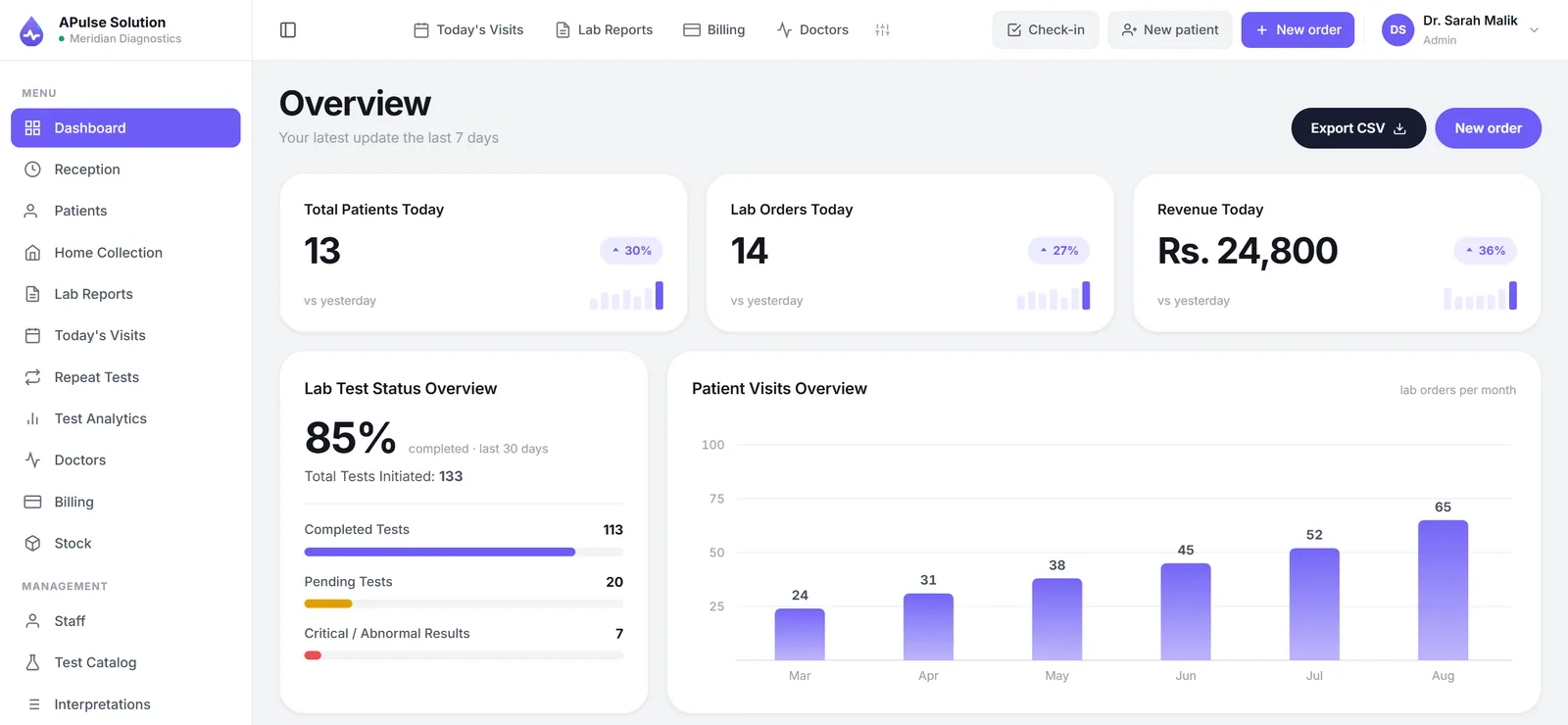
LIMS stands for Laboratory Information Management System — software that keeps track of samples, tests, results and reports as they move through a laboratory. That is the whole definition, and it is deliberately broad, because the same three letters are used for a research institute's sample-tracking platform and for the browser tab a receptionist at a diagnostic lab keeps open all day.
This article is about the second one. We build LIMS software for medical labs, so we will use it for the concrete examples; the shape of the thing is much the same whichever product you end up with. What we will not do is pretend the acronym is more precise than it is, because most of the confusion around LIMS comes from vendors using the word to mean whatever their product happens to do.
LIMS in One Sentence, and What It Replaces
A LIMS is the system of record for the work a lab performs: who the sample belongs to, what was ordered, what the result was, what the report said and what was charged for it.
In a paper lab those five facts live in four different places — the patient register, the worklist or bench slips, the carbon copies of issued reports, and the cash book — and reconciling them is somebody's evening job. In a LIMS they are one connected record, entered once. That single change is the point of the software; almost every benefit people list is a consequence of it.
You will also meet two sibling terms, and they overlap heavily in this market: LIS (laboratory information system) and plain lab management system. The distinction between LIS and LIMS is real but historical, and we have written it up separately in LIS vs LIMS. For a diagnostic lab, the label on the box matters far less than the feature list inside it.
What a LIMS Actually Does, Day to Day
Strip away the terminology and a medical lab's LIMS handles four things.
Registration and identity. The patient is registered once and issued a permanent medical record number. Every later visit, result and invoice attaches to that number. The alternative — a fresh serial per visit — is why paper labs cannot answer "has this patient been here before?" without a search through registers.
Ordering against your own test menu. Tests are picked from a catalogue that holds your lab's names, your prices and your reference ranges. A Pulse Solution ships with around 880 common tests across eight categories precisely so that this step is editing rather than typing from scratch, but the catalogue is yours to add to, rename and re-price.
Result entry with checking. Values are entered against each test's stored reference range — including separate male and female ranges where they differ clinically — and anything out of range is flagged as it is typed.
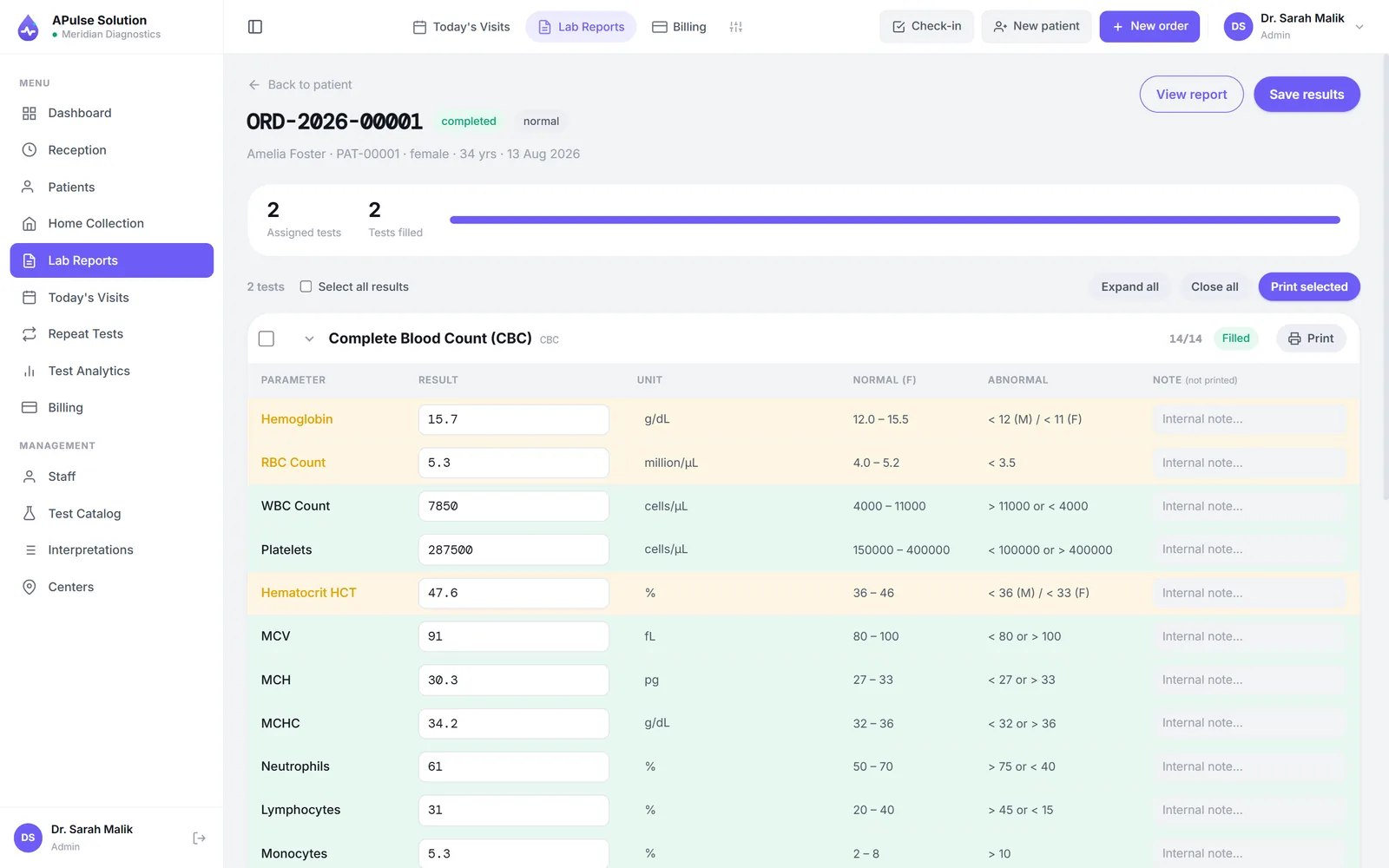
Reporting and billing. The entered values become a branded PDF in your lab's layout, and the invoice was raised at registration rather than reconstructed at closing time. Most labs in Pakistan then share that PDF with the patient over WhatsApp, and keep printed copies at the counter for whoever prefers paper.
Everything else a LIMS offers — inventory, analytics, referral tracking, multi-branch control — sits on top of those four. They are worth having. They are not what makes the system a LIMS.
LIMS vs Registers and Excel
The honest starting point is that paper works, up to a point. A collection point taking a handful of samples a day can run on a register and a receipt book for a long time, and vendors who tell such a lab it is in crisis are selling, not advising.
What changes with volume is not the difficulty of any single task but the number of places the same fact is written down. Three failure patterns show up in that order:
- Duplicate patients. Without a searchable record, a returning patient is easier to re-register than to find. Their history splits across two identities, which is exactly the history a doctor asks about.
- Transcription drift. A value is read off the analyser, written on a slip, then typed into a report template. Two hand-offs, two chances for a digit to move.
- Unreconciled money. Tests get performed that were never billed, discounts get given that were never recorded, and the evening total does not match the drawer.
Excel fixes searchability and nothing else. It has no concept of a reference range, no report layout that stays identical between staff, no invoice, and no protection against two people opening the same file. It is a better register, not a system.
The point where paper genuinely stops working differs by lab, and it is usually not the patient count — it is the moment the owner stops being physically present for every counter transaction. After that, everything they know arrives second-hand.
Who Uses LIMS Software
Pathology and diagnostic labs are the main audience for the patient-centred systems described here: walk-in patients, referring doctors, reports that leave the building.
Collection centres feeding a main lab use the same system in a thinner way — register, bill, hand the sample onward — and the value is that the main lab sees the order the moment it is booked rather than when the runner arrives.
Multi-branch chains need one system across sites rather than one per site, which is the single most expensive decision in this list to get wrong. Separate installations produce separate databases, and separate databases cannot be merged cleanly later.
Research, industrial and QC labs also use software called LIMS, and theirs is a genuinely different product built around batches, aliquots and chain of custody rather than patients. If your lab has no patients, most of this article is the wrong shape for you.
Cloud LIMS vs Installed LIMS
Two delivery models, and the choice shapes everything downstream.
Browser-based (cloud). Nothing is installed. Staff log in from whatever computer or phone the lab already owns, updates arrive without a technician visit, and the records are not sitting on one machine that can be stolen or die. The honest cost is that no connection at the counter means no system, so you need a reasonable link and a phone hotspot as fallback.
Installed (on-premise). The software lives on a specific machine and works without internet. The honest costs are that backups become your discipline to maintain and test, upgrades mean someone visiting or connecting remotely, and every extra counter is another installation to keep in step.
For a lab with one counter, one PC and genuinely unfixable connectivity, installed software still has a case. For everyone else the maintenance burden is the deciding factor, and it is usually underestimated because it does not appear on any quote.
What a LIMS Is Not
Three clarifications that save a lot of disappointment.
It is not a hospital management system. A LIMS covers the laboratory. Wards, pharmacy, OPD scheduling and admissions are a different product, and a lab system that claims all of them is either much bigger than you need or much shallower than it sounds.
Analyser interfacing is not a given. Software that pulls results directly off the analyser exists, and at high volume it earns its cost. It is a different class of system at a different price, and many products serving small and mid-size labs use manual result entry. In A Pulse Solution, entry is manual unless analyser interfacing is switched on for your account, on request, on any plan; it then takes ASTM E1394 or HL7 v2 results that a bridge posts to it, and connecting the machine is part of setup and depends on the analyser. Manual entry is a normal, workable arrangement at small-lab volume; what the software contributes is structure and checking. Any vendor calling interfacing plug and play should be asked for specifics.
A patient portal is not the only way to deliver reports. Plenty of labs simply share the PDF with the patient. At small scale that is less friction for everyone: no account, no password, no support calls about forgotten logins.
What LIMS Software Costs
There is no honest single figure: LIMS pricing in this market depends on how many reports you issue a month, how many staff log in and how many branches you run, plus any one-off work such as migrating old records. Our own plans are sized the same way:
| Plan | Fits |
|---|---|
| Basic | One lab, 3 staff accounts, up to 300 reports a month |
| Medium | One lab, 10 staff accounts, up to 2,000 reports a month, plus inventory, analytics and home collection |
| Premium | Unlimited reports, up to 5 branches and 25 staff (more on request), plus per-doctor prices |
Updates and support are included on every plan. The current plans page shows what each includes, we quote in writing for your lab's size before you commit, and we have unpacked the models other vendors use in what decides lab software prices in Pakistan.
The useful discipline when comparing quotes is to price against your real monthly volume rather than against a feature list. Most labs buying their first system overestimate the features they will use in year one and underestimate how much the core four matter.
Frequently Asked Questions
What does LIMS stand for? Laboratory Information Management System. In medical labs it is used more or less interchangeably with LIS and with "lab management system"; the terms have converged even though they came from different places.
Is a LIMS the same as lab management software? For a diagnostic lab, in practice yes. Vendors answer to whichever term buyers search for. Compare feature lists against your own workflow rather than trying to decide which acronym you need.
Does a small lab need a LIMS? Not on day one. A very small lab can run on paper longer than vendors admit. The signals that it is time are duplicate patient records, tests performed but not billed, and an owner who no longer sees every transaction personally.
Does LIMS software read results from analysers automatically? Some enterprise systems do. Many systems built for small and mid-size labs use manual entry against stored reference ranges. Ours does too by default; analyser interfacing is switched on for your account on request, on any plan, and connecting each machine is setup work that depends on the analyser. Ask any vendor this directly and expect a specific answer rather than the word "integrated".
Can I move my data if I change systems later? You should be able to, and it is worth asking before you sign rather than after. Ask what you get back, in what format, and whether there is a charge. Vagueness on this question is itself the answer.
How long does it take to get a LIMS running? The software is quick; the preparation is the work. Entering your test menu, prices and reference ranges is the real task, and it scales with the size of your menu. The free demo runs for 7 days with up to 10 patients, which is enough to load a slice of your rate list and judge the fit before committing.